
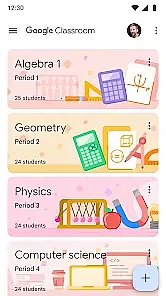
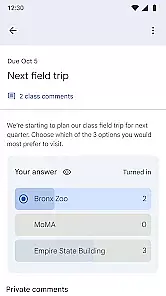
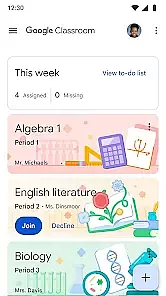
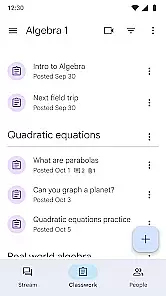
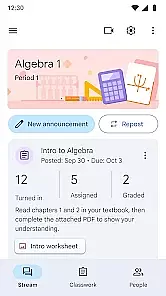
Google Classroom is an educational app designed to help teachers and students streamline the learning process. It allows educators to create, distribute, and grade assignments in a paperless environment, making classroom management more efficient.
The app integrates seamlessly with other Google services like Google Docs, Drive, and Gmail, providing a comprehensive platform for communication, collaboration, and resource sharing. Whether it's assigning homework, conducting quizzes, or facilitating discussions, Google Classroom supports various teaching methods while keeping everything organized in one place.
This app is particularly useful for remote learning environments, where digital tools are essential for maintaining student engagement and tracking progress. By simplifying administrative tasks, Google Classroom enables educators to focus more on teaching and less on paperwork.
One of the standout features of Google Classroom is its ability to integrate with numerous third-party educational apps and tools. This flexibility allows teachers to incorporate multimedia content, interactive exercises, and specialized resources tailored to their curriculum needs.
Another key feature is the real-time feedback system. Teachers can provide instant feedback on assignments, which helps students understand their mistakes and learn more effectively. Additionally, the app offers robust analytics that allow educators to track student performance over time, identifying areas where additional support may be needed.
Google Classroom also emphasizes security and privacy, ensuring that all communications and data exchanges within the app are protected. With easy setup and user-friendly interfaces, both teachers and students can quickly adapt to using Google Classroom as part of their daily routines.
In the realm of educational applications, content authority and curriculum alignment are paramount. Google Classroom ensures that all educational materials and resources provided are vetted by educational experts and align with established curricula.
The app integrates seamlessly with other Google services like Google Docs and Google Drive, allowing educators to distribute assignments that adhere to academic standards efficiently. This integration supports a structured learning environment where students can access authoritative content tailored to their educational level.
By leveraging verified educational content, Google Classroom aids in maintaining consistency across different courses and subjects. This not only helps in standardizing education but also ensures that learners receive information that is both accurate and relevant to their studies.
Gamification in learning introduces game-like elements into educational settings to enhance student engagement and motivation. Google Classroom incorporates these elements by allowing teachers to create interactive assignments and quizzes that make learning more engaging.
Through features such as real-time feedback on assignments and progress tracking, students can see their advancements, which mimics the satisfaction of leveling up in a game. This approach fosters a competitive yet supportive learning atmosphere where achievements are recognized and celebrated.
Moreover, the platform's ability to facilitate collaborative projects adds a social dimension to learning, akin to multiplayer gaming experiences. By integrating these gamified elements, Google Classroom not only makes learning more enjoyable but also helps improve retention rates among its users.
User-friendly interface
Seamless Google integration
Real-time feedback
Robust analytics
Enhanced security
Limited offline functionality
Dependent on Google services
Occasional bugs
Basic grading options
No advanced reporting

A game to memorize
 4.0
4.0
Spark your little ones’ imagination!
3.80
Puzzles, Cats and Programming
4.80
Perfect for Dino fans of all ages.Vivid illustrations.Fascinating_Facts.Narrated
4.5
Get points, learn Spanish, repeat. Speedrun your way to knowledge.
4.4
Pro Doctor Dentist for PetsGame
4.60
Preschool learning games: 123 numbers game for kids, abc learning for toddlers
4.70
Animal games! Adopt virtual pet dog, cat & rabbit to create your pet world!
4.10
3D school bus driving game for kids!
4.50
Kids coloring games for boys! Fun drawing, painting & learning book for kids.
4.60
Play educational games for preschool toddlers—plus more to discover ►AdsFree◄
4.60
Fun educational games for kids that teach number tracing, counting with modes!
4.50
Tracing, phonics & spelling games for toddlers, preschool & kindergarten kids!
4.50
Glow Doodle! Baby Coloring & Drawing games for toddlers: Color and Learn! NoAds!
4.40
Pretend play in Pepi City: become a doctor or a patient. Our city, your stories!
4.30
Explore Fantasy Land, get to know the world and create stories!
4.30
Games, music, crafts and coloring with cats
4.10
Woof! The very first official Hey Duggee app for CBeebies' new favourite show.
3.70
Create stories and build your own virtual world for your avatar!
3.00


User Reviews