
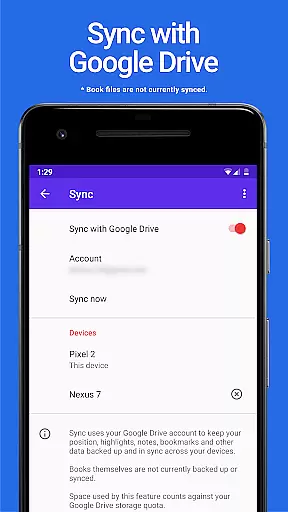
Lithium Pro is an advanced upgrade package designed specifically for users of the free Lithium app, which falls under the Books & Reference category. This Pro version unlocks a suite of premium features that enhance your reading and data management experience. By integrating with your Google Drive account, it offers seamless synchronization across multiple devices, ensuring your data remains secure and up-to-date. Additionally, the app provides extensive customization options, allowing you to tailor the appearance of your reading material with custom themes.
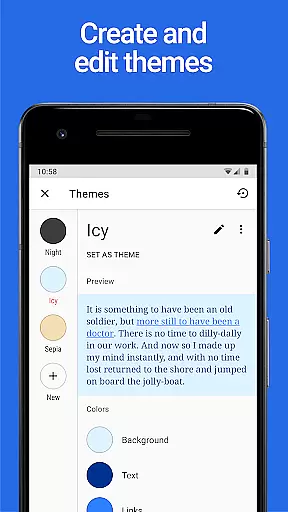
One of the standout features of Lithium Pro is its ability to let users modify various visual elements such as page background color, text color, and link colors. This level of personalization ensures a more enjoyable and comfortable reading session. Moreover, the app includes additional highlight colors, giving users more ways to annotate and organize their content effectively. These enhancements collectively contribute to a richer, more versatile reading experience, making Lithium Pro a valuable tool for avid readers and professionals who rely on digital reference materials.
Lithium Pro boasts several distinctive features that set it apart in the realm of digital reading applications. First and foremost, the app leverages Google Drive integration to provide robust synchronization capabilities. This means that users can effortlessly keep their data synchronized across all their devices, providing peace of mind and convenience. Although book files themselves are not currently included in this backup process, the ability to maintain consistent data access is a significant advantage.
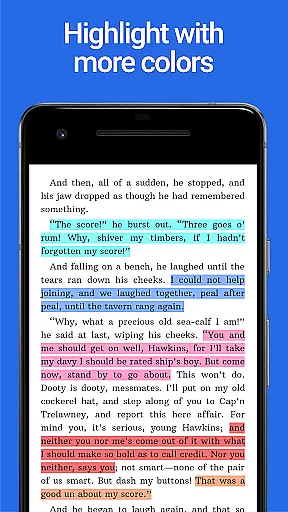
Another remarkable feature is the extensive theme customization options available to users. After upgrading, individuals can access the custom themes feature by navigating to the display settings and tapping the three-dots under Theme. Here, they can create, delete, and edit themes to suit their preferences, altering page background color, text color, and link colors. This flexibility allows for a personalized reading environment that can adapt to different lighting conditions or aesthetic preferences. Furthermore, Lithium Pro offers a broader range of highlight colors, as illustrated in the app's screenshots. These additional colors provide users with more tools to categorize and emphasize important sections of their reading material, thus enhancing productivity and comprehension.
When it comes to e-books, the size of the library and the authenticity of copyrights are crucial factors for any avid reader. Lithium Pro ensures that users have access to a vast collection of e-books, all verified for copyright authenticity.
The app leverages Google Drive to keep your data backed up and in sync across multiple devices, ensuring you never lose your place in your reading journey. Although book backups aren't currently supported, the synchronization feature provides peace of mind for your overall data management.
By integrating with the free version of Lithium, this Pro license unlocks an expansive digital library at your fingertips. The assurance of legally procured content means users can indulge in their reading without concerns over copyright infringement.
Format compatibility is essential for a seamless reading experience across various devices and platforms. Lithium Pro excels in this area by supporting a wide range of e-book formats, making it versatile and user-friendly.
After upgrading, users can access custom themes through display settings, allowing them to tailor their reading environment. This includes customizing page background color, text color, and link colors, thus enhancing format compatibility with personal preferences.
With additional features like more highlight colors and future updates on the horizon, Lithium Pro ensures that readers have a personalized and adaptable reading experience. This commitment to flexibility and customization sets it apart in the realm of digital reading.
Enhanced sync
Custom themes
More highlight colors
User-friendly interface
Google Drive integration
No book backup
Separate install needed
Premium cost
Limited free features
Device dependency

"Five Dr. Seuss titles in one omBook!"
 4.60
4.60
"BIG A, little a. What begins with A?"
4.10
Read the KJV Bible with Strong’s offline: reading plans, audio Bibles, and more.
4.70
Prime novels await! Fantasy & Romance on JoyRead. Immersive reads!
4.20
Holy Bible with verses and audio for studying and prayer
4.30
King James Bible read offline, AI Priest, Bible Quiz, Guiding Prayers & Plans
4.80
Daily Bible app: King James Version with verses and audio for studying&prayer
4.40
Premium reader for ePub, PDF, and more. TTS and translation. Great on any screen
3.50
A Comprehensive Restoration of Sacred Scripture
4.50
Daily thoughts, meditations, and prayers for living a sober life in recovery.
4.90
Personalized Chat with Bible
4.80
8 Dr. Seuss short stories in 1 app!
4.70
Words spoken by native English speakers and full definitions.
4.60
Read aloud texts, audiobooks, PDFs or any eBook with text to speech AI audio
4.60
7 Languages, Google, Wiki, Vocabulary.com, Cambridge & Urban Dictionary!
4.50
Learn Electricians' Handbook PRO complete guide beginners to advance.
4.40
Mirror Bible - eye-opening paraphrase translation of the NT by Francois du Toit
4.30
KJV Bible works offline with Audio, Hebrew & Greek lexicon (concordance) & more!
4.20
A companion for prayer, with Azan alarm, Quibla direction, and Holy Quran book
4.10


User Reviews