
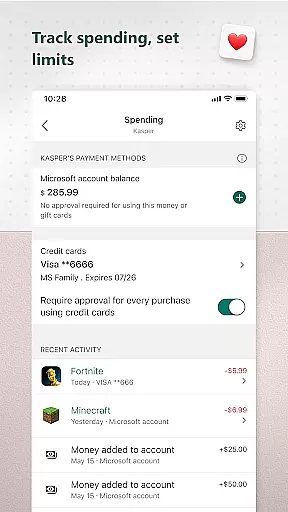
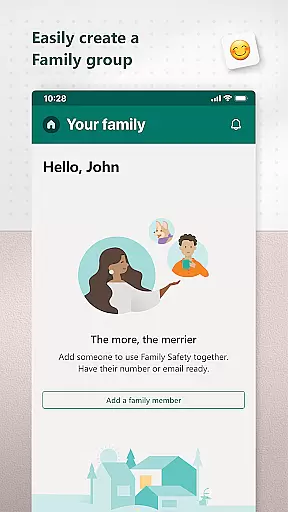
Microsoft Family Safety is a comprehensive parenting app designed to help families develop healthy digital habits while ensuring children's safety online. The app allows parents to set up parental controls, manage screen time, and filter inappropriate content across multiple devices including Android, Xbox, and Windows.
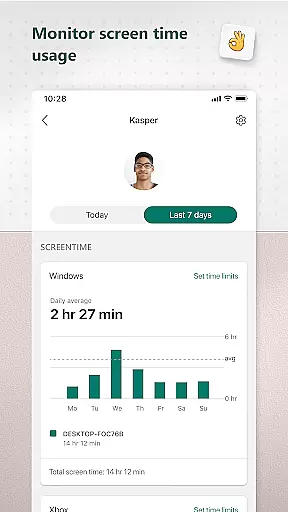
A key feature of the app is its activity reporting system, which provides parents with detailed insights into their children's digital activity through weekly email summaries. This helps facilitate open conversations about responsible device usage. For kids, the app ensures they can safely explore the digital world within the boundaries set by their parents, accessing only age-appropriate content.
The app also offers tools for setting app-specific time limits, managing web browsing filters, and receiving notifications when children request additional screen time. With its dual focus on parental control and child independence, Microsoft Family Safety is an essential tool for modern families looking to balance digital engagement with real-world experiences.
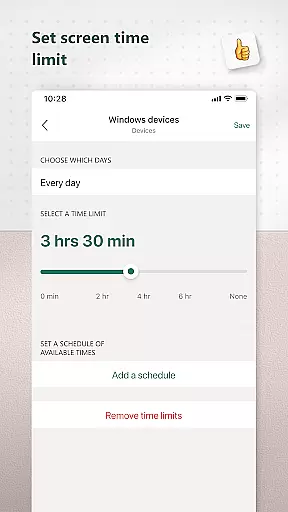
Microsoft Family Safety stands out with its robust set of features designed to give parents granular control over their children's digital environment. One of its core functionalities is the screen time management system, which allows parents to set specific time limits not just for individual apps and games but also for entire devices on Xbox and Windows platforms.
The app's content filtering capabilities ensure that children can only access appropriate material online. Through Microsoft Edge's kid-friendly browsing mode, parents can block inappropriate websites and apps, creating a safer internet experience. Additionally, the activity reporting feature provides a detailed breakdown of each child's screen time and app usage, delivered weekly via email.
What sets this app apart is its commitment to privacy and transparency. Unlike many other parenting apps, Microsoft explicitly states that it does not sell or share location data with third parties. The app requires explicit consent from children before collecting any interaction data, and parents can manage these permissions through accessibility and device admin services.
Microsoft Family Safety provides reliable parenting content that is validated by experts in child safety and digital wellness. The app ensures that all features are designed with the well-being of children in mind.
The parental controls offered by Microsoft have been developed based on extensive research into online safety and are regularly updated to address new challenges faced by families today. This includes setting appropriate filters for web browsing and managing screen time effectively.
Parents can trust that the recommendations and insights provided through activity reports come from credible sources within the field of child development. These reports help parents understand their children's digital habits and foster open conversations about responsible technology use.
By adhering to strict privacy standards, Microsoft demonstrates its commitment to protecting family data. They do not sell or share location data with third parties, ensuring a secure environment for families to explore the digital world.
Accurate growth tracking is essential for understanding a child's development over time. Microsoft Family Safety offers detailed activity logs that provide precise information about screen time and online usage patterns.
Through weekly email summaries, parents receive accurate reports detailing their childrenu2019s digital activities. This consistent feedback loop allows parents to monitor progress and adjust settings as needed to promote healthier habits.
The app also supports setting specific limits on app and game usage across multiple devices, including Xbox, Windows, and Android platforms. By doing so, it helps maintain consistency in how screen time is managed throughout different aspects of a child's life.
When children request additional time, notifications are sent promptly, allowing parents to make informed decisions regarding adjustments to these limits while maintaining transparency and trust within the family dynamic.
Comprehensive cross-platform support
Detailed activity reporting
Robust parental controls
Strong privacy protections
Weekly summary emails
Limited iOS functionality
Requires child consent
No real-time monitoring
Premium features locked
Complex setup process

All-In-One Pregnancy Tracker, Your Baby's Milestones, Growth Stages & Parenting
 4.70
4.70
Discover fun videos, kids songs, bedtime stories and games
3.60
Sleep better with white noise app! Discover rain sounds, fan noise and more.
4.70
Family GPS locator app — child location tracker. GPS kids tracker, family safety
4.70
Play activities, milestones, expert-led classes, baby tracker, and more!
3.00
Learn according to the age of your child and consult with other moms.
4.20
Live Location, Alerts & 2-Way Voice for Kids and Adults with Special Needs
4.60
The 10 development leaps of your baby | newborn milestones & leap days tracker
4.10
GeoLog - Real-Time Location Tracker
4.40
Pregnancy+ App has helped 80m moms track their pregnancy with info & support!
4.80
Pinardin - Smart Parental Control, Online Safety & GPS Tracking!
4.80
GPS tracker app: Simple GPS phone tracker for fast family location tracking
4.60
The Most Trusted Co-Parenting App.
4.60
All-in-one pregnancy app, contraction timer, kick counter & due date calculator
4.40
Parental control: child monitoring app, screen time control, GPS child tracker
4.40
Free symptom & med tracker with expert-reviewed tips.
4.30
Limit screen time, Block Apps & Games, Monitor with Parental control app
4.20
The Baby’s Bounty App is your hub to register for our diaper banks in Nevada
3.70
A Coloring for the Whole Family! Discover the Joy of Family Love Through Colors!
3.60


User Reviews