
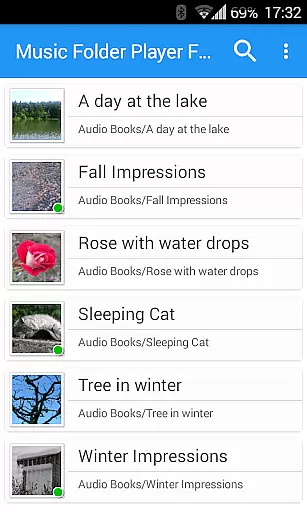
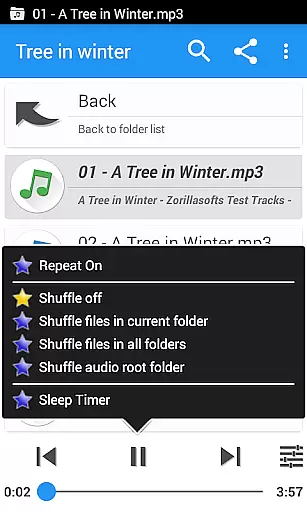
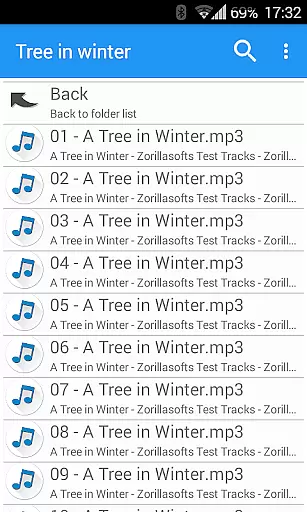
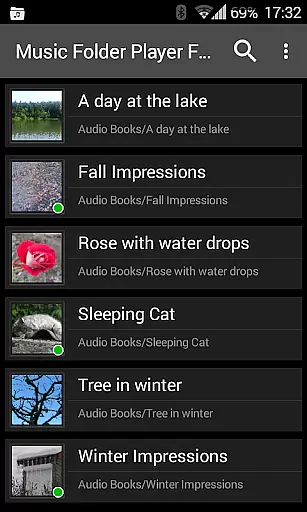
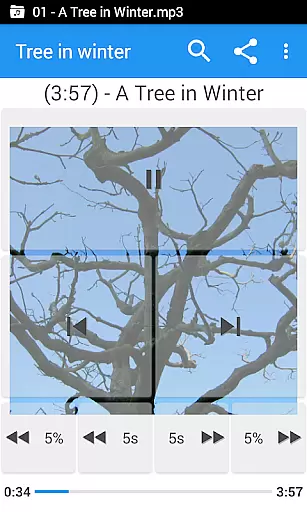
Music Folder Player Full is a specialized audio player designed for users who prefer organizing their music files in folders rather than traditional categories like artist or album. The app offers a unique folder-based playback experience, making it ideal for those with custom file organization systems.
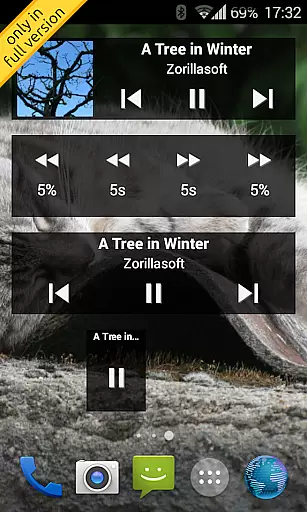
In addition to its core functionality, the app provides advanced features such as homescreen widgets, resume playback where you left off, and multiple display options for different collection sizes. Users can enjoy enhanced audio controls including speed adjustment, equalizer presets, and virtual sound effects, providing a tailored listening experience.
This full version removes ads and includes exclusive features like customizable seek buttons, 432 Hz playback mode, and car/sports mode with enlarged controls. These capabilities make it especially valuable for audiobook and podcast enthusiasts who require precise playback management.
One of the standout features of Music Folder Player Full is its comprehensive customization options. The app includes three unique homescreen widgets that provide quick access to key functions, while the folder hierarchy view allows users to navigate large music collections with ease.
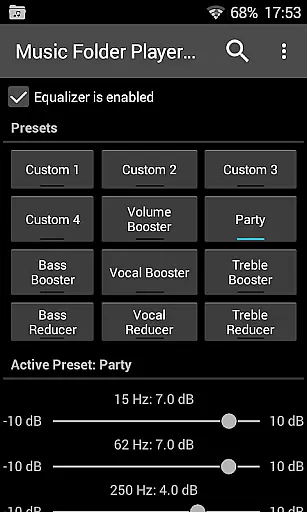
The player offers advanced audio manipulation tools including a four-band equalizer with customizable and preset options, virtual room/reverb effects, and playback speed control with pitch correction. These features are particularly beneficial for users who want to optimize their listening experience for different audio types.
Additional notable features include Last.fm scrobbling integration, multi-functional headset button controls, and innovative gesture-based volume management. The inclusion of practical tools like undo function, file management capabilities, and sleep timer further enhances the app's usability for various listening scenarios.
Music Folder Player Full offers a unique approach to managing and playing your music library. With the ability to organize audio tracks in folders, users can easily navigate through their collection regardless of artist or album information.
The application supports an extensive range of audio formats, ensuring that most of your files will be compatible without conversion. This flexibility allows for a larger library size as it accommodates various file types from different sources.
Regarding copyright authenticity, while the app itself does not verify the legality of each track, it provides features like file sharing and deletion which help manage content responsibly. Users are encouraged to use only legally obtained music.
Additionally, with homescreen widgets and folder hierarchy display options, users can customize how they interact with their music library, making it both expansive and manageable.
One of Music Folder Player Full's standout features is its advanced audio quality options. The equalizer comes with four customizable settings and eight presets such as Bass Booster and Vocal Booster, catering to personal preferences and enhancing listening experiences.
For those seeking more control over sound output, the virtual room and reverb effect add depth to playback, simulating different acoustic environments. This feature is particularly useful for users who want a concert-like experience at home.
Speed control with pitch correction allows listeners to adjust playback speed without affecting the pitch u2013 ideal for podcasts or audiobooks but not recommended for music due to potential distortion.
Lastly, pre-amplification boosts low-level recordings, ensuring consistent volume levels across all tracks. Combined with 432 Hz playback mode support, these tools provide comprehensive control over audio quality.
Ad-free experience
Advanced equalizer
Speed control
Folder organization
Custom widgets
No cloud support
Complex interface
Limited sharing
High resource use
Old design

Turn your phone into a musical instrument from the future!
 3.90
3.90
Offline and always ad-free - stream in the highest quality available.
4.10
JBL PartyBox APP works with 110/310/710/120/320/520/Encore/Encore 2/Encore Ess 2
4.80
Music Streaming suite for Ampache, Nextcloud Music and compatible backends.
4.1
AI Music Maker: Generate And Compose AI Tunes & AI Songs & AI Music & AI Melody!
4.60
Offline Music Player & MP3 Player.Powerful equalizer, Lyrics, Themes, Tag Editor
4.80
Offline Tunes, Unlimited Vibes
3.90
Uninterrupted Tunes, Unmatched Vibes
3.90
Melody Beat: Great for travel, workouts, offline vibes, play your tunes anytime.
4.10
Your song collections with lyrics and chords on Android smartphones and tablets.
4.80
Music, News & Sports Radio Tuner App. Tune in Live FM & AM Radio Stations.
4.80
Listen to live FM radio stations, sports, music and news on global radios online
4.70
Save hundreds of dollars for a physical strobe tuner and instead use this app.
4.50
Enjoy singing any song, no matter how high or low it is
4.30
Turn your Android phone into a professional audio analyser with up to 120 bands.
4.00
Sing, record, and create music together — enhanced by smart voice tools.
4.00
Learn to play the piano using falling notes!
3.80
Control your MIDI USB or Bluetooth devices in app and avoid some trampling
3.30
Make music anywhere. Turn your device into an instrument.
4.4


User Reviews