
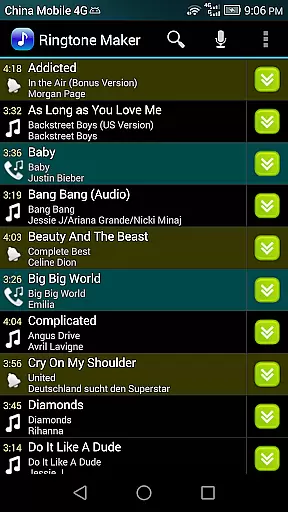
Ringtone Maker Pro is a feature-rich audio editing application designed specifically for creating personalized ringtones, alarms, and notifications. This powerful tool supports multiple audio formats including MP3, WAV, AAC/MP4, and 3GPP/AMR files, making it compatible with various devices.
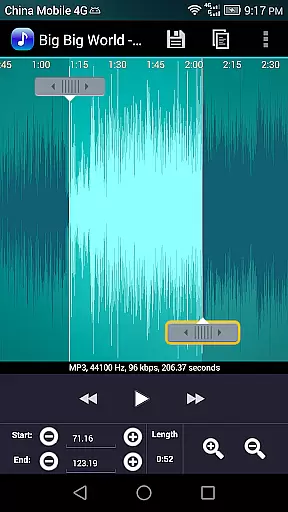
The app's intuitive interface allows users to precisely set start and end points through a timeline slider, manual input, or by pressing dedicated Start and End buttons. With advanced editing capabilities such as copy, cut, paste functions, and volume adjustment options, users can create professional-quality audio clips. The app also provides a waveform visualization at five zoom levels, enabling detailed editing and preview functionality before saving the final audio file.
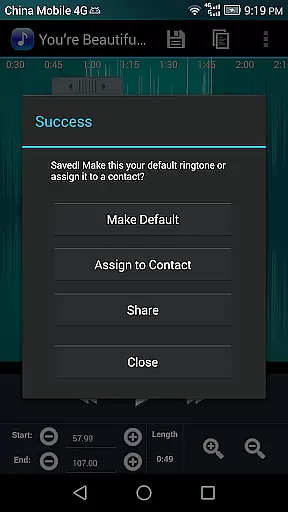
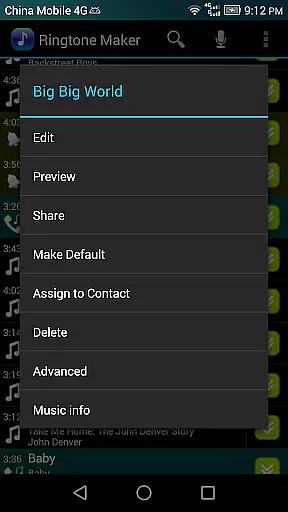
Ideal for both casual users and audio enthusiasts, Ringtone Maker Pro offers practical solutions for managing device sounds. Users can assign custom ringtones directly to contacts, organize audio files by tracks, albums, or artists, and maintain separate directories for different sound types on their SD card.
Ringtone Maker Pro distinguishes itself through its comprehensive set of audio editing tools and user-friendly features. The application's core functionality revolves around its ability to handle various audio formats while providing precise control over editing parameters. Users can utilize the fade in/out effect for MP3 files and adjust volume levels to create smooth transitions between audio segments.
A standout feature is the app's sophisticated waveform representation that supports five zoom levels, allowing for detailed editing work. The touch interface enables accurate selection of clip portions, while the playback function includes an indicator cursor and automatic scrolling during previews. This ensures users can verify their edits before finalizing them. Additionally, the app supports direct assignment of ringtones to contacts, with options to re-assign or remove them as needed.
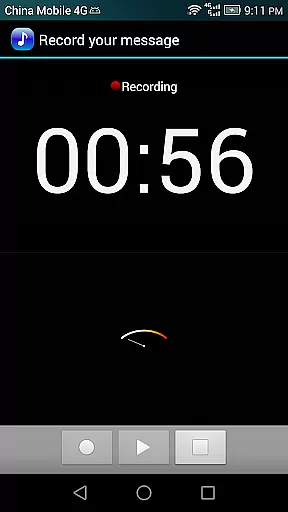
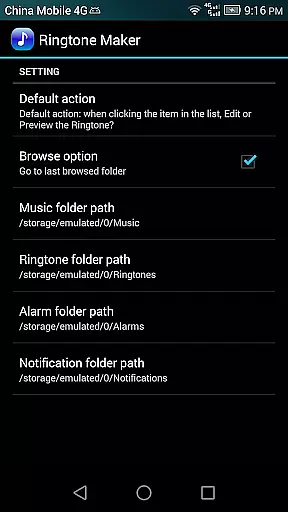
The application maintains organized storage paths for different audio types, automatically saving ringtones, notifications, and alarms in designated folders on the SD card. Advanced users will appreciate the ability to record new audio clips directly within the app for immediate editing. The inclusion of sorting options and contact ringtone management makes this app particularly valuable for users seeking complete control over their device's audio profile.
Ringtone Maker Pro offers an extensive music library that supports multiple formats including MP3, WAV, AAC/MP4, and 3GPP/AMR files. This wide-ranging compatibility ensures users can work with their preferred audio types, making it a versatile tool for creating personalized ringtones, alarms, and notifications.
The app's commitment to copyright authenticity is evident in its transparent handling of audio files. Users can be confident that the ringtones they create do not infringe on any legal rights, as the source material is either user-provided or obtained from legitimate sources. This respect for intellectual property enhances the app's credibility and fosters trust among its users.
Moreover, Ringtone Maker Pro allows users to manage their audio files effectively by sorting them into categories such as Tracks, Albums, and Artists. This organizational feature not only simplifies navigation but also helps maintain a structured library, ensuring that users can easily locate and utilize their desired audio clips.
One of the standout features of Ringtone Maker Pro is its ability to adjust and enhance audio quality. The app provides options to fade in and out for MP3 files, allowing for smooth transitions that improve the listening experience. Additionally, users can modify the volume levels of their MP3 files, giving them control over how their final ringtones sound.
The app includes a waveform representation of audio files at five zoom levels, enabling precise edits. This visual aid, combined with the ability to set exact start and end points, ensures that users can achieve professional-quality results. The inclusion of an indicator cursor and auto-scrolling further refines the editing process, making it intuitive and accurate.
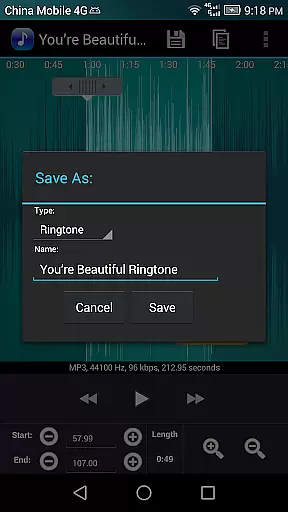
Furthermore, Ringtone Maker Pro supports high-quality audio output, preserving the integrity of the original files. Whether saving clips as Music, Ringtone, Alarm, or Notification, users can be assured that the audio quality remains uncompromised. This dedication to maintaining superior sound standards underscores the app's value proposition for audiophiles and casual users alike.
User-friendly interface
Multiple format support
Precise editing tools
Waveform visualization
Direct contact assignment
Requires storage permission
Contact access needed
No cloud integration
Basic UI design
Manual editing only

Fun & Easy Voice Changer – Record, Edit & Add Hilarious Effects!
 4.50
4.50
Your HD audio recorder on the go for music, meetings, ambience, animal sounds…
4.30
Equalizer, Bass Booster and Volume Booster (Eq & Bass) improve sound quality
4.30
Time Trainer: accurate metronome w tools to help you develop your internal time!
4.20
Network/Cloud Streaming, Visualization, Graphic Equalizer and Sound Effects.
4.20
Ultimate Sonos Controller
4.70
Turn Every Moment into Music
3.60
Uninterrupted Tunes, Unmatched Vibes
3.90
One-tap booster for max volume - enjoy powerful sound with this audio booster
4.50
Unleash your creativity! Turn simple prompts into full fledged songs.
4.70
Let your Android device with the sound effects you want
4.50
DJ Music Mixer Pro is a real DJ controllers and DJ Music Studio to remix DJ.
4.40
Manage your Sonos system directly from your home-screen!
4.40
Enjoy singing any song, no matter how high or low it is
4.30
Master Salsa Rhythm quickly and with a lot of fun!
4.30
Sheet music reader, piano & music note player. Play music score & learn to read.
3.90
Learn to play the piano using falling notes!
3.80
MilkDrop for Android TV
3.00
Remove ads permanently from Music Visualizer
4.3


User Reviews