
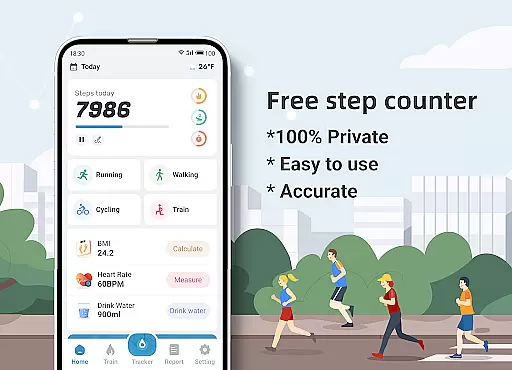
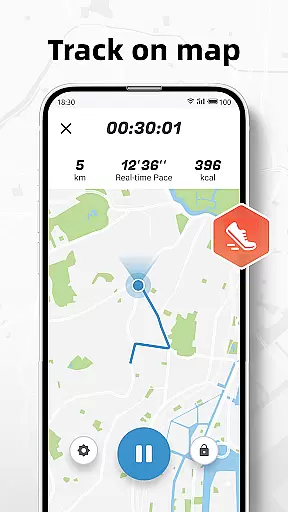
Step Counter - Pedometer & BMI is a comprehensive health and fitness application designed to track your daily steps, monitor BMI, and provide detailed activity reports. The app offers accurate step counting through your mobile device, eliminating the need for additional pedometer hardware. It also features advanced tracking capabilities such as GPS-based route mapping and personalized training plans.
What sets this app apart is its privacy commitment - all your data stays 100% private and isn't shared with third parties. The application provides valuable insights through its reporting features, showing your progress through daily, weekly, and monthly analytics. Whether you're walking or running, Step Counter helps you maintain an active lifestyle while keeping your personal information secure.
The app boasts several key features that enhance user experience in fitness tracking. Its primary function is step counting, which works seamlessly with your phone's built-in sensors to deliver precise measurements of your daily activities. Additionally, it includes a BMI calculator that allows users to track their body mass index over time, promoting better health awareness.
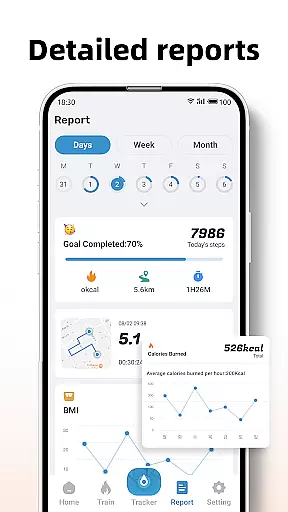
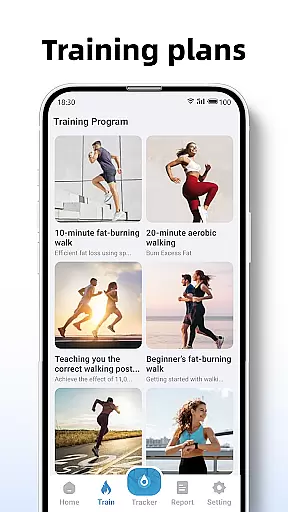
One notable feature is the ability to create customized training plans. Users can select from various workout durations and types, such as jogging sessions, while monitoring essential metrics like distance covered and calories burned. The app also generates detailed reports and graphs, providing visual representations of your fitness journey. With adjustable sensitivity settings and map tracking, Step Counter ensures both accuracy and personalization in your fitness routine.
Personalized planning in fitness applications refers to the ability to tailor workout routines and health goals according to individual user needs. Step Counter - Pedometer & BMI excels in this area by offering customizable training plans that cater to different fitness levels and objectives.
The app provides various training modes, such as a 10-minute jogging plan, which users can select based on their preferences or fitness goals. These plans are not only about counting steps but also include tracking active time, distance, and calories burned during each session, ensuring a comprehensive approach to personal fitness management.
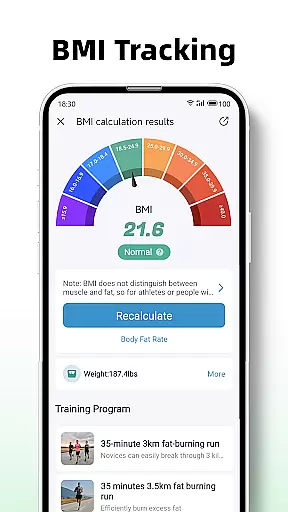
By integrating BMI tracking, the application further refines personalized planning. Users can calculate and monitor their Body Mass Index, allowing them to adjust their fitness strategies accordingly. This feature is crucial for those aiming to maintain or achieve a healthy weight.
Ultimately, the personalized planning features of Step Counter empower users to take control of their health journey. With detailed reports and graphs for daily, weekly, and monthly data, users gain insights into their progress, helping them stay motivated and make informed decisions about their fitness routines.
Progress visualization is an essential component of any health and fitness app, providing users with tangible evidence of their achievements. Step Counter - Pedometer & BMI offers robust visualization tools that display users' activity data through detailed reports and graphs.
These visual representations cover various metrics, including step counts, active time, distance traveled, and calories burned. By presenting this information in an easily digestible format, the app allows users to understand their performance over timeu2014whether they're reviewing daily activities or analyzing trends across weeks and months.
In addition to basic activity tracking, the app includes BMI tracking, which adds another layer to progress visualization. Users can see how changes in their physical activity correlate with shifts in their Body Mass Index, offering deeper insights into their overall health improvements.
Such comprehensive progress visualization not only helps maintain user engagement but also encourages continued use of the app. Seeing concrete results motivates users to stick with their fitness plans, knowing they have reliable data backing up their efforts towards better health.
User-friendly interface
Accurate step tracking
Comprehensive reporting tools
Private data handling
Customizable training plans
Limited to walking/running activities
No integration with wearables
Occasional accuracy issues
Basic social features
Requires manual input for settings

SportWerks - Workout Tracker for Wear OS Watches
 3.90
3.90
Text notifications, button control, heart monitor & more for your Amazfit.
2.40
“Overcoming pain based on EMDR” helps you to alleviate chronic pain and stress.
4.10
Insanity blocks of intense physical activity, short breaks of 30 seconds.
4.3
Beauty Care, Makeup & Skin Care Scanner | Pregnancy App For A Mom | Healthy Baby
5.00
Binaural Beats - Fully Customizable Waves - Pure Sound - No Loops
4.50
The Crunch Mobile app - Find a gym, manage favorites, reserve & cancel classes.
4.60
Medbridge GO gets you moving - get back to doing what you love, faster!
4.90
Jogging app for calorie counter and distance tracker. Running app to lose weight
4.20
Power-lifting, weightlifting and Wendler 531 app to track your workout program.
4.90
Easy to use step counter, calorie counter helps lose weight, count steps offline
4.80
Easy access to health benefits
4.70
a fun app full of surprises :)
4.70
When the night comes, we prepare your eyes for deep, sweet dreams
4.70
The Official Blood Type Diet® App - know your categorized foods anytime.
4.50
See what's really going on inside your head! Real time EEG graphs from your Muse
4.40
50 HD sounds to help you relax during the day and sleep great at night!
4.40
Walk, track, and burn calories with step counter & GPS walking tracker
4.20
Looking to take control of your health? Our psychology-based programs can help.
4.10


User Reviews