
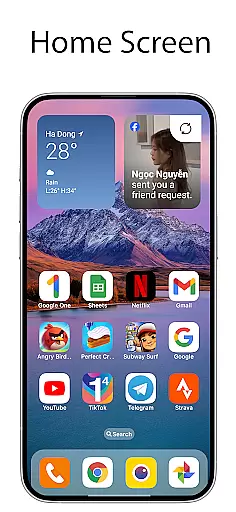
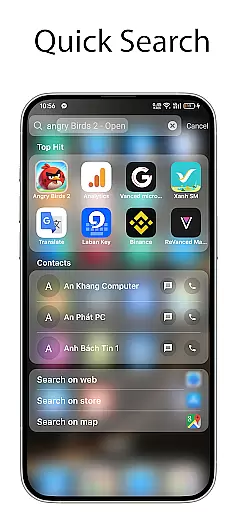
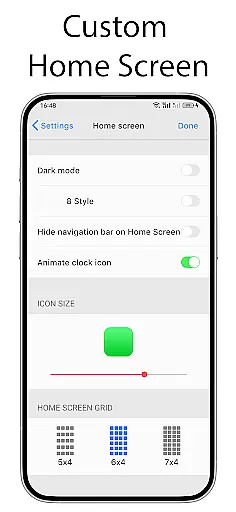
OS Launcher 18 - Phone 16 Max offers a unique way to transform the visual appearance of Android devices, making them more simple and luxurious. This launcher app provides users with a customized interface that includes redesigned app icons, wallpapers, and various other specific features. It allows Android users to enjoy the functionality of their devices while giving them the ability to customize the look and feel to match a more simplistic and elegant style.
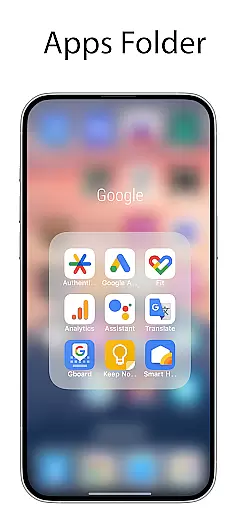
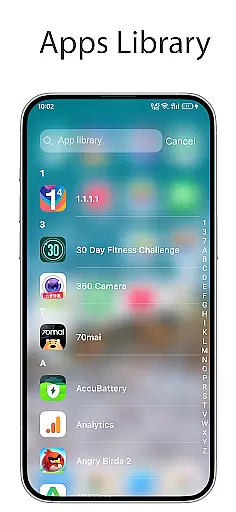
The core feature set includes an Apps Library for organizing apps into categories, a Today View for weather updates and calendar events, and customizable widgets. Users can also create folders by dragging and dropping apps together, hide apps from the home screen, and modify app icons and names. The launcher even provides a beautiful weather forecast widget and unread notification dots for apps, enhancing both aesthetics and usability.
This application is particularly useful for those who desire a cleaner, more organized home screen without sacrificing the versatility of the Android operating system. Its customization options allow users to tailor their device's appearance to their personal preferences, offering both practical utility and aesthetic appeal.
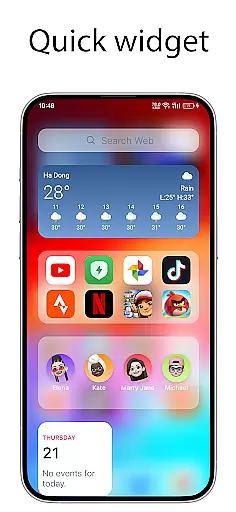
OS Launcher 18 - Phone 16 Max stands out with its comprehensive feature set designed to enhance the user experience on Android devices. One of its key features is the Apps Library, which intelligently groups applications into categories, making it easier to manage and access apps. The Today View is another highlight, providing users with essential information such as weather forecasts, favorite contacts, and upcoming calendar events at a glance.
Customization is at the heart of this launcher. Users can create folders by simply dragging and dropping apps together, apply custom icons to personalize app appearances, and hide apps they don't want to display on the home screen. Additionally, the launcher supports beautiful widgets that can be added to the home screen, including a detailed weather widget showing temperature, wind speed, and humidity.
Security and notifications are not overlooked either. The Lock App feature prevents unauthorized access to selected apps, while the Unread Notification Dot discreetly informs users of unread messages or notifications. These features collectively ensure that users can enjoy a personalized, secure, and efficient mobile experience.
OS Launcher 18 - Phone 16 Max offers a wide array of customization options that allow users to personalize their Android devices extensively. This app provides features such as customizable app icons, wallpapers, and the ability to modify both the icon and name of applications.
Users can organize their apps into categories through the Apps Library, create folders by dragging and dropping apps, and even hide apps from the home screen. These options ensure that each user's device can be tailored to their specific preferences and needs.
In addition to visual customizations, the launcher also includes functional enhancements like the Today View, which displays weather information, favorite contacts, and calendar events. The Unread Notification Dot feature further enhances usability by alerting users to unread messages.
Overall, OS Launcher 18 - Phone 16 Max empowers users with the tools needed to create a personalized and efficient mobile experience, making daily interactions smoother and more enjoyable.
Theme compatibility is a crucial aspect of OS Launcher 18 - Phone 16 Max, ensuring that users can seamlessly integrate various themes to achieve a cohesive look and feel across their devices. The launcher supports a wide range of themes, allowing users to switch between different visual styles effortlessly.
With access to numerous cool widgets, users can add functional and visually appealing elements to their home screens. These widgets not only enhance the aesthetic appeal but also provide quick access to essential information such as weather forecasts, which include temperature, wind, and humidity details.
The app ensures that all customizations, including app icons and names, are fully compatible with chosen themes, maintaining visual consistency throughout the device. This compatibility extends to hidden apps and locked apps, preserving the integrity of the customized interface.
By focusing on theme compatibility, OS Launcher 18 - Phone 16 Max delivers a harmonious and visually pleasing user experience, enabling users to enjoy both form and function in their device customization journey.
User-friendly interface
Highly customizable
Comprehensive security features
Beautiful widgets
Efficient app organization
May drain battery faster
Occasional app crashes
Limited default themes
Ads in free version
Steep learning curve

Add cute Shimeji pets to screen, interact with them and relax with cute motions
 4.60
4.60
Dark icon pack based on One 8
4.80
Interactive Miniature Painting Catalogue
3.30
More than 3000+ themes and 9000+ wallpapers for everybody!
4.10
100+ Stylish Fonts, Emojis, Symbols keyboard for Instagram & TikTok!
4.80
Custom edge gestures for volume control, brightness, apps, and shortcuts.
4.3
Magic fluids wallpaper 4D: Relax with stunning fluid simulation wallpaper app
4.20
Fast SMS & group chat - use GIFs and emojis from your home screen launcher.
4.50
Cool custom fonts & keyboard themes! Symbols & font changer for Instagram
4.50
A minimalist productivity launcher. One-hand-friendly. Zero ads.
4.70
A retro cartoon style watch face and a punch right in the face of the copyright
4.60
3D, live, and moving wallpapers & themes in 4K and HD for your device.
4.50
Customizable screen pets that play, climb, and keep you company.
4.50
Turn text & photos into stunning AI videos, art, and creative visual stories.
4.50
Art & Emoji Keyboard with Cool Fonts, Cute Themes and Custom Designs.
4.40
App Icon Changer & Shortcut Creator. Customize your icons without any watermarks
4.30
Launcher OS™ Pro without ads help make your phone simple and pretty
4.30
Customizable flower power digital watch face for Wear OS watches.
4.00
Create unique, fun emojis with Funny Emoji Maker! Unlimited creativity!
4.00


User Reviews