
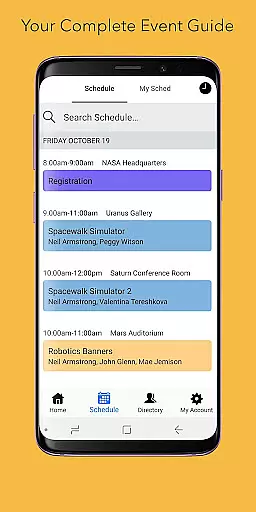
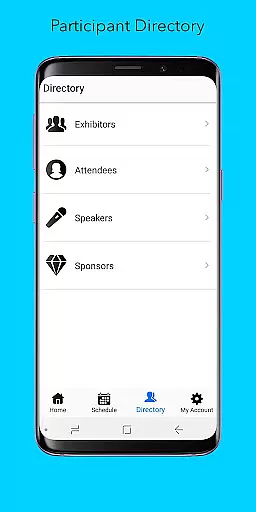
Sched is a leading platform for session registration and attendance management, designed to streamline the organization of complex multitrack events. This app allows event planners and attendees to manage all event details in one place, ensuring a seamless experience. With features like full scheduling, personalization options, speaker directories, and offline caching, Sched enhances event participation by providing key information conveniently at users' fingertips.
Whether you are an event organizer aiming to deliver a well-coordinated event or an attendee looking to maximize your event experience, Sched offers tools that cater to your needs. The app's vision is to transform how people interact with events, making them more engaging and less cumbersome. By centralizing event management and offering mobile access to schedules and resources, Sched ensures that every user can navigate and enjoy events effortlessly.
Sched boasts a variety of robust features tailored to improve event management and participation. One of its standout capabilities is the full schedule view, which lets users browse entire event schedules without needing a physical guide. This feature saves time and provides instant access to crucial event information. Additionally, the app offers personalized experiences through customizable schedules, enabling users to log in and tweak their plans on-the-go.
Another significant feature is the comprehensive directory of speakers and exhibitors. This directory includes detailed professional profiles, helping attendees make informed decisions about which sessions to attend. Moreover, Sched is equipped with offline caching, ensuring that users always have access to their schedules even without an internet connection. These features collectively enhance user engagement and satisfaction, making Sched an indispensable tool for modern event management.
Task creation and detail customization are essential features for event management platforms like Sched. This functionality allows event organizers to create, modify, and manage sessions with precision.
Sched enables users to input comprehensive session details including time, location, speaker information, and session descriptions. The platform supports rich formatting options, allowing organizers to add images, links, and other multimedia elements to enhance session listings.
The benefits of this feature are significant for both organizers and attendees. Organizers can efficiently manage complex multi-track events from a single interface, while attendees enjoy clear and detailed session information that helps them plan their event experience effectively.
This level of customization ensures that each session is accurately represented, leading to better attendee engagement and more successful events overall.
Reminder settings in event applications play a crucial role in keeping attendees informed and engaged. These settings allow users to configure personalized notifications for upcoming sessions and important event updates.
Sched offers flexible reminder options, enabling attendees to set alerts for specific sessions or general event announcements. Users can choose between push notifications, email reminders, or both, ensuring they never miss critical event moments.
The value of customizable reminder settings extends beyond mere convenience. Attendees can optimize their event schedules by receiving timely notifications about session start times, venue changes, or special announcements.
This feature significantly enhances the overall event experience by maintaining consistent communication between organizers and participants, ultimately leading to higher attendance rates and improved session planning.
User-friendly interface
Comprehensive event management
Offline functionality
Personalized schedules
Professional networking opportunities
Limited free features
Occasional sync issues
Requires account creation
Interface can be complex
Some features need improvement

The calendar app in this 2026 year see all dates.
 4.20
4.20
Buy event tickets easily with our user-friendly App. Stay updated on hot events
4.3
TV Garden is a video player to play your own TV streams from around the world!
4.1
Listen Full Quran MP3 Offline - Qibla Compass, Salah Timing & 99 Names of Allah
4.60
TV.Garden is a video player to play your own TV streams from around the world!
3.40
Instant photo sharing for every occasion
3.80
Beautiful invitation cards + easy RSVP tracking for any event. Design Invites.
4.80
Events, Meetings, Photo Shoots
4.50
TodayTix is the easiest way to get tickets to the best shows in your city.
4.90
The KRUU app - plan, celebrate, remember
4.80
Design Invitations & Cards for Any Occasion
4.80
Find Live Event Ticket Deals to Sports, Concerts, Festivals, & Comedy For Less!
4.80
Find tickets to upcoming concerts, sports events, festivals, shows, attractions
4.70
Discover events, experiences, and things to do near you - Anytime, Anywhere!
4.70
Microsoft Build is an annual developer conference hosted by Microsoft
4.20
Rocket Monkey - Space rocket launch schedule for launch sites around the world
4.20
Browse events, find transportation, keep up with the latest news from your team
4.1
The official app of the Carmel Christkindlmarkt!
4.5
Soft Proxy for Your Online World
4.2


User Reviews