
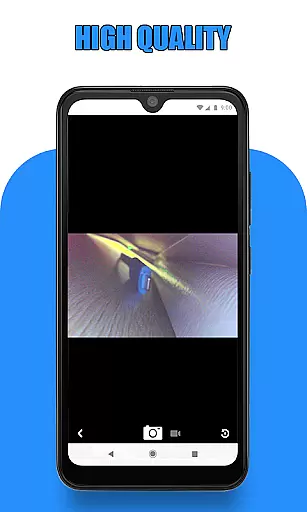
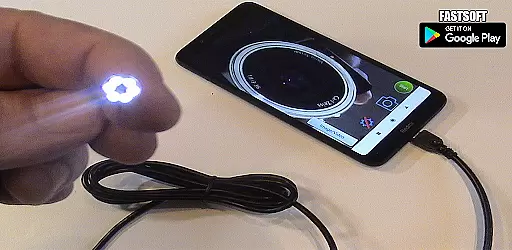
Endoscope Camera Connector is a specialized application designed to connect Android devices with external cameras such as endoscopes, USB cameras, or Borescope cameras. This app enables users to view live feeds, capture images, and record videos from these external devices directly on their smartphones. The app functions similarly to an OTG viewer, allowing seamless integration with UVC-compatible cameras through USB OTG or Type-C connections. Whether you're conducting sewer inspections, plumbing repairs, or other tasks requiring internal views, this app provides the necessary tools to efficiently manage and utilize your external camera equipment.
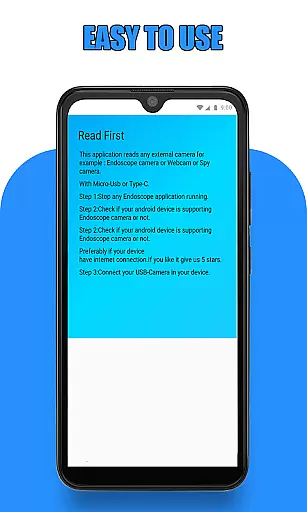
The Endoscope Camera Connector app requires certain permissions to operate effectively, including access to storage for saving media files and the ability to detect connected USB devices. By ensuring your device supports USB OTG technology and verifying your camera's compatibility, you can maximize the app's functionality. With its intuitive interface, users can easily navigate between capturing photos, recording videos, and accessing stored media in the gallery. This makes it an invaluable tool for professionals who rely on visual inspections and detailed imaging in their work.
One of the standout features of the Endoscope Camera Connector app is its ability to seamlessly integrate with a wide range of external cameras. It supports various types of endoscopes and Borescope cameras, making it versatile for different professional needs. Users can connect their devices via USB OTG or Type-C, and the app will automatically detect and display the camera feed. This feature is particularly beneficial for those working in fields like plumbing, where visual inspections of blocked drains are crucial.
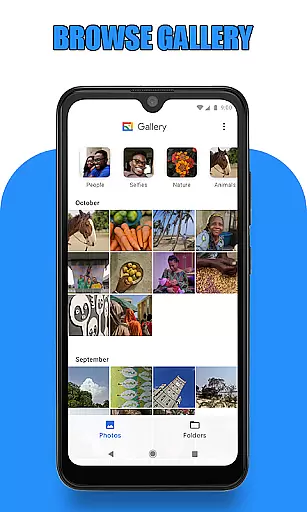
In addition to live viewing, the app offers robust media management capabilities. Users can capture high-quality images and record videos with sound directly within the app. These media files are then stored in an accessible gallery, where they can be viewed, managed, and deleted as needed. The gallery interface is user-friendly, allowing for easy navigation and playback of videos using preferred media players. Furthermore, the app includes a USB OTG checker tool to verify device compatibility before use, ensuring a smooth and trouble-free experience. Overall, these features make the Endoscope Camera Connector app an essential tool for anyone needing reliable and efficient camera connectivity on their mobile device.
Endoscope Camera Connector offers a comprehensive solution for connecting your mobile device with various external cameras, including endoscopes, USB cameras, and Borescope cameras. The app's functionality spans across different use cases, from sewer inspections to plumbing repairs.
The application supports OTG technology, enabling users to connect their devices seamlessly via USB or Type-C ports. This versatility ensures that whether you're using a Depstech inspection camera or any UVC-compatible USB camera, the app can recognize and work with it effectively.
With features like video recording with sound, photo capturing, and gallery management, the app provides a complete suite of tools necessary for professional inspections. Users can easily view, manage, and delete their captured media directly within the app's interface.
This extensive functionality coverage makes Endoscope Camera Connector an essential tool for professionals in various fields, ensuring they have all the necessary features to conduct thorough inspections and maintenance work.
When it comes to usability, Endoscope Camera Connector excels by providing a straightforward and intuitive user experience. The app simplifies the process of connecting external cameras to mobile devices, making it accessible even for users who may not be tech-savvy.
Operational smoothness is evident through its efficient workflow - from checking if your device supports OTG technology to quickly accessing the camera feed. The app's interface is designed to minimize learning curves while maximizing productivity.
Practical features such as long-press deletion options and easy media playback selection enhance the overall user experience. These thoughtful design elements contribute to seamless daily operations without unnecessary complications.
The combination of these usability factors and smooth operational performance makes Endoscope Camera Connector stand out in the Libraries & Demo category, offering both functionality and ease of use for various inspection needs.
User-friendly interface
Wide camera compatibility
Efficient media management
Live feed capability
Intuitive gallery navigation
Limited to compatible devices
Requires specific permissions
No iOS support
Dependent on hardware quality
Occasional connection issues

The Free Catholic Latin American Bible in complete Spanish
 4.60
4.60
Demo for Key Attestation feature of the Android system.
4.80
Android secret code for smart phone, mobile codes, with secret codes app
4.20
charging your phone by other phone easly
4.00
TV USB connector app provides you a seamless cast option from your phone to tv.
4.70
Connect and Find your smart tag via our app.our app is compatible with smarttag.
3.30
Mirror link car connector to share your screen with car dashboard
3.80
Turn your phone into a wireless Xbox controller – play, stream & control anytime
4.0
Barcode scanning made simple!
4.40
SmartCast mirrors Android phone to TV screen With Cast Screen, Chromecast.
4.80
Study Bible King James Version: the correct way to learn the Bible with audio
4.80
Game booster GFX may reduce interruptions and improve gaming experience.
4.50
Connect and find your Smarttag devices through our app.
4.00
A Pydroid Quick Install repository provider.
4.00
The best PS2 games from your childhood come to life in their mobile version!
4.00
Simulator of real black light
3.50
Looking to connect your phone to your car screen? Mirror Link is the solution.
3.20
DamonSx2 is the open Source LGPL Emulator
3.20
Enjoy hours of entertainment with our Roblox mobile games app
4.4


User Reviews