
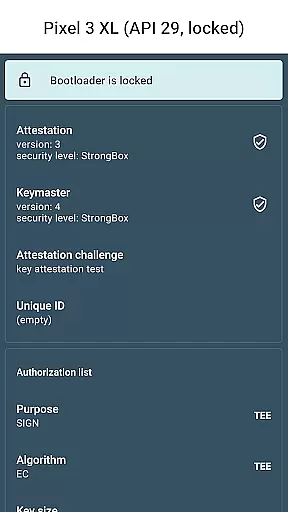
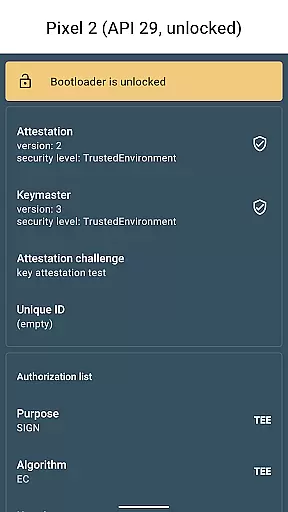
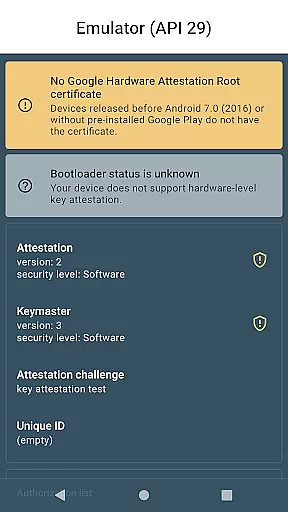
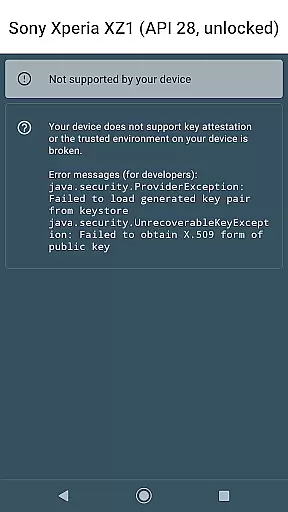
Key Attestation Demo is a specialized application designed for developers and power users who require advanced security features. This app allows users to verify the authenticity of cryptographic keys on Android devices, ensuring that sensitive data remains protected.
The core functionality revolves around implementing and demonstrating key attestation processes as outlined in official Android documentation. It serves as both an educational tool and a practical utility for those working with secure applications. Whether you're developing secure apps or need to validate device integrity, this demo provides essential capabilities.
By leveraging this app, developers can ensure their applications maintain high-security standards while interacting with hardware-backed keystores. The app's value lies in its ability to provide transparency and trust in cryptographic operations, which is crucial for modern mobile security.
One of the standout features of Key Attestation Demo is its alignment with official Android security guidelines. The app integrates seamlessly with Android's Keystore system, allowing users to perform attestation checks directly from their devices.
Another notable feature is the inclusion of comprehensive documentation links. Users can access detailed guides on key attestation from developer.android.com and source.android.com, making it easier to understand the underlying mechanisms. Additionally, the availability of source code on GitHub enables developers to explore, modify, and contribute to the project.
This app also demonstrates how to implement secure communication between applications and hardware security modules. By showcasing real-world use cases, it helps developers build more robust and secure applications, ultimately enhancing user privacy and data protection.
For a library or demo app like Key Attestation Demo, functionality completeness refers to how thoroughly it implements the key attestation feature. This Android app provides developers with an example of using Android's key attestation API to verify hardware-backed keys.
The app demonstrates essential functions such as parsing and verifying attestation certificates, extracting key characteristics, and displaying security levels. It covers different types of keys including RSA and ECDSA, giving developers a comprehensive view of the key attestation process.
By implementing these core features, the app allows developers to understand the complete workflow of key attestation, from certificate chain verification to checking individual key properties. This comprehensive approach helps users grasp the entire security context.
Such thorough functionality enables developers to implement secure key management in their own applications while understanding the underlying security architecture provided by Android devices.
While primarily a demo app for developers, usability remains crucial for Key Attestation Demo. The application presents technical information about key attestation in a clear, organized manner through well-structured interfaces that display certificate details and key characteristics.
Operational smoothness is demonstrated through reliable performance when verifying attestation certificates and extracting key information. The app handles complex cryptographic operations efficiently without crashes or noticeable delays.
Developers benefit from intuitive navigation between different sections of the attestation information and straightforward access to source code references. These aspects make technical concepts more accessible even to those new to key attestation.
The combination of technical depth with operational reliability creates a valuable learning tool that maintains professional standards while remaining approachable for its target audience of developers and power users.
Enhances security
Developer-focused
Open-source
Comprehensive docs
Easy integration
Complex for novices
Limited UI
No direct support
Advanced setup
Niche audience

Game Booster GFX for smoother gaming experience. Enjoy 120 FPS and 4x Game Space
 4.20
4.20
Connect and find your Smarttag devices through our app.
4.00
Collection of Maps and Mods for Dmod
3.30
TV USB connector app provides you a seamless cast option from your phone to tv.
4.70
Study Bible King James Version: the correct way to learn the Bible with audio
4.80
Mobs maker Minecraft help MCPE creators make their own mob by using Blockbench
3.50
Game booster GFX may reduce interruptions and improve gaming experience.
4.50
Experience virtual reality on your smartphone with Cardboard.
3.50
Expo is a free & open source platform to build apps using JavaScript and React.
4.70
Read Holy Quran Feel Like Real Quran & Listen Al Quran Mp3 Audio Online Offline.
4.70
The Free Catholic Latin American Bible in complete Spanish
4.60
View your cameras anywhere and anytime
4.20
use your smartphone as Remote control drones .
4.20
Easily evaluate the performance of Scandit's barcode and ID scanning SDK
4.10
charging your phone by other phone easly
4.00
A Pydroid Quick Install repository provider.
4.00
The best PS2 games from your childhood come to life in their mobile version!
4.00
Mobile Connect To TV - HDMI USB & WiFi Screen Mirroring
3.70
Enjoy hours of entertainment with our Roblox mobile games app
4.5


User Reviews