


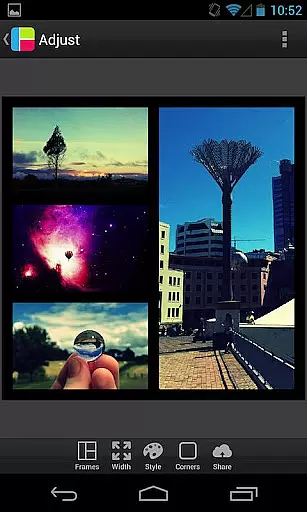
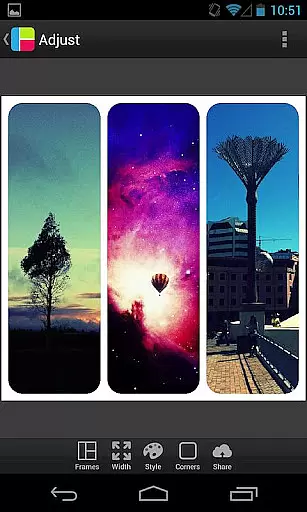

PicFrame is a versatile photography app that allows users to create stunning photo collages by combining multiple images into customizable frames. With 36 adjustable frame layouts, users can include up to five photos in a single composition, offering endless creative possibilities. The app stands out with features like rounded corners, shape customization, and precise control over borders, colors, and patterns.
Designed for both casual users and photography enthusiasts, PicFrame supports advanced editing tools such as brightness, contrast, and saturation adjustments for individual photos. Its intuitive interface makes it easy to zoom, rotate, and reposition images while maintaining high-quality output. Whether sharing memories with family or creating professional-looking designs, PicFrame ensures every collage is unique and visually appealing.
PicFrame offers an impressive range of features tailored to enhance creativity and customization. One standout aspect is its 36 fully adjustable frames, which allow users to drag inner borders for personalized layouts. Each frame can incorporate up to five photos, and additional options like rounded corners, custom shapes (circle, heart, hexagon), and patterned backgrounds provide limitless design potential.
The app also includes robust editing capabilities. Users can fine-tune the brightness, contrast, and saturation of each photo individually, ensuring optimal visual balance. A simple yet powerful color picker lets you choose border colors effortlessly, while pinch-to-zoom functionality enables precise placement of images within frames. With support for various aspect ratios and seamless integration with social media platforms, PicFrame empowers users to save, share, and showcase their creations with ease.
PicFrame offers a unique real-time capture and preview experience that allows users to see their creations come to life instantly. This feature is crucial for photography apps as it enables users to adjust their photo frames and effects on the fly.
The app provides 36 fully adjustable frames with endless customization options, allowing users to drag inner frame borders for a personalized look. With additional features like rounded corners, adjustable border width, and various shapes, users can create visually stunning frames that stand out.
Users benefit from an easy-to-use color picker to change border colors and access to 52 patterns for the frame's background. These capabilities ensure that every creation has a unique appearance, enhancing the overall user experience.
The real-time preview ensures that users can adjust brightness, contrast, and saturation of each photo with immediate visual feedback. This empowers users to produce professional-looking collages without any prior design experience, making PicFrame an essential tool for photography enthusiasts.
PicFrame includes AI-powered beauty and enhancement features that bring a natural touch to photo editing. In today's photography landscape, achieving natural-looking enhancements is vital for maintaining authenticity in images.
The app allows users to adjust individual photo attributes such as brightness, contrast, and saturation, ensuring each picture within the frame looks its best. The ability to rotate photos and pinch to zoom provides precise control over the final composition, enhancing the natural feel of the collage.
With multiple output resolutions available, users can save their creations to the gallery or share them directly to social media platforms like Instagram and Facebook. This seamless integration supports a natural flow from creation to sharing, keeping the user engaged throughout the process.
By offering six different aspect ratios, including square format, PicFrame caters to diverse user preferences and platform requirements. This flexibility ensures that every shared image maintains its intended aesthetic, preserving the natural beauty captured in each frame.
User-friendly interface
Highly customizable frames
Versatile editing tools
Multiple sharing options
Unique design possibilities
Limited free features
In-app purchases required
Occasional ads
Advanced tools may overwhelm beginners
Heavy on device storage

How would you look like with a differently shaped nose, chin or lips?
 3.90
3.90
What celebrity do you look like? Celebs will find your celebrity match!
4.10
Pet Camera
3.70
Create Business Headshots, Polaroid Filter, Retake Photos,Profile Pics,AI Photos
4.50
Over 800 film simulation recipes for Fujifilm. Black Friday Offer!
4.4
Turn your phone into a professional camera - full DSLR manual photography
4.30
Light-weight Media Gallery app for Android made with Jetpack Compose
4.60
Snap photos remotely using your Garmin watch as the camera trigger
4.0
The original Rarevision VHS look seen everywhere!
4.70
Perfect body tune & face app - photo retouch, makeup, slim body & beautify face.
4.80
Your personal guide to the sun and moon. Plan ahead, visualize and predict!
4.70
A must-have app for landscape photographers
4.60
Create collages easily! Nice pic collage maker & background eraser for Instagram
4.50
Shooting photos and records video easily and efficient with professional Camera
4.30
Natural Beauty, Selfie Retouch
4.30
Professional photography on your mobile phone
4.20
A light meter for true photographers.
4.20
Professional camera app that brings DSLR manual photography controls to Android.
4.20
Transform Photos: Edit, Beautify and Craft Memories & Make Collages!
4.10


User Reviews