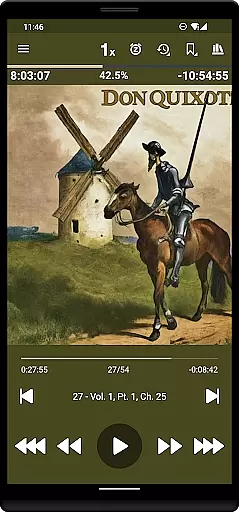
Listen Audiobook Player is a feature-rich audio player designed specifically for audiobook enthusiasts. This application allows users to play DRM-free audiobooks from various sources, including popular platforms like Librivox, Downpour, and Loyalbooks. The app supports multiple audio formats such as MP3, M4B, M4A, Opus, Ogg, AAC, FLAC, and more, ensuring compatibility with a wide range of audiobooks.
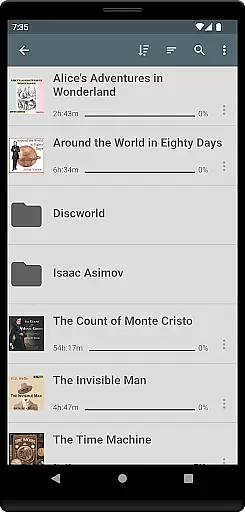
One of the standout features of Listen Audiobook Player is its folder-based library system that automatically syncs with your audiobook folder, allowing for easy organization and quick access to your entire collection. Additionally, it offers advanced playback options including variable speed playback (0.5x to 4x), pitch control, volume boost, and an equalizer. Users can also enjoy seamless integration with Android Auto, Plex, and Audiobookshelf, enhancing their listening experience across multiple devices.
This app is ideal for users who want a dedicated audiobook player without the hassle of advertisements or in-app purchases. Whether you're commuting, exercising, or relaxing at home, Listen Audiobook Player provides a smooth and customizable listening experience tailored to your preferences.
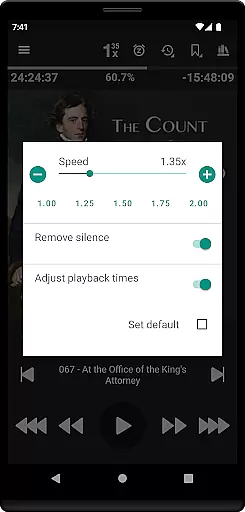
Listen Audiobook Player boasts a comprehensive set of features designed to enhance the audiobook listening experience. One of its key features is the support for embedded chapters in most audio codecs, which allows users to navigate through audiobooks easily. The app also includes advanced playback controls such as variable playback speed (ranging from 0.5x to 4x), trim silence, pitch control, and volume boost, providing users with complete control over how they listen to their audiobooks.
Another notable feature is the ability to add cover art from embedded files, images within the book folder, or by downloading them directly within the app. This ensures that your library not only sounds great but looks great too. Furthermore, the app offers built-in synchronization support, enabling users to sync their current position and bookmarks across multiple devices. This feature is particularly useful for those who switch between different devices throughout the day.
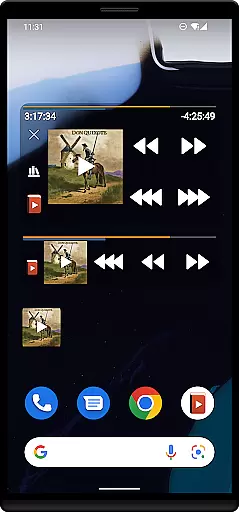
Additional functionalities include Bluetooth play/pause/skip support, widgets, lock-screen controls, and integration with automation apps like Tasker and Llama. These features provide users with convenient ways to manage their audiobooks and ensure a seamless listening experience regardless of their environment or device setup.
When evaluating an audiobook player, the size and authenticity of its music library are crucial factors. Listen Audiobook Player offers a vast selection of DRM-free books that users can access from various sources like Librivox, Downpour, and Loyalbooks. This ensures that listeners have a wide array of choices without worrying about copyright infringement.
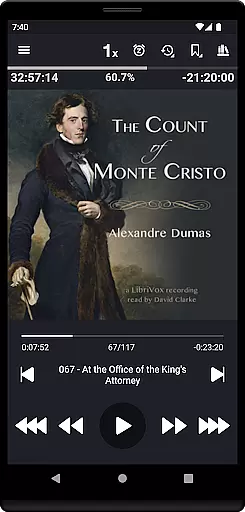
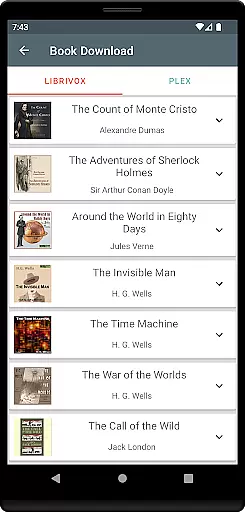
The app goes a step further by allowing users to download curated books directly from Librivox. These include timeless classics such as 'The Count of Monte Cristo' and 'Pride and Prejudice,' among others. By providing these options, the app not only expands its library but also guarantees that all content is legally obtained and free to use.
Moreover, Listen Audiobook Player supports multiple audio formats including mp3, m4b, and flac, which means users can enjoy their personal collections without compatibility issues. The assurance of copyright authenticity coupled with extensive format support makes this app a reliable choice for audiobook enthusiasts.
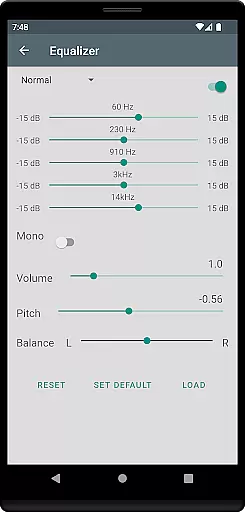
Audio quality is paramount when it comes to enjoying audiobooks, and Listen Audiobook Player excels in this area. The app provides variable playback speed ranging from 0.5x to 4x, allowing users to adjust the tempo according to their preference. This feature is complemented by pitch control and volume boost options, ensuring an optimal listening experience.
In addition to playback speed, the app includes an equalizer and balance settings. Users can set global defaults or customize these settings on a per-book basis, tailoring the sound output to match individual tastes. Such flexibility ensures that every audiobook sounds clear and engaging, regardless of the original recording quality.
Another standout feature is the option to convert books into the Opus format. This conversion reduces file sizes significantly while maintaining high sound quality. For audiophiles who value both storage efficiency and audio fidelity, Listen Audiobook Player offers a compelling solution that enhances the overall enjoyment of digital audiobooks.
User-friendly interface
Wide format support
Advanced playback options
Sync across devices
No ads or in-app purchases
Limited to DRM-free content
Requires manual library management
No cloud storage integration
Complex settings for beginners
Occasional bugs reported

Taal player that lets you sing any Indian & Western song with Tabla & Tanpura
 4.60
4.60
Network/Cloud Streaming, Visualization, Graphic Equalizer and Sound Effects.
4.20
The alternative folder based music player.
4.20
Learn and play 2M+ music tabs & chords on guitar, ukulele, bass, and more
4.30
Help you quickly get started with Shokz headphones
4.40
A complete sound package for the sound engineer or enthusiast
4.60
Ringtone Maker is free app create ringtone from music files or your recording.
4.40
Uninterrupted Tunes, Unmatched Vibes
3.90
Get alarms that fit your lifestyle and wake up to the sounds you love.
4.80
24,000 free audio books and no ads!
4.90
SqueezePlayer turns your Android phone or tablet into a SqueezeBox on its own!
4.60
Super Sound Editor, Song Maker & Mixer, Vocal Remover, Voice Recorder & Changer!
4.60
10-Band Audio Equalizer, Sound / Bass Booster for Spotify Users & Music Players
4.40
DJ Music Mixer Pro is a real DJ controllers and DJ Music Studio to remix DJ.
4.40
DJ Music Mixer - DJ Remix: remix songs, make beat music & record mix of DJ.
4.40
Your HD audio recorder on the go for music, meetings, ambience, animal sounds…
4.30
Advanced 10-Band Audio Graphic Equalizer Sound Booster Pro
4.30
Versatile MP3 recorder with auto-backup to Dropbox and Google Drive
4.10
The only true audiophile music player with Hi-Fi audio rendering and DSP engine
3.90


User Reviews