
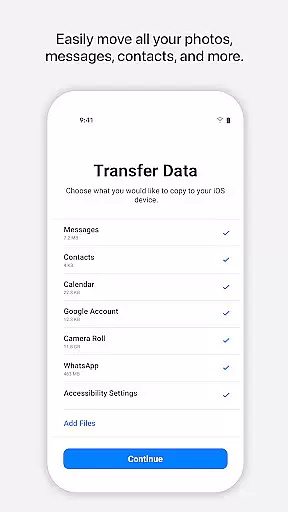
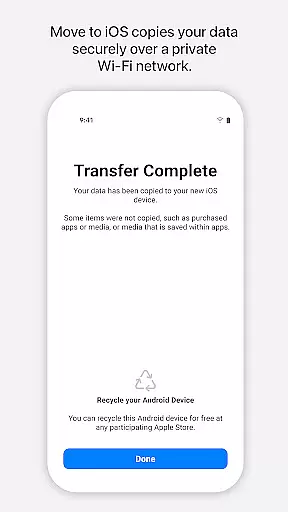
Move to iOS is a powerful migration tool designed to simplify the transition from Android to iPhone or iPad. This application enables users to transfer all essential content securely and automatically, including contacts, photos, videos, message history, and even WhatsApp data. The app creates a private Wi-Fi network between devices, ensuring a smooth and secure data migration process without the need for third-party storage solutions.
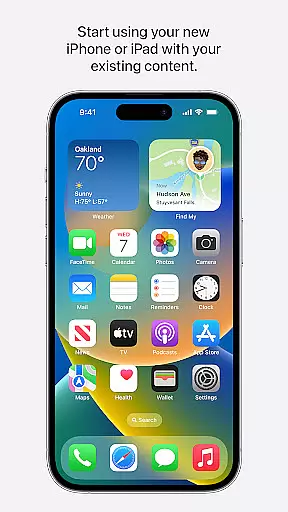
One of the standout features of Move to iOS is its ability to place transferred content into the correct locations on your new Apple device, such as the Photos app or Contacts app. With just a few steps, users can complete the entire migration process by entering a security code. This makes switching to iOS not only easy but also efficient, allowing users to quickly start enjoying their new device's capabilities.
Move to iOS offers a comprehensive set of features that cater to various types of data migration needs. It supports the transfer of apps, calendars, call logs, contacts, camera media, mail accounts, voice memos, and more. The app ensures that all migrated content is placed in the appropriate locations on the new iOS device, maintaining organization and usability.
A key feature of Move to iOS is its secure Wi-Fi connection protocol, which establishes a direct link between the Android device and the new iPhone or iPad. This eliminates the need for external storage or cloud services during the migration process. Additionally, the app provides optional permissions for SMS, photos, notifications, and other data types, giving users control over what they want to migrate. These features collectively ensure a seamless and personalized transition experience.
Move to iOS offers a seamless and secure way to transfer content from an Android device to an iPhone or iPad. The app's core functionality lies in its ability to migrate various types of data, including contacts, message history, photos, videos, mail accounts, calendars, and even WhatsApp content.
The effectiveness of Move to iOS is evident in its straightforward process. By creating a private Wi-Fi network between devices, it ensures that all data transfers occur without the need for third-party storage solutions. This automatic and direct migration simplifies switching operating systems while maintaining privacy and security.
Users benefit from this precise functionality as they can continue enjoying their digital lives uninterrupted on their new Apple device. With just a few steps, users can rest assured knowing that their valuable information has been accurately moved over, allowing them to pick up right where they left off with minimal hassle.
The interface design of Move to iOS emphasizes simplicity and ease-of-use, ensuring that even those who may not be tech-savvy can navigate through the migration process effortlessly. Upon launching the app, clear instructions guide users through each step required for transferring content from an Android device.
Intuitive prompts help establish a connection between devices using a unique security code provided during setup. Once connected, the app takes care of everything else behind the scenes, freeing users from complex configurations or manual input tasks typically associated with moving large amounts of personal data.
This intuitive approach significantly reduces potential frustration often encountered when switching platforms. By focusing on user experience and streamlining interactions within the app itself, Move to iOS delivers a stress-free transition into iOS territoryu2014allowing individuals more time enjoying their new gadgets rather than troubleshooting technical issues.
User-friendly interface
Secure data transfer
Comprehensive content migration
Private Wi-Fi network
Optional permission settings
Limited to Android-to-iOS migration
Requires both devices nearby
Dependent on Wi-Fi stability
No reverse migration support
Optional features may be missed

A convenient photo, video, and file recovery tool.
 4.00
4.00
Unit and currency converter with easy and simple UI.
4.80
Safely recover deleted photos, videos, and files with a single easy tap.
3.70
An easy-to-use calculator designed to save time calculating and bending conduit
4.30
Best leveling tool for your Android device. Hang paintings like a pro.
4.90
Planner and Tracker for Stardew Valley
4.60
Quickly check the frequency of the Earth
4.30
Mirror your screen to Fire TV - Super fast and simple
4.40
Screen Mirroring with sound for Samsung TV, LG TV, Sony TV, Smart TV and Browser
4.20
Support Fossify apps with a warm thank you!
5.00
Monitor car performance in real time and troubleshoot malfunctions.
4.80
Extremely fast, secure, and protects your privacy
4.80 4.50
4.50 4.50
4.50
Remote for Roku, Fire TV, Samsung TV, LG TV, Android TV, Chromecast and VIZIO TV
4.20
App that Recover your pictures, videos or files after you delete them.
4.20
Effortlessly run ADB commands directly on your device without a PC.
4.20
Fun lie-detection pranks for friends and parties.
3.80
Undelete and recover your lost or deleted files with DiskDigger!
3.40


User Reviews