
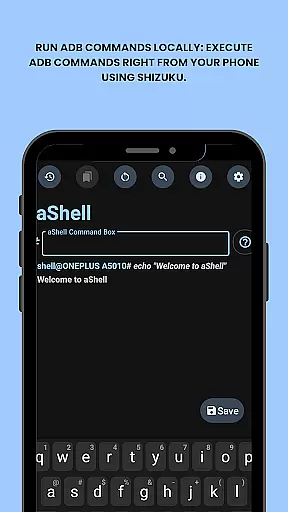
aShell is a specialized Android tool that allows users to execute ADB commands directly from their mobile devices without requiring a PC. Designed for developers, power users, and tech enthusiasts, this app provides full control over device internals through an intuitive interface.
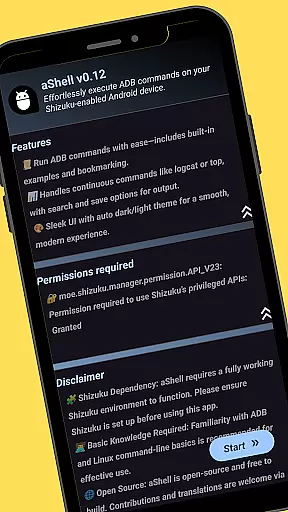
Key features include live command output, preloaded examples of common ADB commands, and the ability to save outputs to files. The app also supports dark/light mode and offers bookmarking functionality for frequently used commands. With its dependency on Shizuku, aShell ensures secure and seamless execution of advanced operations.
Ideal for debugging, system exploration, or automation tasks, aShell empowers users to interact with their Android devices at a deeper level, enhancing productivity and technical capabilities.
aShell stands out with its unique set of features tailored for advanced Android users. The app enables local execution of ADB commands using Shizuku, making it possible to perform complex operations directly from your phone.
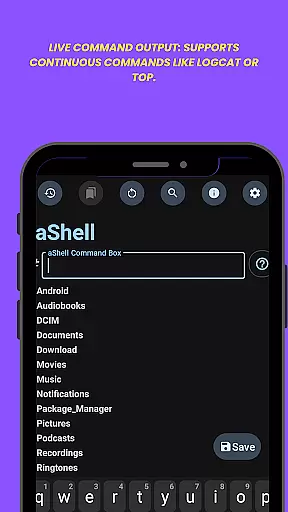
Among its notable features are live command output support for continuous processes like logcat, search functionality within command results, and the ability to export outputs to text files. Additionally, users can bookmark frequently used commands for quick access and enjoy adaptive theming with dark/light mode support.
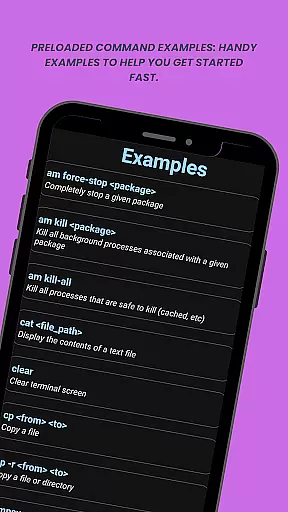
The app also includes preloaded examples of common ADB commands, helping users get started quickly. Its open-source nature and integration with external resources such as GitLab for source code and POEditor for translations make it a versatile tool for both learning and practical use.
aShell is designed to provide developers and power users with the ability to execute ADB commands directly on their Android devices. This eliminates the need for a PC and offers full control over the device's internals, making it an essential tool for those familiar with ADB/Linux command-line operations.
The app supports live command output, allowing continuous commands like logcat or top to run seamlessly. It also includes preloaded command examples, which help users get started quickly and efficiently. These features ensure that users can perform tasks such as debugging, system monitoring, and more with precision and ease.
With functionalities like search within output and saving output to a file, aShell enhances productivity by enabling users to manage and review command results effectively. The ability to bookmark frequently used commands further streamlines workflows, ensuring that important tasks can be executed swiftly and accurately.
aShell offers a user-friendly interface that adapts to both dark and light modes, providing a comfortable viewing experience regardless of your system theme. Its intuitive design ensures that even those with basic ADB knowledge can navigate and utilize its features without a steep learning curve.
The app provides handy examples of common ADB commands, making it easier for users to understand and implement complex operations. This approach not only simplifies the process but also encourages users to explore and learn more about ADB functionalities at their own pace.
By focusing on clarity and ease of use, aShell ensures that users can execute commands, review outputs, and manage their device internals efficiently. This simplicity in design and operation allows users to focus on their tasks without being hindered by a complicated interface.
Lightweight and fast
Open-source project
Live command output
Dark mode support
Bookmark functionality
Requires Shizuku
Not beginner-friendly
Limited use cases
No native ADB support
Depends on external tools

 4.10
4.10
Just one-tap to easy translate in any language after calls within seconds.
4.20
A recovery soft,it features photo recovery, video recovery, file recovery.
3.40
Unit and currency converter with easy and simple UI.
4.80
Amateur Radio app for APRS: Track friends, exchange messages, get tactical info.
3.90
Making emulation easy for everyone!
4.30
Powerful collection of electronics tools and reference.A must for any enthusiast
4.90
Introducing Smart Printer, your ultimate destination for printing solutions!
4.00
fast and easy mp3 music downloader
4.80
Best leveling tool for your Android device. Hang paintings like a pro.
4.90
The ultimate tool for network analysis, wifi scanning and problem detection.
4.90
Protect your device with antivirus, storage cleanup, and system monitoring
4.70
Connect instantly to a fast, encrypted VPN with one tap
4.60
Remote for Roku, Fire TV, Samsung TV, LG TV, Android TV, Chromecast and VIZIO TV
4.20
MS-DOS in your pocket. Play old DOS games anywhere you are ;)
4.10
Family Locator, Share location, StayConnect with your family in real time
3.90
Unleash gamepad precision for ultimate mobile gaming dominance.
3.90
Create your own custom widget with endless possibilities
3.90
A non-root local ADB shell client. READ BELOW!
3.40


User Reviews