
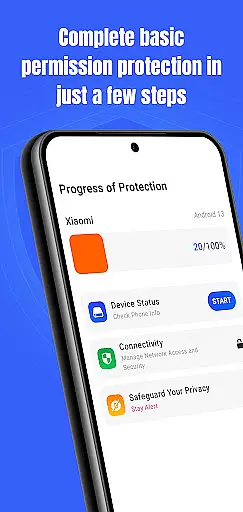
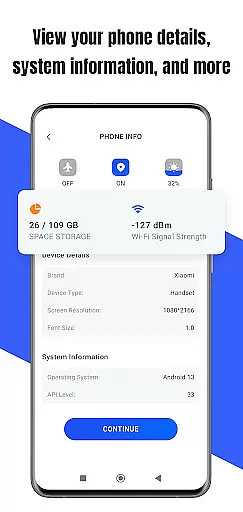
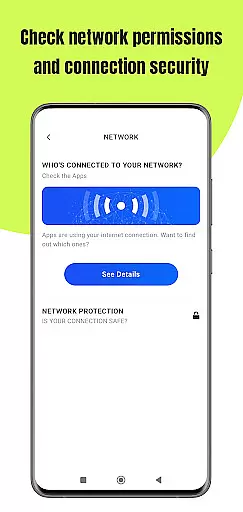
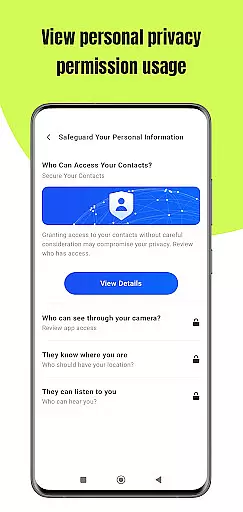
Permission Guard is a specialized security application within the Business category, designed to help users manage app permissions effectively. The core functionality revolves around monitoring and controlling the access rights of other apps on your device. It ensures that installed applications only access necessary data, protecting both personal and business information.
The app provides real-time alerts when an application requests excessive or suspicious permissions, allowing users to make informed decisions. This feature is particularly valuable for business users who handle sensitive data and need to maintain strict privacy controls. With its intuitive interface, Permission Guard makes permission management accessible even to non-technical users.
By maintaining control over app permissions, businesses can significantly reduce security risks and potential data breaches. This proactive approach to device security helps organizations comply with data protection regulations while safeguarding their valuable information assets.
Permission Guard offers several distinctive features that set it apart in the Business security space. The primary feature is its comprehensive permission scanning capability, which analyzes all installed applications and provides detailed reports about their access levels. This allows users to identify potentially risky apps quickly.
The app's real-time monitoring system is another crucial feature. It actively tracks permission requests and changes, notifying users immediately when an app attempts to access sensitive information. The built-in recommendation engine suggests optimal permission settings based on industry best practices and security standards.
Additional features include scheduled permission audits, enterprise-level reporting tools, and customizable alert thresholds. These capabilities are particularly beneficial for business environments where multiple devices need consistent security policies. The app also maintains a historical record of permission changes, helping administrators track security trends over time.
Collaborative work features are essential for businesses that rely on teamwork and shared responsibilities. Permission Guard enhances this aspect by ensuring that all collaborative apps on your device operate within their intended scope.
The app meticulously monitors permissions granted to collaborative tools, preventing unauthorized access to sensitive data. This ensures that team members can use necessary applications without risking the privacy and security of shared information.
With Permission Guard, businesses can maintain a secure environment for collaboration. Team members are notified of any permission changes, allowing them to stay informed about how their data is being accessed and used.
This level of control not only boosts productivity but also builds trust among team members. Knowing that their shared workspace is secure, teams can focus on achieving their goals without worrying about potential security breaches.
Effective task management is crucial for business success, and Permission Guard plays a vital role in securing the apps that facilitate this process. By managing permissions, it ensures that task management tools function optimally without compromising security.
The app provides detailed insights into which task management apps have access to critical device information. This allows users to revoke unnecessary permissions, keeping their task-related data private and secure.
Permission Guard's intuitive interface makes it easy to adjust permissions for task management apps. Users can quickly modify settings to align with their workflow requirements, ensuring that only relevant data is accessible.
By safeguarding task management processes, Permission Guard helps businesses maintain efficiency and organization. Users can confidently manage their tasks, knowing that their data is protected from unauthorized access.
Enhanced security
Real-time alerts
User-friendly interface
Comprehensive reporting
Customizable settings
Premium features locked
Occasional false positives
Device compatibility issues
Resource intensive
Learning curve present

Completed Course Lectures on how to use IBM Maximo in Maintenance issues
 4.2
4.2
Formerly Facebook Ads Manager. Manage and create ads on the go.
4.20
Quickly open and manage PDF files on your device.
3.80
Take the stress out of storage with the all-in-one app to manage your space.
3.70
Use Generative Summary to understand your rental or insurance docs in seconds.
4.70
Start earning fast. Apply Today.
4.80
Find jobs near you and temp work in minutes, from your phone.
4.50
From Gone to Back Again — In Just a Few Taps
4.50
ADP Mobile Solutions is an employee self service app
4.50
GoTo Mobile is a simple & secure calling, messaging & meetings solution
4.80
Find jobs and make money fast with JobStack.
4.60
Chat, meet, and collaborate to achieve more together, all in one place on Teams
4.60
Collaborate seamlessly with Google Chat, part of Google Workspace
4.50
The revolutionary flexible staffing platform
4.40
Shop, deliver, and earn with the Spark Driver™ App
4.10
enjoy effortless PDF reading anytime, anywhere
3.90
Windows App allows you to connect to remote PCs and virtual apps.
3.70
Find part-time earning opportunities near you that pay within days.
3.20
Convert Your Lovable.dev Website into a Mobile App Instantly!
4.5


User Reviews