
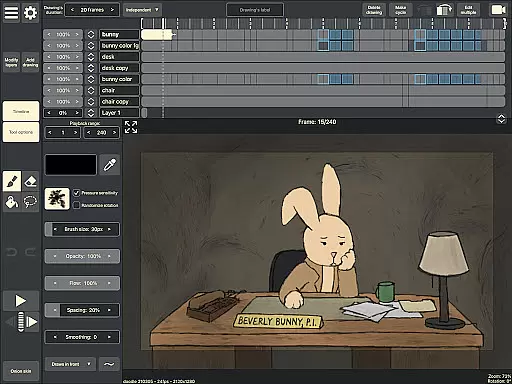
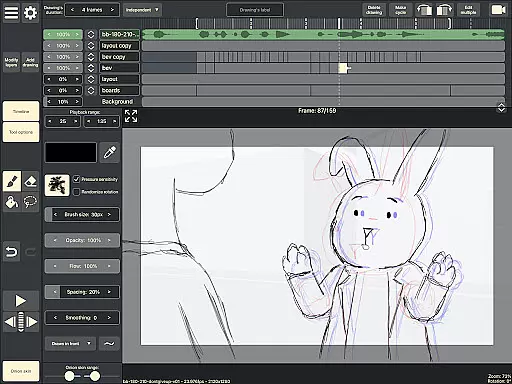
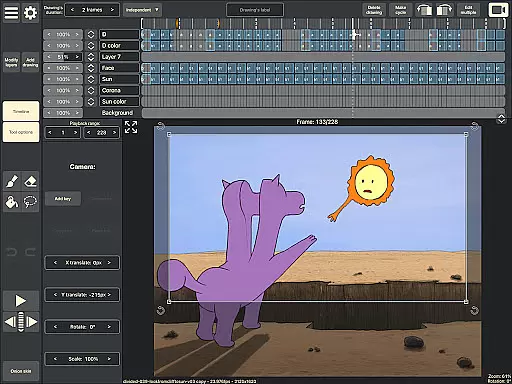
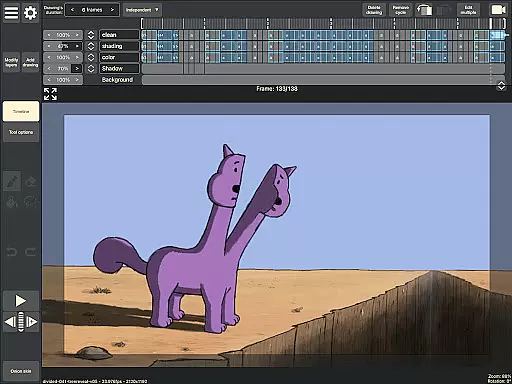
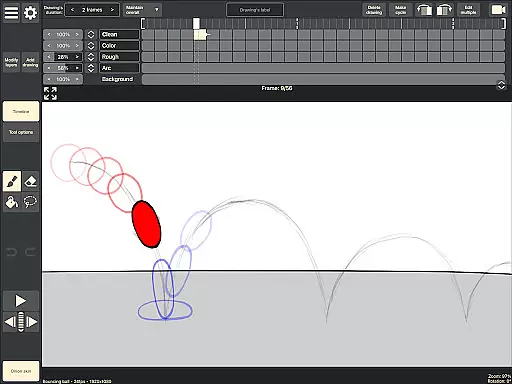
RoughAnimator is a professional-grade hand-drawn animation app designed for both Android and desktop platforms. This powerful tool caters to animators of all levels, from beginners to professionals. The application allows users to create traditional frame-by-frame animations with advanced features like onion skinning, timeline control with unlimited layers, and customizable drawing settings.
One of the standout capabilities of RoughAnimator is its support for various professional workflows. Users can import audio for lip-syncing, video for rotoscoping, and even export their projects to industry-standard software like Adobe Flash/Animate, After Effects, and Toon Boom Harmony. With support for pressure-sensitive devices like the Samsung S-Pen, this app provides a complete mobile animation studio experience.
RoughAnimator offers an impressive array of features that make it stand out in the Art & Design category. The app's timeline system supports unlimited layers with adjustable exposure lengths, enabling both pose-to-pose and straight-ahead animation techniques. Artists can preview their work in real-time and scrub through frames for precise timing adjustments.
The application's professional toolset includes advanced features like onion skinning for better frame referencing, custom brush creation for unique drawing styles, and framerate/resolution control for optimized output. Particularly noteworthy is its cross-platform compatibility - projects created on mobile can be seamlessly imported into desktop animation software, making it an ideal solution for animators who need flexibility in their creative process.
Creative tools are the backbone of any design application, and RoughAnimator excels in this area. As a hand-drawn animation app, it offers a comprehensive suite of features that cater to both professional animators and beginners. The inclusion of unlimited layers, customizable brushes, and support for pressure-sensitive devices like the Samsung S-Pen ensures that users have everything they need to bring their creative visions to life.
The app provides powerful functionalities such as onion skinning, pose-to-pose animating, and the ability to import audio and video for advanced techniques like lip-syncing and rotoscoping. These tools allow for intricate and detailed animations that can rival traditional studio-produced work. Furthermore, the app's ability to export projects to industry-standard software like Adobe Flash/Animate and After Effects makes it an invaluable asset in a professional animator's toolkit.
For users seeking flexibility and control over their animations, RoughAnimator allows them to adjust exposure lengths, preview playback, and scrub along the timeline. This level of control is crucial for fine-tuning animations and achieving the desired effect. By offering these robust features in a mobile format, RoughAnimator empowers creators to produce high-quality animations from anywhere, at any time.
Flexibility in canvas and format options is essential for accommodating various project requirements and ensuring seamless integration with other software. RoughAnimator addresses this need by providing users with the ability to control frame rates and resolutions, thus allowing precise adjustments to suit specific animation styles or platform requirements. Whether creating content for social media or preparing files for post-production in software like Toon Boom Harmony, animators can tailor their output accordingly.
In addition to supporting different resolutions and frame rates, RoughAnimator enables exporting animations into multiple formats including Quicktime video, GIFs, and image sequences. This versatility ensures that finished projects can be shared across diverse platforms or further refined in other applications. The capability to import RoughAnimator projects directly into desktop software enhances workflow efficiency and opens up possibilities for complex editing tasks that may not be feasible on mobile devices alone.
By combining extensive creative tools with adaptable canvas and format settings, RoughAnimator positions itself as a versatile solution for animators who demand both power and portability. Its compatibility with industry-standard file types and software bridges the gap between mobile creativity and professional production environments, making it an indispensable tool for modern animators.
Powerful animation tools
User-friendly interface
Cross-platform compatibility
Professional export options
Pressure-sensitive support
Steep learning curve
Requires high-end device
Limited free features
No cloud backup
Complex interface

Premium version of Shimeji-ee app with no ads & no limit active shimeji
 4.1
4.1
Customizable Outlined Fonts. Watch Face Format. Battery friendly Digital Clock.
4.20
Design your dream room with AI. Get decor ideas & plan home interiors
3.90
Digital illustration drawing & painting pad app to paint Anime and Manga art
4.50
Digital, Abstract, Classic - all types of color wheels in one app!
4.60
Photo editor for art, avatars, filters & fun transformations.
4.60
Draw Trace image sketch by, AR art projector app, Easy to trace any image.
4.50
Get an overview over all your embroidery threads, projects and more.
4.60
An intuitive, high-performance painting app that lets you focus on creating
4.40
Mobile pixel art editor. Simple. Fast. Portable.
4.80
Make your phone cooler and have a fantastic experience
4.80
Logo Generator powered by AI: Create stunning logos effortlessly!
4.70
Minecraft & Roblox Clothes
4.70
Image/ Text to Video Generator
4.40
Bring One UI 8.5 Icons to life -elegant dark icons with a modern, premium touch.
4.30
Create stylish invitation cards using templates for weddings, birthdays & RSVP.
4.20
Turning simple sketches into captivating tales filled with life and motion
3.90
Your homescreen as an elegant glass with customized blur, lighting, and visuals.
3.70
Art of Combination Wear OS Watch Faces
4.2


User Reviews