
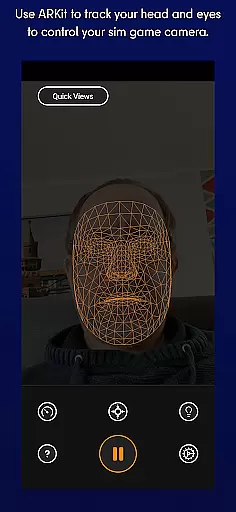
SmoothTrack is an innovative tool that transforms your mobile device into a 3D head tracking controller for simulation games. By utilizing the AR capabilities of your device, it allows you to intuitively control the in-game camera with natural head movements. This creates a near-magical experience where slight head motions translate to precise camera control in supported games.
The app works with any game that supports TrackIR, FreeTrack, or similar protocols, including popular titles like Microsoft Flight Simulator, Elite: Dangerous, and Euro Truck Simulator 2. Its sophisticated tracking system requires no additional equipment - just position your device to see your face, and you're ready to go. The app's intelligent design magnifies your head movements, enabling precise control while maintaining comfortable motion range.
Whether you're a flight simulation enthusiast or a gamer looking for more immersive experiences, SmoothTrack offers a unique solution that enhances gameplay through intuitive head-tracking controls. The app also features thoughtful additions like dark mode for OLED screens and bright mode for low-light environments, making it versatile for various gaming setups.
SmoothTrack stands out with its advanced AR-based tracking technology that delivers precise and responsive head-tracking performance. The app intelligently exaggerates your head movements, allowing you to achieve wide camera angles with minimal physical movement. This feature is particularly valuable for cockpit-based simulations where peripheral vision is crucial.
The application supports both FreeTrack and TrackIR protocols, ensuring compatibility with a wide range of simulation games. Its automatic calibration system and simple setup process make it accessible even for users new to head-tracking technology. The inclusion of both dark and bright modes demonstrates attention to detail, catering to different lighting conditions and helping preserve OLED screen lifespan.
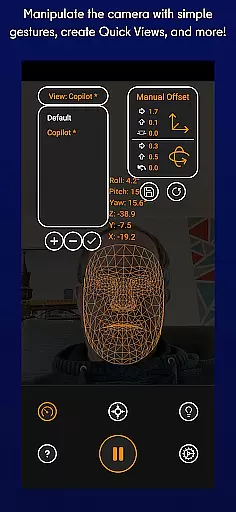
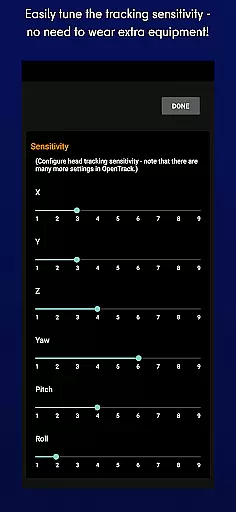
Additional notable features include intuitive gesture controls, adjustable sensitivity settings, and reliable face detection algorithms. The developers have implemented a robust support system through Discord and email channels, ensuring users can quickly resolve any technical issues. These comprehensive features create a seamless integration between mobile devices and PC gaming setups, enhancing the overall simulation experience.
SmoothTrack's core functionality lies in its ability to provide precise 3D head tracking for controlling simulation game cameras. This is achieved through the device's AR capabilities, ensuring accurate detection of even the slightest head movements.
The app employs advanced algorithms that translate these subtle motions into responsive in-game camera perspectives. Whether you're leaning forward to inspect your Flight Simulator cockpit or glancing left before a turn in Euro Truck Simulator 2, the response is immediate and reliable.
This level of precision benefits users by creating an immersive near-magical experience. The exaggerated yet controlled head movements allow gamers to naturally interact with their virtual environments without the need for additional equipment.
By supporting industry-standard protocols like FreeTrack and TrackIR, SmoothTrack ensures compatibility with numerous popular simulation titles. This versatility makes it an invaluable tool for both casual and professional simmers seeking enhanced realism in their gameplay.
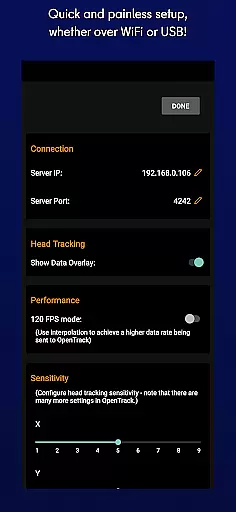
SmoothTrack excels in delivering an intuitive user interface that requires minimal setup. Users simply position their device to capture their face, eliminating the need for complex calibration procedures or specialized equipment.
The application's design focuses on natural interaction through simple camera gestures. Gamers can seamlessly shift their in-game perspective just by moving their head, making the control scheme feel second-nature.
This straightforward approach extends to its operational modes as well. The inclusion of both dark and bright modes demonstrates thoughtful consideration for different playing environments while addressing practical concerns like battery conservation and OLED screen protection.
With comprehensive support available through Discord and Email, plus clear documentation for compatible games, SmoothTrack maintains an accessible experience throughout. This combination of simplicity and effectiveness makes sophisticated head-tracking technology approachable for all users.
Intuitive head-tracking controls
Wide game compatibility
No extra hardware required
Responsive tracking performance
Thoughtful display modes
Requires compatible games
Dependent on good lighting
Device positioning crucial
May need calibration
Learning curve present

Fluid navigation gestures for all of us!
 4.30
4.30
Use your phone as a webcam on your computer over WiFi or USB.
4.40
PC precision for mobile gaming: dominate with keyboard and mouse!
4.30
WiFi Signal Strength Meter help you detect WiFi Signal Strength in real time.
4.80
With videos, electrical calculators, and built-in ebook, Ugly’s has your answer.
4.50
Fast Video Downloader, Movie Downloader, Torrent Downloader & Adblock Browser
4.70
Fun lie-detection pranks for friends and parties.
3.80
A clean app.
4.50
fast and easy mp3 music downloader
4.80
Support Fossify apps with a warm thank you!
5.00
Connect wirelessly to your computer to watch movies, browse the web, play games
5.00
The ultimate tool for network analysis, wifi scanning and problem detection.
4.90
Bedrock Together: Join any bedrock server on Xbox/PS
4.80
FV File Manager Pro, Fast and powerful file manager for Android
4.60 4.10
4.10
Introducing Smart Printer, your ultimate destination for printing solutions!
4.00
Family Locator, Share location, StayConnect with your family in real time
3.90
Undelete and recover your lost or deleted files with DiskDigger!
3.40
Download any file easily and quickly with Downloader
4.3


User Reviews