
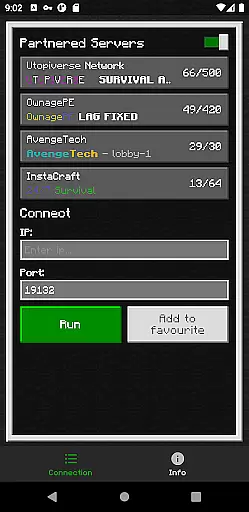
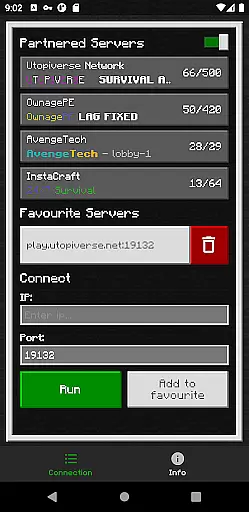
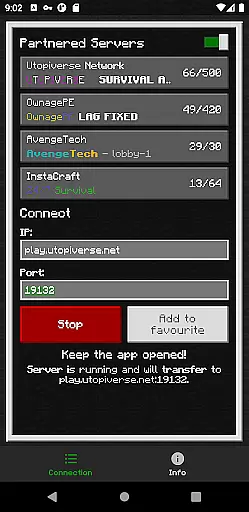
BedrockTogether (Pro) is an innovative networking tool designed to simplify server connections for Minecraft Bedrock Edition players. This ad-free version allows any Bedrock Edition server to appear as a LAN server on Xbox or PlayStation clients, enabling seamless connections without DNS rerouting. While Realms and Nintendo Switch compatibility are not supported, the app provides a reliable solution for local network gaming.
The application's core functionality lies in its ability to establish direct connections between devices on the same LAN network. By entering server IP and port details, users can quickly access their desired servers through the game's Friends tab. The straightforward setup process makes it particularly valuable for Minecraft enthusiasts who frequently play on local networks with friends.
This tool demonstrates its practical value by eliminating complex network configurations. Gamers can enjoy uninterrupted Minecraft sessions while benefiting from the app's efficient connection management system. The developer's support channels, including Discord and Telegram, ensure users receive timely assistance when needed.
BedrockTogether (Pro) distinguishes itself through several notable features that enhance the Minecraft connection experience. The application's primary capability is its unique server bridging technology, which creates virtual LAN connections between devices on the same network. This feature eliminates the need for complicated DNS settings while maintaining stable server connections.
The app's user interface is designed for simplicity and efficiency. Users can easily input server information through a straightforward form, then activate the connection with a single button press. Advanced troubleshooting guidelines help users resolve common connectivity issues, ensuring smooth operation across supported platforms. The exclusion of advertisements in this Pro version further enhances the user experience.
Additional features include comprehensive support resources and active community channels. The developer maintains an active presence on Discord and Telegram, where users can report bugs and receive technical assistance. These support systems, combined with the app's reliable connection capabilities, make BedrockTogether (Pro) a valuable tool for Minecraft players seeking hassle-free local network gaming experiences.
BedrockTogether (Pro) delivers exceptional core functionality by enabling Bedrock Edition servers to appear as LAN servers on Xbox or PlayStation clients. This seamless integration allows users to connect effortlessly without the need for DNS rerouting, ensuring a smooth and reliable connection process.
The app's primary feature is its ability to facilitate simple server connections through an intuitive interface. By entering the desired server IP and port, then clicking the 'Run' button, users can quickly access their servers via the 'Friends' tab in Minecraft Bedrock Edition. This streamlined approach significantly enhances user experience by reducing complexity and potential connectivity issues.
For gamers, this means more time enjoying Minecraft and less time troubleshooting network settings. The app ensures that once the client joins the server, it can be closed, allowing uninterrupted gameplay. This efficiency not only saves time but also optimizes device performance, making BedrockTogether (Pro) a valuable tool for enhancing multiplayer gaming sessions.
One of the standout features of BedrockTogether (Pro) is its straightforward and user-friendly interface. Designed with simplicity in mind, the app allows users to input server details and initiate connections with minimal steps, ensuring even those new to networking can navigate the process with ease.
The interface guides users through each step clearly: from entering server information to opening the game and connecting via the LAN tab. Such intuitive design reduces the learning curve typically associated with network configurations, empowering users to focus on their gaming experience rather than technical setups.
Moreover, the app provides helpful troubleshooting tips directly within its description, reinforcing its commitment to user accessibility. By ensuring that both gaming consoles and mobile devices are on the same LAN network, BedrockTogether (Pro) maintains a hassle-free environment. This dedication to clarity and ease-of-use makes the application an essential tool for Minecraft enthusiasts seeking efficient server connections.
Seamless LAN connection
User-friendly interface
Ad-free experience
Active support channels
Efficient connection management
No Nintendo Switch support
Limited platform compatibility
Requires manual setup
No official Minecraft endorsement
Network dependency

Complete kernel toolbox with features to manage and tweak your rooted device
 4.30
4.30
FV File Manager Pro, Fast and powerful file manager for Android
4.60
Use your phone as a webcam on your computer over WiFi or USB.
4.40
Family Locator, Share location, StayConnect with your family in real time
3.90
App to pay for FUTO Keyboard
4.60
An easy-to-use calculator designed to save time calculating and bending conduit
4.30
The one-and-only remote control for PC, Mac, and Linux
4.70
Quickly check the frequency of the Earth
4.30
Clean up your phone, find files, play media, and share files offline
4.50
Change your GPS location instantly. Simulate routes anywhere in the world.
4.90
Monitor car performance in real time and troubleshoot malfunctions.
4.80
WiFi Signal Strength Meter help you detect WiFi Signal Strength in real time.
4.80
ADB support Android 4.X-Android 13(Support wireless pair mode).No root required!
4.70
Game Booster, GFX Tool is now compatible with newer game update
4.50
Just swipe the edge to do something!
4.40
Remote for Roku, Fire TV, Samsung TV, LG TV, Android TV, Chromecast and VIZIO TV
4.20
A simple app to back up and restore SMS & MMS messages and call logs.
4.10
Amateur Radio app for APRS: Track friends, exchange messages, get tactical info.
3.90
A powerful, easy-to-use flight computer on your phone or tablet!
3.80


User Reviews