
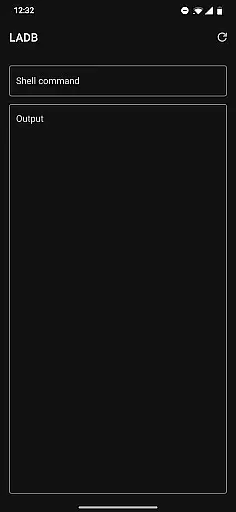
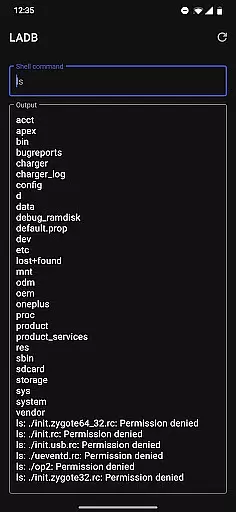
LADB is a specialized Android tool that enables users to establish a local ADB shell connection without requiring a physical USB link. By leveraging the Wireless ADB Debugging feature, it allows seamless communication between the ADB server and client directly on the device. This functionality is particularly beneficial for developers and power users who need to execute commands or manage their Android devices remotely.
The app simplifies the initial setup process by providing clear instructions for pairing and connecting via split-screen mode or pop-out windows. It also addresses common compatibility issues, such as conflicts with Shizuku, ensuring a smoother user experience. With its focus on privacy and open-source licensing, LADB offers a reliable solution for advanced device management while maintaining data security.
LADB stands out with its innovative bundling of an ADB server within the app itself, eliminating the need for external tools or connections. The app supports manual pairing for scenarios where Assisted Pairing may encounter issues, ensuring consistent performance across different Android versions. Its troubleshooting mechanisms, including clearing app data and rebooting, help resolve most connectivity problems effectively.
One of the key features of LADB is its strict adherence to user privacy. Unlike other tools, it does not transmit any device data outside the app, making it a secure choice for developers. Additionally, the app operates under a modified GPLv3 license, which encourages community contributions while preventing unauthorized builds on platforms like Google Play Store. These attributes make LADB a versatile and trustworthy tool for both casual users and professionals.
For a tool like LADB, core function accuracy and effectiveness are paramount. This app bundles an ADB server within its libraries to facilitate local device connections that typically require active USB. With Android's Wireless ADB Debugging feature, LADB enables communication between the server and client locally, thus streamlining the debugging process for developers.
The app provides a detailed initial setup guide, suggesting the use of split-screen mode or a pop-out window to keep both LADB and device settings accessible simultaneously. This ensures that users can efficiently manage wireless debugging connections without dismissing critical dialogs, which could invalidate pairing information. By following these steps, users can expect a reliable connection setup, enhancing their productivity.
LADB also addresses potential compatibility issues with other applications such as Shizuku, advising users on necessary actions like uninstallation and rebooting to maintain optimal functionality. The troubleshooting section further empowers users by providing solutions to common errors, ensuring minimal downtime and consistent performance.
Overall, LADB's commitment to precision in its core functions allows developers to debug with confidence, knowing that the tool is designed to offer both accuracy and effectiveness in its operations.
A tool is only as good as its interface, and LADB excels in providing simplicity and intuitiveness. The app's design focuses on enabling users to pair their devices seamlessly through clear instructions and an approachable layout. This ensures that even those new to Android debugging can navigate the app with ease.
One of the key features of LADB is its Assisted Pairing mode, which, although sometimes finicky with newer Android versions, aims to simplify the pairing process. For instances where this mode may not work perfectly, LADB offers a manual pairing tutorial complete with a video guide. This dedication to user experience helps bridge any gaps in the intuitive use of the app.
Moreover, LADB includes comprehensive support options, encouraging users to reach out via email if they encounter persistent issues. Such measures reinforce the app's user-centric design, making sure help is readily available. These elements collectively contribute to an interface that feels natural and easy to engage with.
By prioritizing interface simplicity and intuitive interaction, LADB ensures that users can focus more on their development tasks rather than grappling with complex configurations. This thoughtful design ultimately enhances the overall effectiveness of the tool.
Easy wireless ADB setup
No USB connection required
Strong focus on privacy
Compatible with various Android versions
Open-source and customizable
Incompatible with Shizuku
Manual pairing can be tricky
Limited to developer use cases
Requires careful setup steps
No automatic updates

Change your GPS location instantly. Simulate routes anywhere in the world.
 4.90
4.90
Quickly switch to an encrypted DNS server on Android TV
4.50
Just swipe the edge to do something!
4.40
Universal TV remote control all TVs, Roku, LG, Samsung, Fire, Vizio, Sony, TCL.
4.40
Making emulation easy for everyone!
4.30
The one-and-only remote control for PC, Mac, and Linux
4.70
Introducing Smart Printer, your ultimate destination for printing solutions!
4.00
Your personal health butler
3.60
fast and easy mp3 music downloader
4.80
The ultimate tool for network analysis, wifi scanning and problem detection.
4.90
FV File Manager Pro, Fast and powerful file manager for Android
4.60
Mirror your screen to Chromecast and Android TV - Super fast and simple
4.60 4.50
4.50
Head tracking for PC sim games such as MSFS 2024 or Elite:Dangerous. No headset!
4.50
Button mapper, mouse toggle, sleep timer and a lot of another features
4.50
Forza Tuning Calculator App for Forza Horizon 5, Motorsport and Earlier Titles
4.40 4.10
4.10
An open-source APK explorer for Android!
4.10
Unlock your Essential Key. Create custom shortcuts to your favorite apps!
4.4


User Reviews