
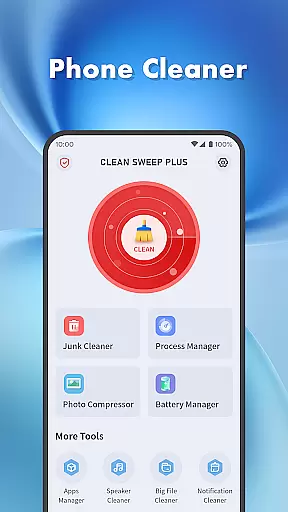
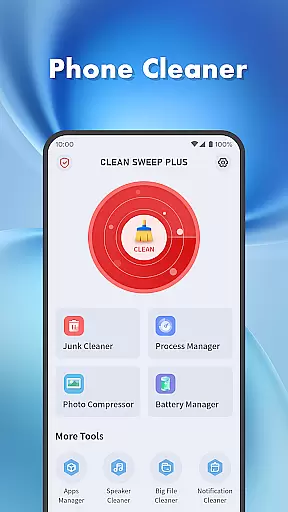
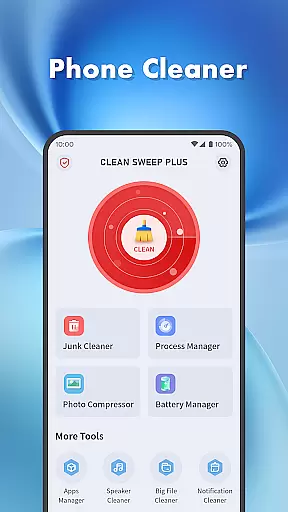
Clean Sweep Plus is a comprehensive mobile device management tool designed to optimize your phone's performance. The app focuses on four key areas: basic device management, app and process control, battery monitoring, and additional utility tools.
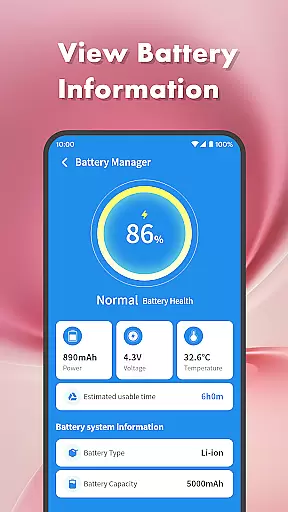
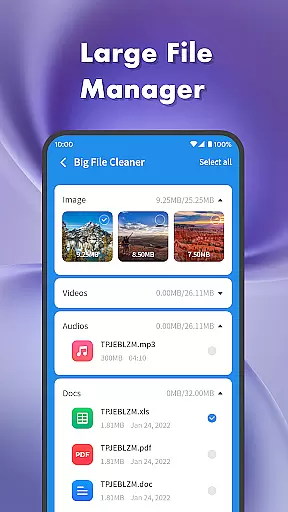
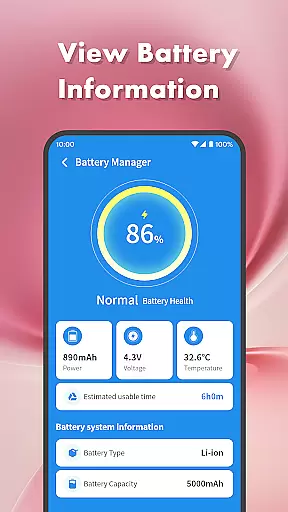
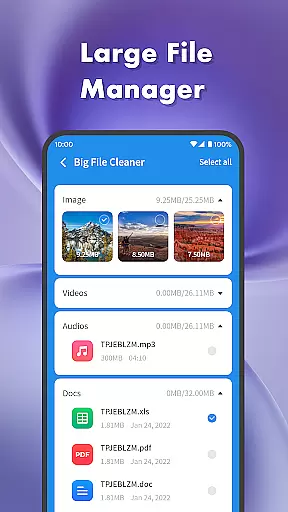
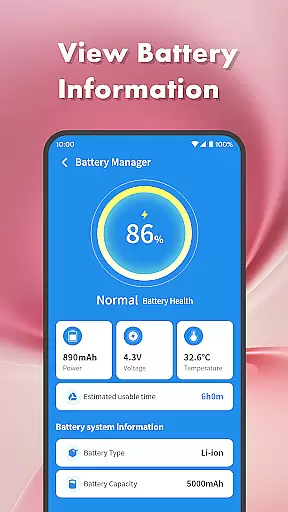
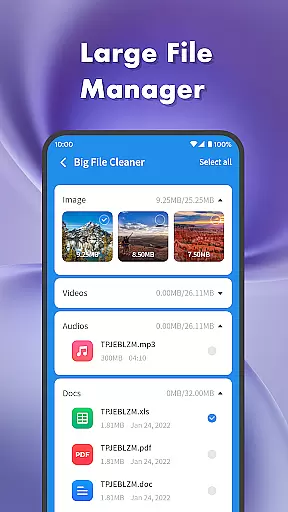
For device management, it offers junk file cleaning, large file locating, photo compression, and notification clearing. In terms of app management, users can easily uninstall unwanted applications and monitor background processes. The battery management feature provides detailed information about battery health and estimated usage time. Additionally, the speaker cleaner tool uses vibration technology to remove dust from phone speakers.
This application is particularly useful for users who want to maintain optimal device performance and manage storage space effectively. With its intuitive interface and practical features, Clean Sweep Plus helps streamline daily phone maintenance tasks.
Clean Sweep Plus stands out with its diverse range of practical features. The junk cleaner function efficiently scans and removes unnecessary files, while the large file manager helps users identify and manage space-consuming media files.
The app manager provides a clear overview of installed applications, allowing for easy removal of infrequently used apps. The process manager enables users to monitor and terminate background processes that may be affecting device performance. Battery management tools offer detailed insights into power consumption patterns and battery health.
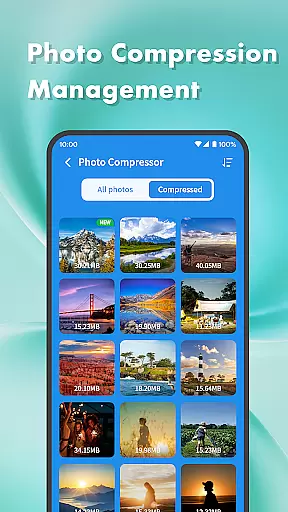
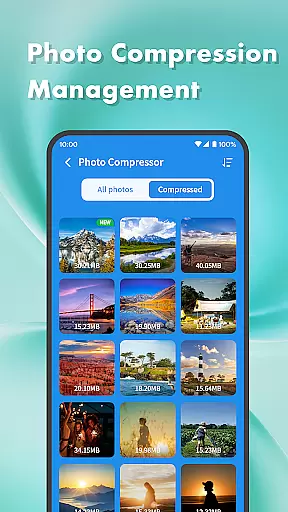
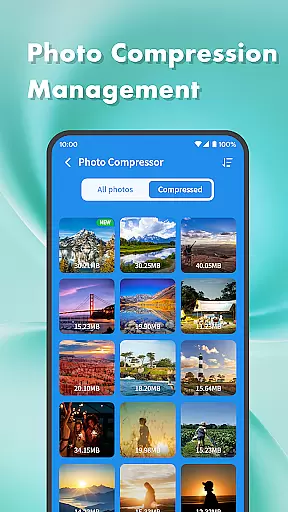
Additional features include photo compression for optimizing storage, notification cleaning for decluttering the notification bar, and a unique speaker cleaning function that uses vibration technology. These features collectively contribute to a more organized and efficient mobile device experience.
When it comes to mobile device management tools, the accuracy and effectiveness of core functions are paramount. Clean Sweep Plus excels in this area by offering a comprehensive suite of features that address various phone management needs. The app's junk cleaner precisely identifies unnecessary files, while the large file manager efficiently locates space-consuming media.
The app manager provides clear information about installed applications, making uninstallation straightforward. Meanwhile, the process manager gives users control over background processes, ensuring optimal device performance. These features work together seamlessly, delivering reliable functionality that users can depend on for maintaining their devices.
Each tool within Clean Sweep Plus has been designed with user experience in mind. From photo compression that reduces file sizes without compromising quality to the notification cleaner that declutters the notification bar, every feature serves a practical purpose. This thoughtful design ensures that users can manage their phones effectively without requiring technical expertise.
A well-designed interface is crucial for productivity tools, and Clean Sweep Plus demonstrates exceptional attention to user experience. The app presents its various functions through an intuitive page layout that makes navigation effortless. Each tool is clearly labeled and easy to locate, eliminating the learning curve typically associated with device management applications.
The visual design maintains consistency across all features, from battery management displays to speaker cleaning functions. This uniformity helps users quickly understand different sections of the app without confusion. Important information is always prominently displayed, such as battery power levels and estimated usage time in the battery management center.
Clean Sweep Plus achieves an optimal balance between functionality and simplicity. While offering a wide range of practical tools, it never overwhelms users with complex interfaces or hidden features. The straightforward operation and clear function locations make daily phone management tasks accessible to users of all technical backgrounds, enhancing overall productivity without creating additional stress.
User-friendly interface
Comprehensive cleaning tools
Effective battery monitoring
Intuitive app management
Innovative speaker cleaning
Limited advanced features
Basic design aesthetics
No cloud backup option
Occasional performance lag
Ads in free version

 4.50
4.50
Change your GPS location instantly. Simulate routes anywhere in the world.
4.90
Easily install aab(Android App Bundle) files on your Android device with our app
4.80
This app unlocks the Pro features of the Central for DayZ app
3.60
Create your own live wallpaper or check out thousands already made presets
3.90
Mirror your screen to Chromecast and Android TV - Super fast and simple
4.60
Connect wirelessly to your computer to watch movies, browse the web, play games
5.00
Introducing Smart Printer, your ultimate destination for printing solutions!
4.00
Mobile Security with Scam Protection | Malware & Virus Cleaner | Safe Browser
4.70
Unit and currency converter with easy and simple UI.
4.80
ADB support Android 4.X-Android 13(Support wireless pair mode).No root required!
4.70
Fast Video Downloader, Movie Downloader, Torrent Downloader & Adblock Browser
4.70
Button mapper, mouse toggle, sleep timer and a lot of another features
4.50
PC precision for mobile gaming: dominate with keyboard and mouse!
4.30
Just one-tap to easy translate in any language after calls within seconds.
4.20
Unleash gamepad precision for ultimate mobile gaming dominance.
3.90
Safely recover deleted photos, videos, and files with a single easy tap.
3.70
Clean the junk files on your device
3.40
Undelete and recover your lost or deleted files with DiskDigger!
3.40


User Reviews