
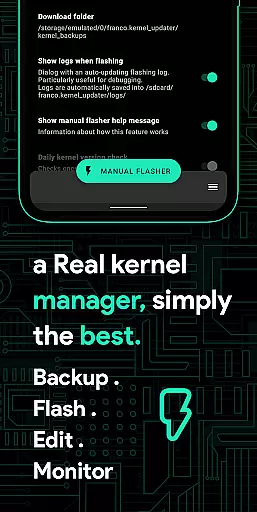
Franco Kernel Manager is a comprehensive toolbox designed for Android users who want to optimize their device performance. This app provides a rich set of features that cater to both novice and expert users, allowing them to manage and tweak their kernel with ease. Whether you're looking to enhance your device's performance or extend battery life, Franco Kernel Manager has got you covered.
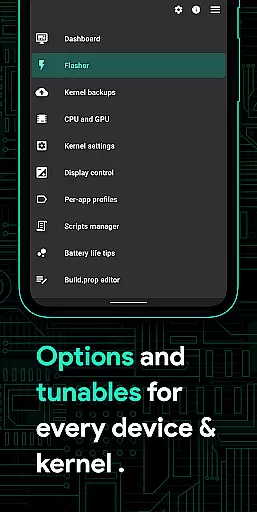
The application supports a wide range of functionalities including battery monitoring, detailed power consumption stats, build.prop editing, and auto-flashing of kernels and mods without the need for a custom recovery. It also offers advanced features like CPU frequency adjustments, GPU support, and per-app profiles for customized settings. With its user-friendly interface and powerful tools, this app is an essential utility for rooted Android devices.
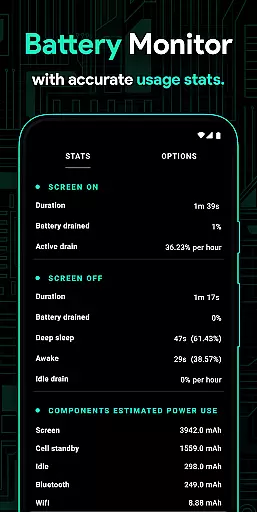
Franco Kernel Manager stands out with its extensive feature set tailored for device optimization. One of its key features is the Battery Monitor notification, which provides detailed insights into power consumption during active and idle periods, charging time estimates, and more. The app also includes a build.prop editor and supports auto-flashing of various mods without requiring a custom recovery.
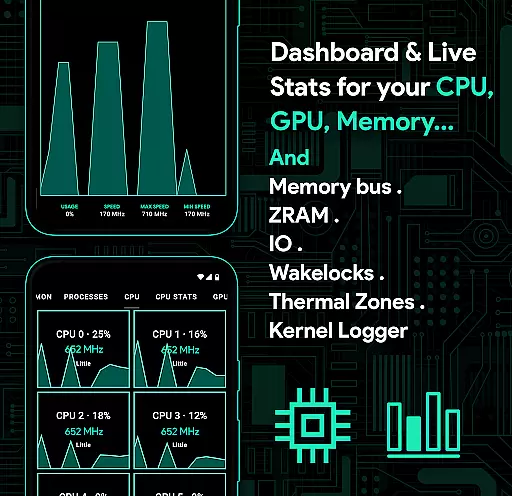
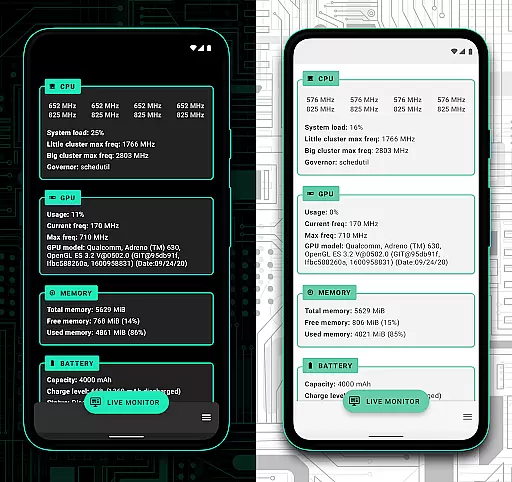
For advanced users, the app offers deep system-level controls such as CPU frequencies, governor profiles, GPU settings, and custom kernel tunables. It also allows the creation of per-app profiles, enabling different settings for specific apps. Additionally, the System Health section provides real-time monitoring of CPU, GPU, RAM, and thermal zones. These features make Franco Kernel Manager a powerful tool for those looking to fine-tune their device's performance.
Franco Kernel Manager stands out as a comprehensive toolbox designed to supercharge your device's kernel with precision and efficiency. The app offers an extensive range of features that cater to both novice users and experts, ensuring every function performs optimally. From managing CPU frequencies and GPU settings to tweaking battery consumption parameters, the app provides accurate control over essential device functions.
One of the key highlights is its ability to flash kernels, Magisk modules, and other zips without requiring a custom recovery. This feature not only simplifies the process but also ensures that all operations are executed accurately, reducing the risk of errors. Additionally, the build.prop editor and detailed battery stats allow users to fine-tune their devices for maximum performance or battery savings, depending on their needs.
The app's effectiveness is further enhanced by its per-app profiles, which let users customize settings based on specific applications. Whether you need maximum CPU power for gaming or lower frequencies for reading, Franco Kernel Manager adapts seamlessly. This level of customization ensures that each function serves a practical purpose, enhancing the overall user experience.
Ultimately, the core functions of Franco Kernel Manager deliver tangible benefits such as improved device performance, extended battery life, and simplified management of advanced settings. By combining powerful tools with an intuitive interface, the app empowers users to take full control of their devices while maintaining operational accuracy.
Achieving a balance between advanced functionality and user-friendly design, Franco Kernel Manager excels in providing an interface that is both simple and intuitive. Despite offering a rich set of technical features, the app ensures that users can navigate through its options effortlessly. The layout is thoughtfully organized, grouping related functions together and presenting them in a clear, accessible manner.
For instance, the System Health section provides real-time monitoring of CPU, GPU, RAM, and thermal zones, all displayed within a visually appealing UI. This makes it easy for users to understand complex data at a glance. Similarly, the battery monitor notification breaks down power consumption into active and idle periods, charging time estimates, and more, delivering critical information without overwhelming the user.
Another example of intuitive design is the Per-app profiles feature, where users can create tailored settings for individual apps. With straightforward toggles and dropdown menus, even less experienced users can configure advanced settings like CPU frequency adjustments or Wi-Fi toggling. These thoughtful touches make the app approachable for everyone, regardless of technical expertise.
By prioritizing clarity and ease of use, Franco Kernel Manager ensures that its sophisticated tools remain accessible to all users. The result is an interface that feels natural to interact with, allowing users to focus on optimizing their devices rather than struggling with complicated controls.
User-friendly interface
Comprehensive feature set
Supports rooted devices
Auto-flash mods without custom recovery
Detailed battery monitoring
Requires root access
Complex for beginners
Limited use on non-rooted devices
No iOS support
Some features may void warranty

pdf merge, word to pdf, jpg to pdf, edit pdf, convert to pdf and much more!
 4.20
4.20
Transfer Files, APK from Phone to Watch & Install.
4.0
Safely recover deleted photos, videos, and files with a single easy tap.
3.70
Carry a FTP server in your pocket and avoid USB cables for file transfer
4.20
App to pay for FUTO Keyboard
4.60
Forza Tuning Calculator App for Forza Horizon 5, Motorsport and Earlier Titles
4.40
Mirror your screen to Fire TV - Super fast and simple
4.40
A clean app.
4.50
fast and easy mp3 music downloader
4.80
Powerful collection of electronics tools and reference.A must for any enthusiast
4.90
Best leveling tool for your Android device. Hang paintings like a pro.
4.90
Learn the vast amount of system information about device and monitor it's state
4.70
FV File Manager Pro, Fast and powerful file manager for Android
4.60
Keep track of your Palia friendships, tasks, and inventory with Palia Notebook
4.60 4.50
4.50
Button mapper, mouse toggle, sleep timer and a lot of another features
4.50
VESC Tool can monitor and configure VESC-compatible devices over BLE and Wifi
4.20
Effortlessly run ADB commands directly on your device without a PC.
4.20
PDF Reader - Document Viewer: Read, Manage & Organize Your Documents
3.10


User Reviews