
Vivid Navigation Gestures is a powerful tool that revolutionizes the way you interact with your Android device. This app allows users to control their devices through intuitive gestures instead of traditional button presses, offering a more modern and fluid user experience.
One of the standout features of Vivid Navigation Gestures is its beautiful visual effects during gesture interactions, enhancing both functionality and aesthetics. The app supports multiple gesture triggers across different areas of the screen, providing versatile control options. Whether you want to launch Google Assistant, toggle split-screen mode, or take a screenshot, this app puts the power at your fingertips.
This application is particularly useful for users who prefer minimalistic design or have difficulty using physical buttons. By enabling gesture-based navigation, it helps declutter the screen while offering advanced customization options for power users.
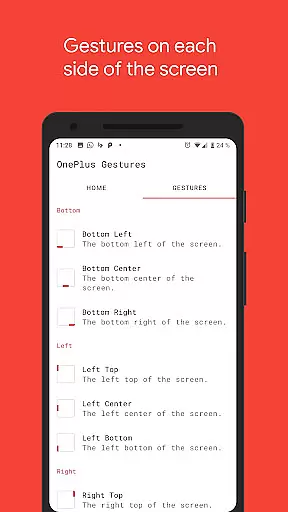
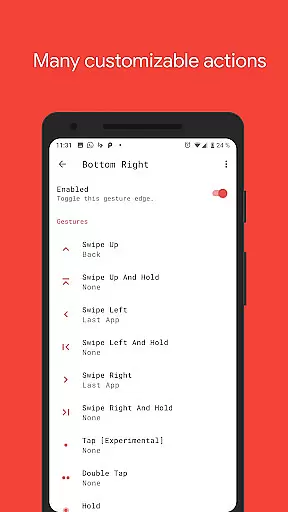
Vivid Navigation Gestures stands out with its comprehensive set of features designed to maximize convenience and efficiency. The app offers various gesture triggers located at different screen positions, including bottom left, center, right, and more. These triggers support an extensive range of gestures such as swipe up, swipe left, double tap, and hold, each customizable to perform specific actions.
Users can assign a multitude of actions to these gestures, including launching apps, controlling media playback, opening notifications, toggling settings, and even taking screenshots. The app leverages accessibility services to execute commands like back, home, and quick settings without collecting any personal data, ensuring privacy and security.
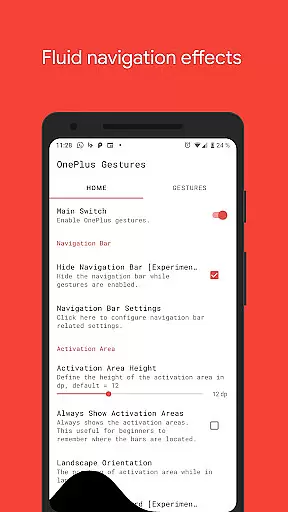
Additionally, Vivid Navigation Gestures allows users to hide the stock navigation bar when gestures are enabled, creating a cleaner and more immersive interface. For advanced users, ADB or root access provides further customization capabilities, making it a versatile tool for both casual and tech-savvy individuals.
Vivid Navigation Gestures excels in delivering precise and effective gesture controls for Android devices. The app enables users to execute a wide range of actions through intuitive gestures, replacing traditional button presses.
With multiple gesture triggers spread across different screen areas, the app ensures that users can access navigation functions effortlessly. Whether it's swiping up from the bottom center or tapping on the right top corner, each gesture is accurately registered and translated into specific commands.
The application supports an extensive list of available actions, including launching Google Assistant, navigating back, going home, opening notifications, and even taking screenshots. This comprehensive functionality allows users to interact with their devices seamlessly.
By utilizing accessibility services, Vivid Navigation Gestures programmatically executes essential navigation tasks without collecting any personal data. This approach not only enhances usability but also maintains user privacy and security.
The interface design of Vivid Navigation Gestures emphasizes simplicity and intuitiveness, making gesture-based navigation accessible to all users. Instead of relying on physical buttons, users can perform simple swipe and tap gestures to control their devices.
Available gestures such as swipe up, swipe left, double tap, and hold are straightforward and easy to remember. These gestures cover all basic navigation needs, ensuring that users won't face a steep learning curve when adopting this new method of interaction.
Visual feedback during gesture execution provides additional clarity and enhances the overall user experience. Beautiful fluid effects accompany each gesture, offering immediate confirmation that the action has been recognized by the system.
Furthermore, the option to hide the stock navigation bar declutters the screen and maximizes usable space, contributing to a cleaner and more immersive interface. Users can enjoy an uninterrupted view of their content while still having full navigational control at their fingertips.
Intuitive gesture controls
Beautiful visual effects
Highly customizable
Privacy-focused design
Versatile action assignments
Requires ADB for full features
Complex for beginners
Limited iOS support
Potential learning curve
Device compatibility issues

 4.10
4.10
Transfer Files, APK from Phone to Watch & Install.
4.4
PDF Reader - Document Viewer: Read, Manage & Organize Your Documents
3.10
App that Recover your pictures, videos or files after you delete them.
4.20
Carry a FTP server in your pocket and avoid USB cables for file transfer
4.20
Monitor car performance in real time and troubleshoot malfunctions.
4.80
Connect wirelessly to your computer to watch movies, browse the web, play games
5.00
A simple app to back up and restore SMS & MMS messages and call logs.
4.10
Automate everything from settings to photos, SMS to speech. ADC2 prize winner.
4.10
Powerful collection of electronics tools and reference.A must for any enthusiast
4.90
Easily install aab(Android App Bundle) files on your Android device with our app
4.80
Unit and currency converter with easy and simple UI.
4.80
NFC Tools can read and write NFC tags.
4.70
With videos, electrical calculators, and built-in ebook, Ugly’s has your answer.
4.50
An open-source APK explorer for Android!
4.10
Smart and comfortable browsing experience.
3.80
Fun lie-detection pranks for friends and parties.
3.80
Clean the junk files on your device
3.40
Undelete and recover your lost or deleted files with DiskDigger!
3.40


User Reviews