
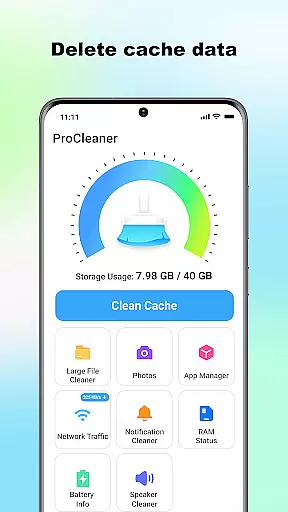
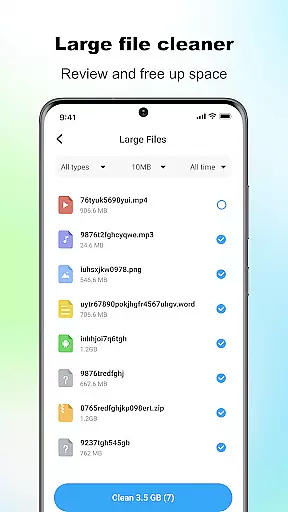
ProCleaner is a comprehensive device optimization tool designed to help users efficiently manage their smartphone storage. The app's core functionality revolves around scanning and cleaning various types of unnecessary files, including cache, residual, and junk files that accumulate over time.
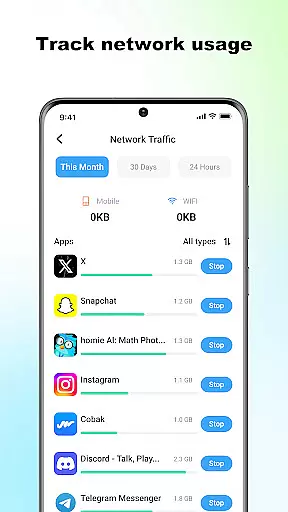
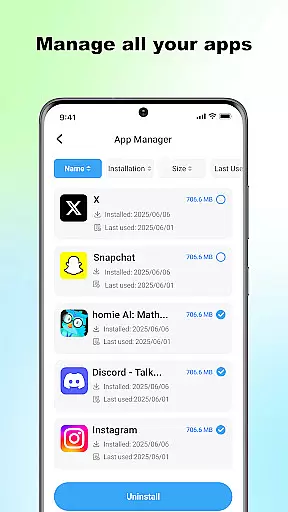
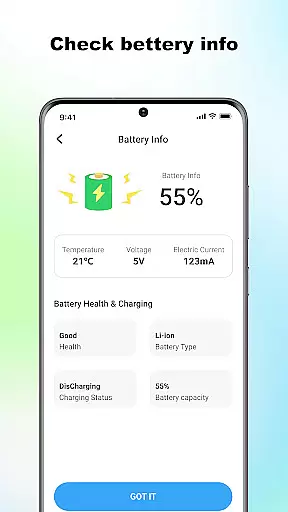
Beyond basic cleaning capabilities, ProCleaner offers advanced features for managing large files and uninstalling multiple applications simultaneously. Users can also monitor their network speed and check battery status, providing a complete solution for device maintenance and performance optimization.
This application is particularly useful for individuals who frequently encounter storage issues or wish to maintain optimal device performance. By offering both basic and advanced management tools, ProCleaner delivers significant value to users looking to streamline their device's operation without requiring technical expertise.
ProCleaner distinguishes itself through its comprehensive suite of device management features. The application's primary strength lies in its robust file scanning and cleaning capabilities, which can identify and remove various types of unnecessary files, including cache, residual, and junk files.
The app's advanced features include a sophisticated large file manager that helps users identify and remove space-consuming files. Its multi-application uninstaller allows for efficient removal of unwanted programs. Additionally, the integrated network speed monitor and battery status checker provide valuable insights into device performance and resource usage.
What sets ProCleaner apart is its commitment to user privacy and security. All operations are performed locally on the device, with no personal data being collected or uploaded. This approach, combined with its technical requirement of storage access for file management and app usage permission for application control, ensures both functionality and user protection.
ProCleaner excels in delivering accurate and effective core functions that are essential for device optimization. The app scans and cleans cache files, removes residual and junk files, and finds large files with precision.
Each feature is designed to ensure maximum efficiency. For instance, the cache cleaning function identifies unnecessary temporary files without affecting critical system data. Similarly, the junk file removal tool ensures no important personal files are deleted during the cleanup process.
Users benefit from a noticeable improvement in device performance. By freeing up valuable storage space, ProCleaner helps devices run faster and more smoothly. This reliability makes it a trusted tool for maintaining optimal device health.
The app's effectiveness extends to its ability to manage large files and uninstall multiple applications simultaneously. These features provide users with comprehensive control over their device's storage, ensuring they can easily maintain an organized and efficient system.
A simple and intuitive interface is crucial for ensuring users can easily navigate and utilize an app's features. ProCleaner achieves this by providing a clean, straightforward design that allows users to access all core functions without confusion.
The main dashboard presents all primary tools in a single view, eliminating the need for complex navigation. Each function is represented by clear icons and labels, making it easy for users to identify and use the features they need.
This intuitive layout significantly reduces the learning curve for new users. Even those unfamiliar with device optimization tools can quickly understand how to perform essential tasks like cache cleaning and junk file removal.
Moreover, ProCleaner maintains consistency across its interface, ensuring users can predict where to find specific features. This thoughtful design enhances user satisfaction and encourages regular use of the app for maintaining device performance.
Comprehensive cleaning tools
Local data processing
Advanced file management
Multiple app uninstallation
Performance monitoring features
Requires storage access
Needs app permissions
Limited to local operations
No cloud backup option
Basic interface design

Learn the vast amount of system information about device and monitor it's state
 4.70
4.70
Head tracking for PC sim games such as MSFS 2024 or Elite:Dangerous. No headset!
4.50
HD Video player and downloader for all formats, fast & smooth 4K video playback.
4.60
eXtended Permission Manager - a small app to manage permissions and AppOps
4.50
An easy-to-use calculator designed to save time calculating and bending conduit
4.30
MS-DOS in your pocket. Play old DOS games anywhere you are ;)
4.10
Detect hidden spy camera with advanced scanning {{ Premium version }}
4.00
Signal Strength, Mobile, Wifi, Speed Test, Bad Signals, Cellular, 5G, LTE, 4G
4.20
The ultimate tool for network analysis, wifi scanning and problem detection.
4.90
Change your GPS location instantly. Simulate routes anywhere in the world.
4.90 4.50
4.50
Making emulation easy for everyone!
4.30
VESC Tool can monitor and configure VESC-compatible devices over BLE and Wifi
4.20
Amateur Radio app for APRS: Track friends, exchange messages, get tactical info.
3.90
Create your own live wallpaper or check out thousands already made presets
3.90
Unleash gamepad precision for ultimate mobile gaming dominance.
3.90
Create your own custom widget with endless possibilities
3.90
Smart and comfortable browsing experience.
3.80
Clean the junk files on your device
3.40


User Reviews