





Collage Maker is a versatile photo collage application that allows users to create stunning visual compositions by combining multiple photos into one cohesive design. With the ability to merge up to 100 photos, this app offers an extensive range of creative possibilities for photography enthusiasts and social media influencers alike.
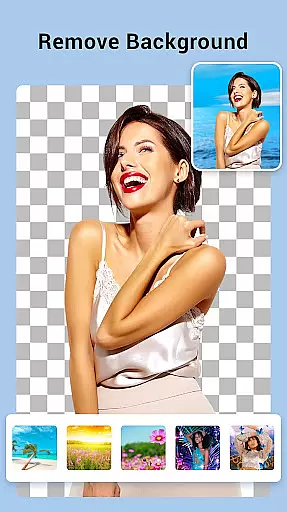
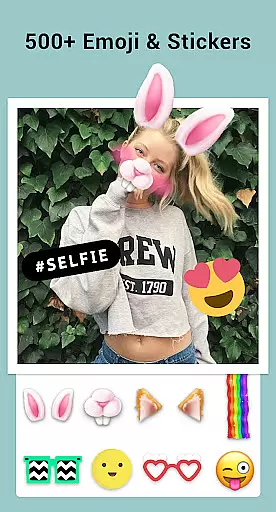
The app features over 100 layouts and provides a plethora of customization options including backgrounds, stickers, fonts, and photo frames. Users can also enhance their images with filters, texts, and doodles, as well as crop and edit pictures to achieve the desired effect. Its AI Photo Enhancer tool transforms low-quality images into high-definition masterpieces with just a single tap.
Whether you're looking to create side-by-side comparisons, grid-style collages, or freeform designs, Collage Maker caters to various needs. It's particularly useful for Instagram users who want to post perfectly sized photos without cropping, thanks to its multi-fit feature which supports different aspect ratios.
Collage Maker stands out with its comprehensive set of features tailored for creating impressive photo collages. The app allows seamless integration of up to 100 photos into a single collage, offering more than 100 layout options to choose from. This flexibility ensures that every project can be uniquely personalized.
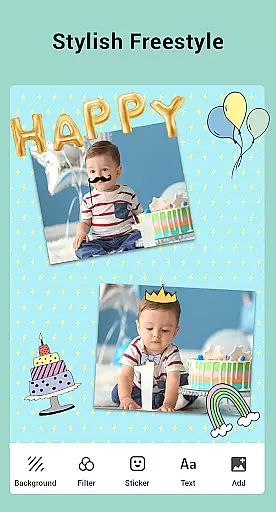
Users have access to a vast library of backgrounds, stickers, fonts, and stylish photo frames suitable for any occasion. Editing tools such as cropping, applying filters, adding text, and drawing on images provide further customization. The Insta square photo feature helps optimize images for Instagram with blur or white backgrounds.
Additionally, the app includes specialized templates for stories, side-by-side photo arrangements, and freestyle creations. These functionalities make it easy to produce professional-looking content for social media platforms like Instagram and Snapchat. The intuitive interface and powerful editing capabilities ensure that both novice and experienced users can achieve outstanding results.
Real-time capture and preview functionality is essential for photography apps like Collage Maker. This feature allows users to see exactly what their final collage will look like as they create it, ensuring that the end result meets their expectations.
Collage Maker excels in this area by providing instant previews of photo collages. As users select different layouts, apply filters, or add stickers and text, they can immediately see how these changes affect the overall appearance of their collage. This real-time feedback helps users make informed decisions about design elements.
The benefit to users is significant. They can experiment with various creative options without committing to any single choice, leading to more satisfying and professional-looking results. The ability to preview changes also saves time, as users don't need to complete an entire collage only to discover it doesn't meet their vision.
This feature's value extends beyond just convenience. It empowers users to be more creative and confident in their photo editing skills, knowing they have full control over the final outcome while working in a user-friendly environment.
AI-powered beauty and enhancement features are becoming increasingly important in modern photo editing applications. These tools use advanced algorithms to improve image quality while maintaining a natural appearance, avoiding the artificial look often associated with heavy photo editing.
Collage Maker incorporates AI technology through its Photo Enhancer feature, which can transform low-quality images into stunning HD versions with a single tap. The app intelligently analyzes each image, applying enhancements that preserve original details while removing imperfections. This includes improving resolution, correcting colors, and reducing noise without creating unnatural artifacts.
Users benefit from this feature by being able to rescue old or damaged photos while maintaining their authenticity. The AI ensures that enhanced images retain their original character, making them suitable for both casual sharing and professional use. This capability particularly appeals to social media enthusiasts who want their photos to stand out without appearing overly edited.
The implementation of AI enhancement demonstrates Collage Maker's commitment to providing sophisticated editing tools that are both powerful and accessible. By focusing on natural results, the app strikes a balance between technical capability and artistic integrity, offering users the best of both worlds in photo enhancement.
User-friendly interface
Extensive customization options
AI-powered photo enhancement
Versatile layout choices
Social media optimization
May require storage permissions
In-app purchases for premium features
Occasional ads in free version
Limited advanced editing tools
Performance may vary on older devices

Remote control of the phone camera from your Wear OS smartwatch
 3.70
3.70
Photo Album Watch Face shows your favorite pictures as a Watchface.
1.90
Long exposure camera with computational photography
2.60
Pet Camera
3.70
USB Storage Access for Photos, Videos, Music and Documents
3.80
Turn photos into cartoons & avatars! - Photo Editor, Cartoon Face!
3.90
Pro version: AR sun/moon tracker for any date. Tool for photographers & planners
4.90
Snap photos remotely using your Garmin watch as the camera trigger
4.2
Discover How to Plan any Sun, Moon and Milky Way Photo You Imagine in Seconds
4.70
Photo prints, cards, & gifts at Walgreens. Easy ordering & fast local pickup !
4.80
See your baby AI baby face generator AI baby maker Face generator babymaker fun!
4.70
A must-have app for landscape photographers
4.60
PhotoSync Bundle Add-On License. Enables all features and services in PhotoSync.
4.60
Photo Exif Editor allows to view, add and modify EXIF data of multiple photos
4.50
AI photo enhancer with Sora 2! Enhance, descratch, and colorize your old photos.
4.50
Professional quality photo edits with the new Snapseed.
4.00
Hair color changer, AI haircut app, fun hair editor and buzz cut filter for all!
3.80
Professional video recording application with manual controls for filmmakers!
2.80
Over 800 film simulation recipes for Fujifilm. Black Friday Offer!
4.3


User Reviews