
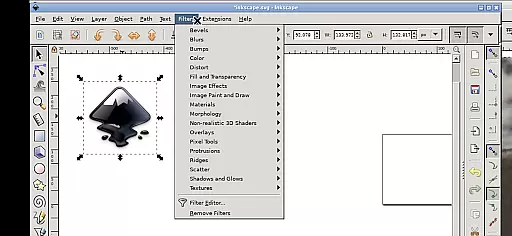
Inky is a powerful vector graphics editor that brings the full functionality of Inkscape to your mobile device. This professional-grade application allows users to create and edit vector images in Scalable Vector Graphics (SVG) format, with support for importing and exporting other file types. The app supports rendering of primitive shapes, text manipulation, and advanced color filling options.
What sets Inky apart is its ability to maintain the integrity of vector graphics while offering tools for transformations like moving, rotating, scaling, and skewing. Users can also trace raster graphics to create vector equivalents. The Android-specific interface provides intuitive touch controls, making it suitable for both tablets and smartphones. Whether you're a professional designer or hobbyist, Inky offers a complete vector editing solution on the go.
Inky comes packed with features that make vector graphic design accessible on mobile devices. The app supports all basic vector shapes including rectangles, ellipses, polygons, and spirals, along with advanced elements like 3D boxes and stars. It offers sophisticated color management with solid fills, patterns, gradients, and adjustable transparency settings.
The Android version maintains the core functionalities of desktop Inkscape while adapting to touch-based interactions. Users can zoom by pinching, pan by pressing and holding, and access a virtual keyboard when needed. File management is seamless with direct access to Android directories, eliminating the need for import/export processes. Additionally, the app runs under GPLv3 licensing, ensuring freedom to use, study, share, and improve the software.
Inky offers a comprehensive suite of creative tools that cater to both professional designers and hobbyists. The app provides full-featured vector graphics editing capabilities, allowing users to create intricate designs with ease.
With support for primitive vector shapes such as rectangles, ellipses, polygons, arcs, spirals, stars, and 3D boxes, Inky ensures that all your design needs are met. These elements can be filled with solid colors, patterns, or gradients, and their borders can be customized with adjustable transparency.
The app also supports the embedding and optional tracing of raster graphics, enabling the transformation of photos and other raster sources into scalable vector images. This feature expands the creative possibilities, allowing for versatile design work directly on your Android device.
Moreover, Inky's manipulation tools, including moving, rotating, scaling, and skewing, provide users with the flexibility needed to refine their creations. This robust set of features ensures that Inky stands out in the Art & Design category, delivering a professional-grade experience on mobile devices.
Inky excels in providing canvas and format flexibility, ensuring that users can work with a variety of file types and sizes. This adaptability is crucial for designers who need to switch between different projects and formats seamlessly.
The app supports Scalable Vector Graphics (SVG) as its primary format, but it also allows for the import and export of other file types. This means you can integrate your work with other design tools and platforms without any hassle.
Inky's interface includes useful links in the home directory, providing easy access to files from across your Android device. Whether you're working with documents, pictures, or other resources, there's no need to import or export files manually.
Additionally, the app's ability to render and manipulate vector shapes with precision ensures that your designs maintain their quality across different scales and formats. This level of flexibility makes Inky an invaluable tool for anyone involved in art and design, offering both convenience and high performance.
User-friendly interface
Full-featured vector editor
Seamless file integration
Advanced transformation tools
Open-source flexibility
Steep learning curve
Resource-intensive
Limited mobile optimizations
No native Android UI
Paid version required

Pose and morph realistic male and female models! 3D poser app
 3.00
3.00
Create sweet, cool and unique couple avatars easily, in just a few steps!
3.40
Design your dream room with AI. Get decor ideas & plan home interiors
3.90
Paint with oils and sketch with natural tools on a realistic virtual canvas.
3.80
Your Essential Color Theory Guide: Red, Yellow, Blue (RYB)
4.5
Powerful home decoration & house design that allows you to design dream home.
3.80
OneUI 8.5 icons ✨ Smooth, modern & based on the latest Play Store design ??
4.10
Unleash the artist in you with our AR drawing and tracing tool for photo drawing
4.10
AI-powered photo & video creation—fast, fun, and effortless with Quick Actions
4.60
See Color, Paint Color
4.90
Mobile pixel art editor. Simple. Fast. Portable.
4.80
Learn how to draw with step-by-step tutorials, fun lessons & multiplayer drawing
4.70
Turn your drawings into flipbook-style animations with simple creative tools
4.60
Create color palette from Image, RGB & RYB Color wheel harmonies, Color Scheme
4.50
Stylish letters, Stylish Keyboard, Symbols, Emojis, Cool nickname
4.40
Image/ Text to Video Generator
4.40
Sketch, plan, take notes and illustrate on an infinite canvas.
4.20
Text to Image, Image to Video & AI Chat
4.20
Create Logos, Tattoos, AI Art & more with our AI Photo Generator & Design Editor
4.20


User Reviews