

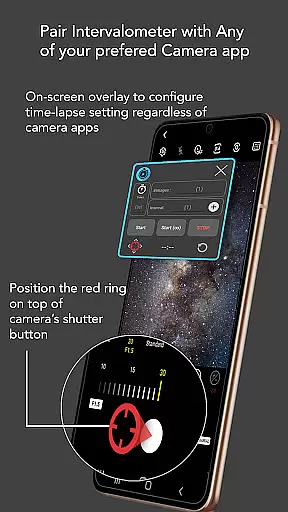
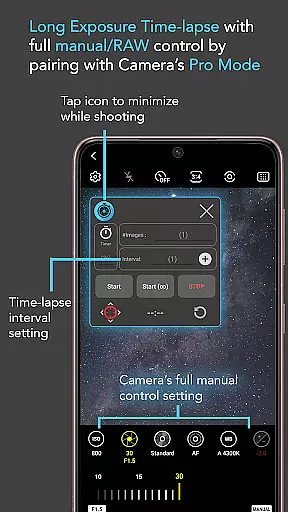
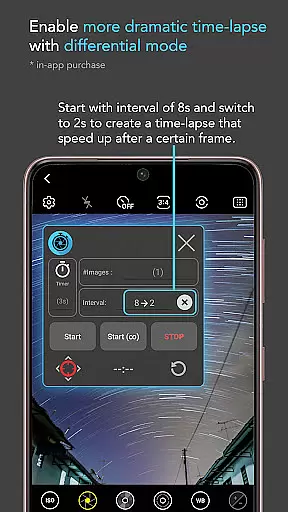
Intervalometer for TimeLapse is a powerful photography tool designed to automate the process of capturing time-lapse sequences. This app allows photographers to configure specific time intervals between shots, enabling precise control over exposure settings and camera modes that are not typically available in standard smartphone time-lapse features.
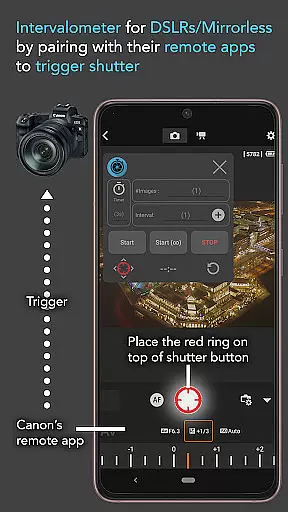
The application works seamlessly with any camera app on Android 7 and above, functioning like a traditional intervalometer but with added flexibility. It supports various specialized photography techniques such as low light time-lapse, HDR time-lapse, and star trail capture. Additionally, it can be used with dedicated camera remote apps from major brands like Canon, Sony, and Nikon.
Whether you're creating professional-grade time-lapses or capturing frames for image stacking, Intervalometer provides the control and automation needed to produce high-quality results across different lighting conditions and creative scenarios.
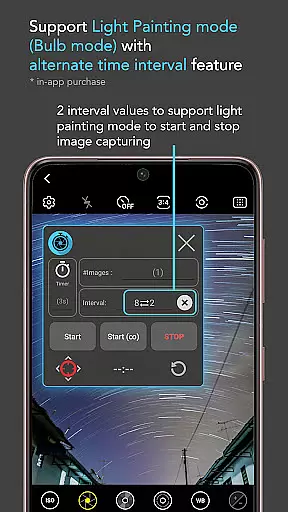
Intervalometer offers an impressive array of features that cater to both amateur and professional photographers. The app provides full control over time-lapse configurations, including delay timers, interval times, and the number of shots. Its infinite mode allows for continuous shooting until manually stopped, while bulb mode enables extended exposure times for night photography.
One of the standout features is its compatibility with any camera app, regardless of manufacturer or specific camera mode. Users can configure the shutter button position to work with different interfaces, making it versatile for various devices and setups. The app's ability to work with dedicated camera remote applications expands its functionality beyond smartphones to professional-grade cameras.
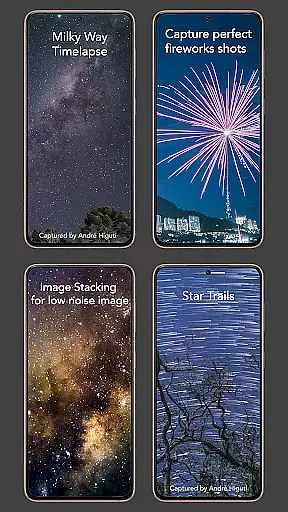
These features collectively enable photographers to execute complex time-lapse projects with precision and consistency, whether they're capturing star trails, holy grail transitions from day to night, or ultra-wide angle sequences. The app's flexibility also extends to supporting post-processing techniques like image stacking and lightning stacking.
Real-time capture and preview functionality is essential for photographers who need precise control over their time-lapse sequences. Intervalometer for TimeLapse offers this by integrating seamlessly with any camera app, allowing users to configure and trigger the shutter at specific intervals.
This app uses AccessibilityService API to automate the photo-taking process without being restricted to basic camera modes. It supports advanced settings such as light-painting mode, HDR, night mode, manual adjustments, telephoto, or ultra-wide angle shots, ensuring that every moment is captured exactly as intended.
Users benefit from the ability to execute complex time-lapse projects like low light scenes, long exposures, star trails, and more. The real-time aspect ensures that each frame is taken at the right moment, providing consistent and high-quality results throughout the sequence.
While primarily focused on time-lapse photography, Intervalometer also enhances the natural beauty of images through meticulous timing and exposure control. This app allows photographers to experiment with various modes including HDR and manual settings which contribute to the enhancement of image quality.
The flexibility in configuring time-lapse settingsu2014delay timer, interval time, number of shotsu2014ensures that each photograph is taken under optimal conditions. This leads to stunning visual effects such as smooth transitions in Holy Grail time-lapses (day to night) and detailed captures in low light or Milky Way scenarios.
By enabling bulb mode and infinite shooting capabilities, Intervalometer empowers users to explore creative possibilities while maintaining the authenticity and natural essence of their subjects. Whether capturing star trails or light paintings, the app ensures every shot counts towards a breathtaking final composition.
User-friendly interface
Wide camera compatibility
Precise time-lapse control
Supports advanced techniques
Works with professional equipment
Requires careful setup
May need device restart
Limited initial features
Not a standalone camera app
Depends on other camera apps

Photo editor: face & body editor, beauty cam, filters and quality enhancer.
 4.00
4.00
All-in-One Editor & AI Photo Enhancer, Beautify & Retouch, Collage, Cartoonify
4.20
Easily stitch panoramas from multiple photos or video.
4.40
Be your best in every shot! Fix, edit and retouch your face in selfies & photos.
3.70
Create AI Photos, Improve and restore quality of blurry, old or damaged pics.
4.20
A must-have app for landscape photographers
4.60
Movie camera, supports pro recording settings for filming. Try it and be amazed!
4.50
AI photo enhancer with Sora 2! Enhance, descratch, and colorize your old photos.
4.50
RAW video capture with advanced controls
4.40
Easily view, share, delete photos with Gallery.
4.70
Viewfinder, Light meter, Reciprocity failure time, DOF & Bellows Extension
4.60
Edit like a pro with Hypic. Apply filters, AI effects, & magic touch.
4.40
Professional quality photo edits with the new Snapseed.
4.00
live datamoshing
4.00
How would you look like with a differently shaped nose, chin or lips?
3.90
USB Storage Access for Photos, Videos, Music and Documents
3.80
Create amazing frames with up to five photos. Rounded corners, effects and more!
3.60
Remote control the phone camera shutter from your smartwatch and take a picture
1.60
Over 800 film simulation recipes for Fujifilm. Black Friday Offer!
4.5


User Reviews