
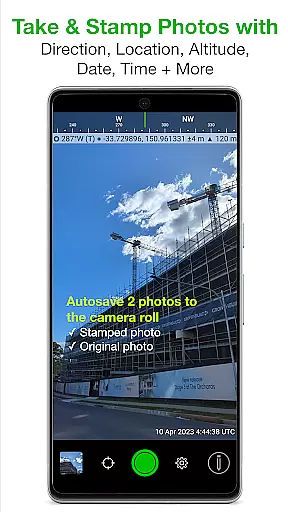
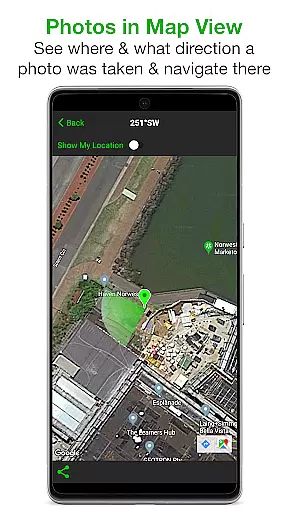
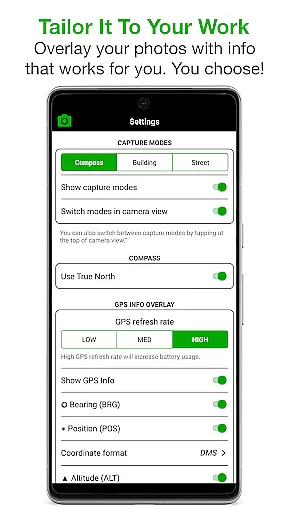
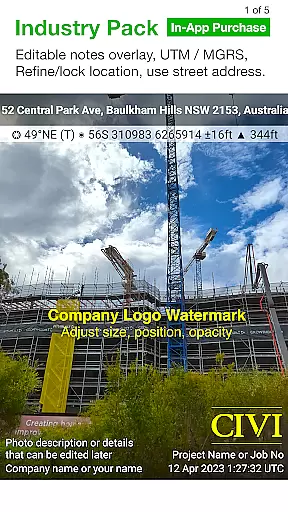
Solocator is a professional GPS camera app designed for fieldwork and photo documentation across various industries. It allows users to overlay critical information such as location, direction, altitude, date, and time directly onto photos. With the optional Industry Pack, users can capture additional field notes like project names and descriptions, making it ideal for professionals who need detailed records.
The app supports both front and back cameras, includes pinch zoom functionality, and offers advanced features like autosaving photos with or without overlays. Solocator also provides extensive sharing options, including Exif metadata export, map navigation links, and cloud storage integration. Its customizable export settings and batch editing capabilities make it a versatile tool for businesses and government agencies worldwide.
Solocator stands out with its highly customizable overlay options tailored to specific user needs. Users can select from a wide range of data points to stamp on their photos, including GPS coordinates, compass direction, altitude, tilt and roll angles, and even street addresses (with the Industry Pack). The app supports multiple coordinate formats like UTM/MGRS and offers unique modes such as Building mode for capturing elevation details.
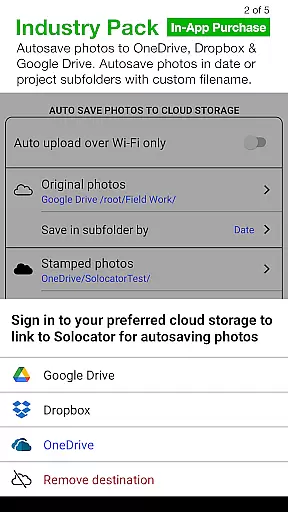
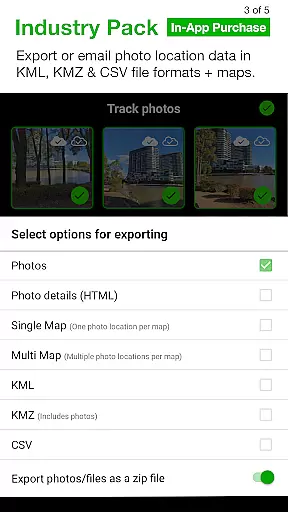
Advanced functionalities include autosaving photos to the Camera Roll in two versions—stamped and original—and seamless integration with cloud services like Google Drive and Dropbox. The Industry Pack enhances productivity further by enabling editable note overlays, custom filenames, batch editing, and exporting photo data in KML, KMZ, or CSV formats. These robust features ensure that Solocator meets the diverse requirements of professionals in engineering, construction, and environmental monitoring.
Solocator excels in providing real-time capture and preview capabilities, ensuring that users can overlay critical information directly onto photos as they are taken. This feature is particularly valuable for professionals who require accurate documentation in fields such as construction, surveying, and environmental monitoring.
The app offers a comprehensive set of data points that can be stamped onto images, including GPS coordinates, compass direction, altitude, tilt and roll angles, and local date and time. These details are captured instantly, allowing users to produce reliable and informative visual records without delay.
With support for both front and back cameras, Solocator ensures flexibility in capturing images from different perspectives. The inclusion of pinch zoom and standard camera controls enhances the user experience, making it easy to take high-quality photos with all necessary data overlays in real time.
This real-time functionality not only saves time but also improves accuracy by reducing the risk of errors that can occur when adding information manually after the photo is taken. Users can trust that their photos will include precise and relevant data, making them suitable for professional reporting and analysis.
While Solocator is primarily designed for professional photo documentation rather than aesthetic enhancements, it incorporates features that ensure the naturalness and clarity of images. The emphasis on accurate data overlay contributes to maintaining the authenticity of photos, which is crucial for industries relying on truthful visual evidence.
The app's ability to autosave two versions of each photou2014one with overlays and one originalu2014provides users with the option to retain unaltered images. This dual-saving feature supports the integrity of the photographic record while still offering the enhanced version with vital stamped information.
Although Solocator does not focus on traditional beauty enhancements, its precise GPS and directional data contribute to the overall quality and reliability of the images. By refining and locking GPS locations, users can ensure that the contextual information added to photos is both accurate and meaningful.
In summary, Solocator prioritizes the naturalness and authenticity of photos through meticulous data capture and overlay, ensuring that images serve their intended purpose without compromising on factual representation. This approach aligns with the needs of professionals who depend on clear, credible visual documentation.
User-friendly interface
Customizable overlays
Cloud storage support
Batch editing tools
Comprehensive metadata
Paid Industry Pack
Limited free features
Device compatibility issues
No offline maps
Occasional GPS lag

Add Watermark - Sign your pictures with a text or logo. Effective, quick, easy!
 4.50
4.50
HD Photo gallery and photo manager to edit, hide private photos, videos & albums
4.2
Be your best in every shot! Fix, edit and retouch your face in selfies & photos.
3.70
Create AI Photos, Improve and restore quality of blurry, old or damaged pics.
4.20
Automatically backup your photos and videos to computer, NAS and Cloud services
4.60
A must-have app for landscape photographers
4.60
Smart, light, and fast photo and video gallery
4.30
PhotoSync Bundle Add-On License. Enables all features and services in PhotoSync.
4.60
Welcome to ProShot, the most powerful camera app on Android.
4.20
Gallery show photo, video, slideshow, is perfect 3D effect private photo albums.
4.80
1M influencer's special filter
4.60
Search, tag and rate your way to an organized image gallery
4.40
Catch sunlight, sunrise sunset times and sun phases with the AR sun tracker.
4.10
Professional quality photo edits with the new Snapseed.
4.00
USB Storage Access for Photos, Videos, Music and Documents
3.80
Remote control of the phone camera from your Wear OS smartwatch
3.70
Application for remote controlling DSLR
3.00
Photo Album Watch Face shows your favorite pictures as a Watchface.
1.90
Over 800 film simulation recipes for Fujifilm. Black Friday Offer!
4.4


User Reviews