


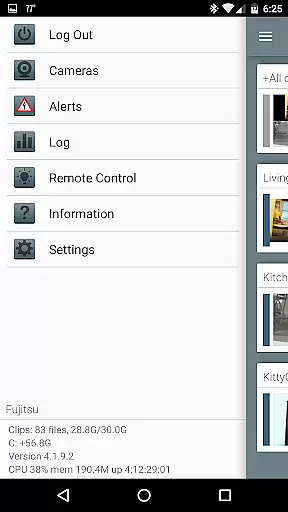
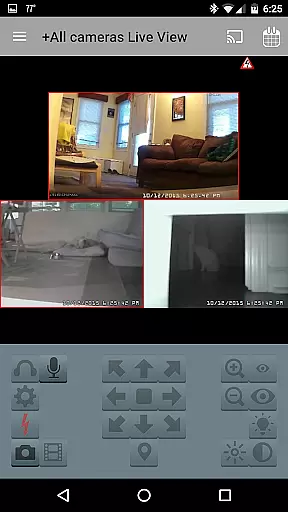

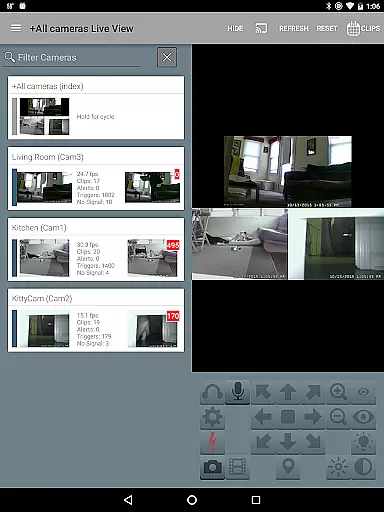
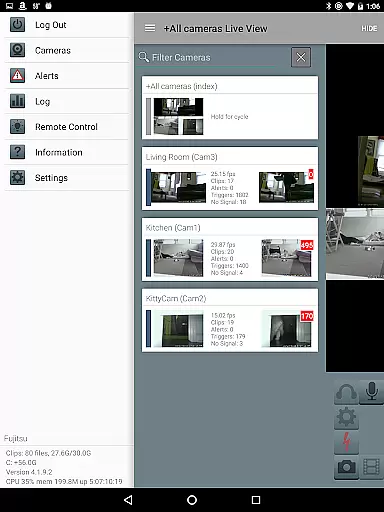
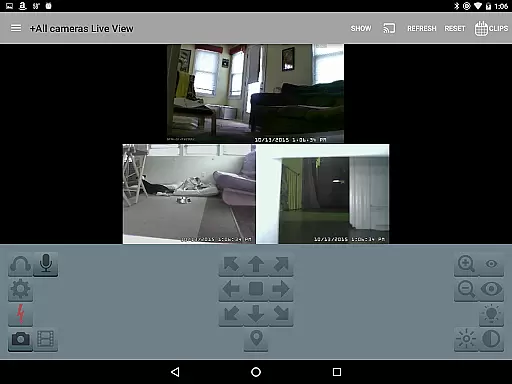
Blue Iris is a specialized client application designed to work seamlessly with the Blue Iris Windows PC software version 5.x. This app serves as a secure and centralized access point to your home camera network, eliminating the need to expose individual cameras directly to the internet. By utilizing a session-based protocol, it ensures that your connection remains protected without transmitting passwords in plain text.
The app offers comprehensive management features for multiple Blue Iris installations, including control over traffic signals, scheduling, and profile selection. Users can receive instant Android push notifications for triggered cameras or critical status updates. With support for fast H.264 streaming, PTZ (Pan-Tilt-Zoom) control, audio interaction, and swift navigation through intuitive tap and swipe gestures, Blue Iris provides an efficient way to monitor and manage your surveillance system remotely.
Blue Iris stands out with its robust feature set tailored for managing sophisticated home camera networks. One of its key capabilities is the ability to handle multiple Blue Iris installations from a single interface, allowing users to switch between different setups effortlessly. The app provides complete control over essential functions such as adjusting traffic signal icons, managing schedules, and selecting profiles according to user preferences.
Another significant feature is the advanced alert system that delivers real-time Android push notifications. These alerts notify users immediately when any connected camera detects motion or when there are crucial status messages requiring attention. Additionally, Blue Iris supports high-speed H.264 video streaming, ensuring smooth and reliable footage playback even on mobile devices. Users can also interact with their cameras by controlling PTZ movements, IR settings, and other functionalities available on the Blue Iris PC software.
For enhanced usability, the app includes options for two-way audio communication, quick review of recordings stored on the Blue Iris PC at speeds up to 64x, and selective deletion of unwanted recordings. Remote control of DIO output signals further extends its utility for integrating with compatible smart home devices.
Blue Iris app excels in video format compatibility, ensuring seamless integration with a multitude of camera types. The application supports H.264 streaming, which is a widely adopted standard for video compression. This allows users to efficiently manage and view high-quality video streams without excessive bandwidth consumption.
The app's compatibility extends to various devices, enabling users to control PTZ (pan-tilt-zoom), IR (infrared), and other functionalities for any camera controllable at the Blue Iris PC. This versatility ensures that whether you're using basic or advanced camera systems, Blue Iris can handle the video input effectively.
Moreover, users can review recordings stored on the Blue Iris PC with remarkable speed, up to 64x, and selectively delete recordings as needed. This comprehensive support for different video formats and functionalities makes Blue Iris a robust tool for managing your home camera network.
While Blue Iris primarily focuses on video management and surveillance, it incorporates features akin to AI-powered editing through its sophisticated alert system. Users receive Android push alerts when a Blue Iris camera is triggered or there is a critical status message, allowing for immediate attention to potential security threats.
The app provides an intuitive interface for navigating cameras by tapping and swiping, offering a streamlined experience akin to smart editing tools. This ease of navigation enhances user interaction, making the monitoring process more efficient and reducing the time required to switch between different camera views.
Additionally, Blue Iris enables users to listen to and talk through supported cameras, adding another layer of interactivity and control. These innovative features collectively contribute to a more dynamic and responsive surveillance system, setting Blue Iris apart from conventional video players and editors.
User-friendly interface
Secure connection protocol
Comprehensive camera controls
Real-time alerts
Multi-installation management
Requires Windows PC
No standalone functionality
Limited OS compatibility
Dependent on network stability
Premium pricing model

Client application for NextPVR software
 3.00
3.00
Save photos and videos from social apps in one tap.
3.60
Your media, on your terms.
4.10
Support 1000+ Video Format, Subtitle Download, mp3 & Background Play, Cast On TV
4.60
All in one multi protocols stream receiver for AirPlay, Cast and DLNA.
3.60
Browser + Remote for Roku to stream webvideos, online movies and livestreams
4.60
AI Video Editor with Music, Filter, Slideshow, Effect, Merge & Trim Video.
4.80
Livestream, news, & gaming content. Watch, chat, and upload. Join Rumble today!
3.80
Download Hub, easy and private way to download and enjoy your videos offline
4.80
#1 Torrent App on Android ** No Ads Ever + Battery Saver **
4.80
Cast Videos from Web Browser, IPTV to Roku, Chromecast, DLNA, Smart TV +more
4.60
Search & download videos from net with all video downloader, auto-detect & safe.
4.60
Cast movies, tv shows and live streams to Chromecast, Roku, DLNA, Fire TV & more
4.60
Cast to Chromecast, Xbox, Fire Stick, Roku, DLNA, Smart TV & No Feature Limited!
4.50
Fast video downloader & private browser. Save HD clips to watch offline.
4.40
All format media Player, no need video converter any more!
4.00
Connect 2 UVC devices for recording and broadcast video/audio stream
3.90
Browser for Sony TV to stream web videos, online movies and live tv
3.20
You can play SWF format file!
2.50


User Reviews