
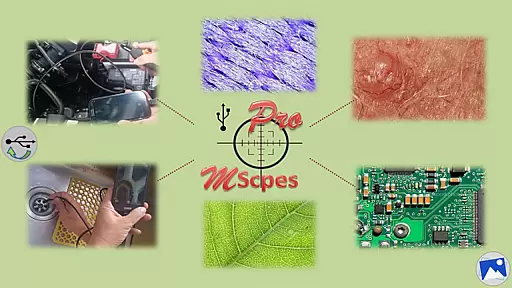
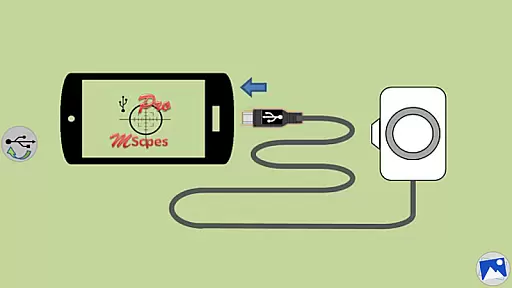
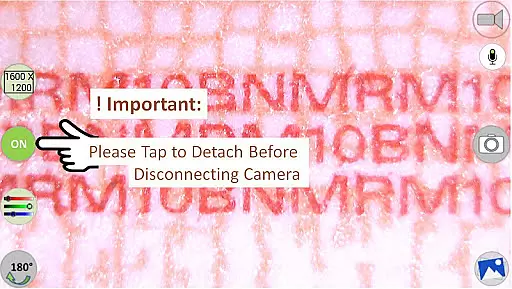
MScopesPro for USB Camera is a versatile application designed to enhance the functionality of USB video class cameras when connected to Android devices. This app allows users to view, capture images, and record videos from digital microscopes, endoscopes, borescopes, camcorders, or webcams via USB connection. For devices with type-A connectors, an OTG adapter is necessary to bridge the connection with smartphones or tablets.
One of the standout features of MScopesPro is its ability to facilitate microscopy or endoscopy on-the-go. This portability significantly boosts the convenience and flexibility of examining microscopic objects or hard-to-reach areas such as cracks, pipes, or cavities. The Pro version offers advanced functionalities including full-screen mode, zoom and pan capabilities, various image types support, date and time stamp options, customizable notes, cross-hair display, watermark-free images, pinch and zoom, multiple camera resolutions, adjustable color parameters, and more.
The practical applications of MScopesPro are vast, ranging from educational purposes in classrooms to professional use in laboratories and industrial inspections. Its comprehensive feature set makes it an invaluable tool for anyone requiring detailed visual analysis without being tethered to a desktop setup.
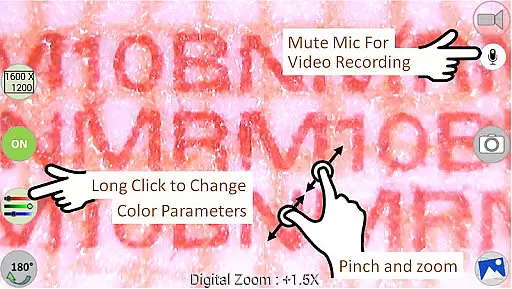
MScopesPro for USB Camera boasts a rich array of features that cater to both amateur enthusiasts and professionals alike. Among its most notable attributes is the full-screen mode which provides an uninterrupted 100% preview experience, free from any obstructive buttons. Users can effortlessly zoom and pan across their footage using one or two fingers directly on the preview screen, offering unparalleled control over their viewing experience.
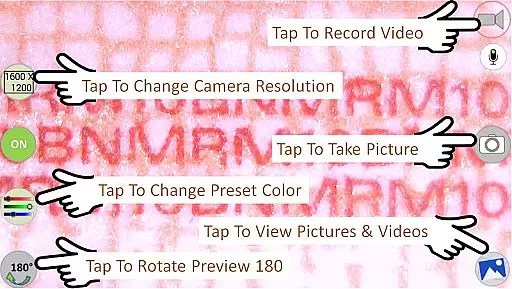
In addition to supporting JPEG and PNG image formats, this app includes options to add date and time stamps, personalized notes, and even cross-hairs on previews and captured images. The absence of watermarks ensures clean, professional-looking outputs while pinch-to-zoom functionality further enhances user interaction during live previews. Furthermore, users can select from various camera resolutions and preview sizes like 640x480, 800x600, 1280x720, and 1600x1200 pixels.
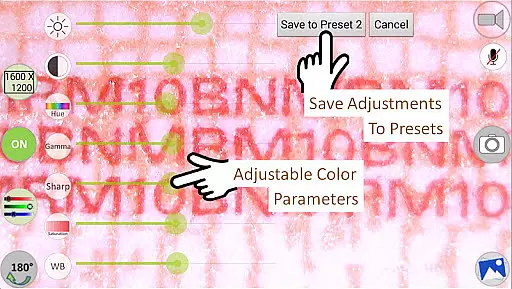
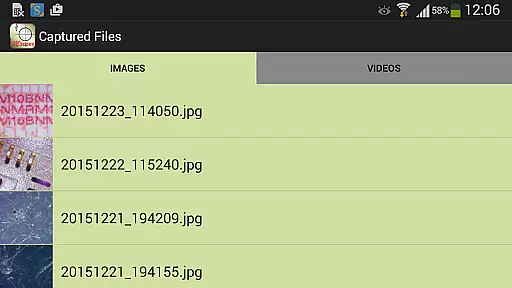
Advanced customization options allow adjustments to brightness, contrast, hue, gamma, sharpness, saturation, and white balance settings. These parameters can be saved into three distinct presets for quick access. Additional conveniences include toggling the microphone on or off during video recordings, sharing media files directly through the app interface, editing images post-capture, deleting unwanted content, and navigating through stored visuals by swiping gestures.
Video format compatibility is a crucial feature for any video player or editor, ensuring that users can work with a wide range of video files without conversion hassles. MScopesPro for USB Camera excels in this area by supporting multiple video resolutions including 640x480, 800x600, 1280x720, and 1600x1200. This flexibility allows users to choose the best resolution for their specific needs, whether it's for detailed microscopic analysis or broader endoscopic exploration.
The application also supports both JPEG and PNG image formats, providing options for different use cases and preferences. Users can capture images in either format based on their requirements for quality and file size. Additionally, the app offers adjustable color parameters such as brightness, contrast, hue, gamma, sharpness, saturation, and white balance, which are essential for fine-tuning video output to match various display environments.
By offering these comprehensive format and parameter adjustments, MScopesPro ensures that users can achieve optimal results regardless of the source material or intended use. The ability to save adjusted color settings into three presets further enhances workflow efficiency, allowing quick recall of preferred configurations. This level of control over video and image properties makes MScopesPro an invaluable tool for professionals who require precision and adaptability in their visual documentation processes.
AI-powered editing features represent the cutting edge of video processing technology, enabling smarter and more efficient workflows through automation and intelligent algorithms. MScopesPro for USB Camera incorporates several advanced functionalities that leverage AI capabilities to enhance user experience significantly. One standout feature is the full-screen mode, which removes all buttons from the interface, providing a completely unobstructed 100% preview area. This mode is particularly beneficial for focusing on intricate details during microscopy or endoscopy sessions.
In addition to full-screen viewing, the app allows users to zoom and pan across the preview using one or two fingers, mimicking natural gestures found in many modern touch-enabled devices. This intuitive interaction method simplifies navigation within high-resolution images and videos, making it easier to explore minute details. Furthermore, options like adding date and time stamps, custom notes, and cross-hairs directly onto previews streamline data annotation tasks, enhancing record-keeping accuracy and consistency.
MScopesPro also includes practical sharing and management tools powered by AI enhancements. Users can effortlessly share captured images and recorded videos via integrated buttons, facilitating collaboration and dissemination of findings. Editing and deleting media files are equally straightforward, thanks to dedicated controls that simplify content management. These AI-driven conveniences not only improve usability but also empower users to focus more on their primary objectives rather than getting bogged down by technicalities, thereby maximizing productivity and effectiveness in professional settings.
User-friendly interface
Comprehensive feature set
Highly customizable settings
Portable solution for microscopy
Supports multiple file formats
Limited device compatibility
Does not work on Android 5.1.1
Requires OTG adapter for some devices
Premium pricing for Pro version
Occasional performance issues

HD Video player all format, HD Videos, Cast & Subtitle. No annoying ads.
 4.60
4.60
Watch full episodes of your favorite Cartoon Network and Cartoonito shows!
3.50
VLC Remote lets you control your VLC Media Player on Mac, PC or Linux.
4.60
Download website videos fast&privacy
4.40
All in one HD video downloader & player for multiple formats with full privacy
4.70
Watch IPTV on your Android device
4.60
Web Browser for LG TV to stream webvideos, online movies and livestreams in HD
4.20
Fast & Private HD Video Downloader with Built-in Proxy Browser and Video Player.
4.50
Fast private browser with secure, seamless access & supported video downloads!
4.00
IPTV Loader, loads your own Playlist. DOES NOT CONTAIN ANY LIST OR CHANNELS
4.60
Cast to Chromecast, Xbox, Fire Stick, Roku, DLNA, Smart TV & No Feature Limited!
4.50
KineMaster, Your Ultimate Video Editor!
4.40
Powerful Video Editor & Photo Editing App —— Quick Edits & Stunning Effects!
4.30
LumaFusion: The Ultimate Storytelling Experience for Video Editing
4.10
All format media Player, no need video converter any more!
4.00
Make your own Animations, Video and Photo Edits, Visual Effects, and more!
4.00
AirMirror is Receiver for Screen Mirroring and Casting from Apple Devices.
3.60
Mix with Virtual DJ directly from your phone or tablet !
3.10
Play and download HD videos from all sources — fast, simple, and all-in-one.
4.5


User Reviews