
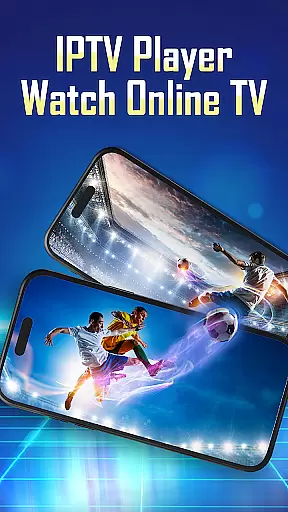
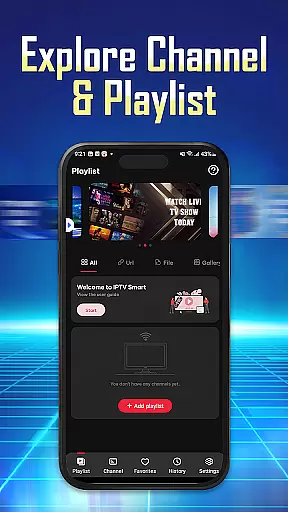

IPTV Player - Smarters Watch TV is a versatile media player tailored for streaming enthusiasts. This application allows users to access live TV channels, sports events, and an extensive library of movie series from their mobile devices or Android TV. With support for M3U and M3U8 playlists, it offers high-definition streaming capabilities while enabling users to organize their favorite content for easy access.
The app's key strength lies in its seamless integration with IPTV services, allowing simultaneous streaming on multiple devices through a single account. Whether you're following a live football match or catching up on your favorite shows, IPTV Player ensures uninterrupted playback with its reliable integrated player. Designed for convenience and flexibility, this app caters to diverse entertainment needs anytime, anywhere.
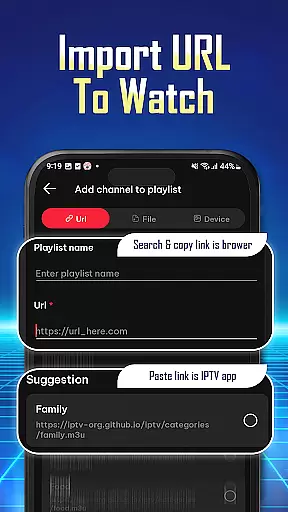
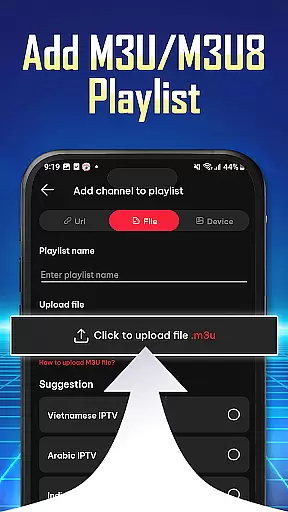
IPTV Player stands out with its robust feature set designed to enhance user experience. One notable feature is the ability to import and manage playlists effortlessly using Playlist URLs or by uploading M3U/M3U8 files. This functionality simplifies the process of adding personalized content libraries, making it accessible even for non-technical users.
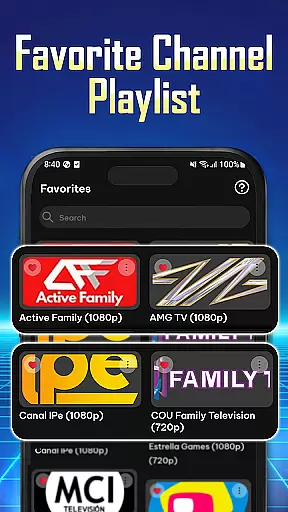
Another significant aspect is the app's wide compatibility across devices, including smartphones, tablets, and Android TV systems. Its flexible playlist support ensures that users can stream content in various formats without compatibility issues. Additionally, the app provides tools for organizing preferred channels and saving favorites, ensuring quick navigation and a personalized viewing experience. These features collectively make IPTV Player a comprehensive solution for modern streaming requirements.
Video format compatibility is a crucial feature for any video player application, ensuring that users can enjoy content in various formats without technical hindrances. IPTV Player - Smarters Watch TV excels in this area by supporting both M3U and M3U8 playlist formats, which are widely used for internet television streaming.
The app's ability to handle these formats means that users can import playlists from different sources with ease. Whether it's live TV channels or on-demand content, the IPTV Player ensures seamless playback without the need for additional conversion tools or plugins.
This compatibility not only enhances user convenience but also broadens the range of content they can access. By simply adding a playlist URL or importing an M3U/M3U8 file, viewers can instantly connect to their favorite shows, sports events, and movies in high-definition quality.
Ultimately, the IPTV Player's robust support for multiple video formats empowers users to customize their entertainment experience according to personal preferences while maintaining optimal performance across devices.
While IPTV Player - Smarters Watch TV focuses primarily on streaming capabilities, its AI-powered editing features contribute significantly to enhancing the overall user experience. The app integrates advanced algorithms that optimize video playback settings based on network conditions and device specifications.
These intelligent adjustments ensure uninterrupted viewing sessions even when bandwidth fluctuates. For instance, if internet speed decreases during peak hours, the system automatically adapts resolution settings to maintain smooth streaming without manual intervention.
Moreover, personalized recommendations powered by AI help users discover new channels and programs tailored to their interests. By analyzing viewing habits and preferences, the IPTV Player suggests relevant content, making navigation more intuitive and engaging.
Although direct editing tools may be limited compared to dedicated video editors, these smart functionalities streamline media consumption processes effectively. As a result, IPTV Player delivers a sophisticated yet user-friendly interface designed to elevate everyday entertainment routines effortlessly.
User-friendly interface
High-definition streaming
Multi-device support
Flexible playlist options
Seamless navigation tools
No pre-installed channels
Requires manual setup
Limited offline functionality
Dependent on stable internet
Premium features may cost extra

Play ALL formats in 4K & HD. Video downloader, MP3 player, Chromecast & more.
 4.80
4.80
Powerful HD video player with support for all formats & subtitles.
4.3
1)AirPlay/DLNA Mirroring/Streaming, up to 4 connections; 2)Samba/NAS/DMS Player.
4.00
All in one multi protocols stream receiver for AirPlay, Cast and DLNA.
3.60
A Simple app to download Video & Music from the Internet.
4.70
AI Video Editor with Music, Filter, Slideshow, Effect, Merge & Trim Video.
4.80
Fast & Private HD Video Downloader with Built-in Proxy Browser and Video Player.
4.50
VLC for Android is the best open source video and music player, fast and easy!
4.10
Create, Publish & Maximize
4.70
#1 Torrent App on Android ** No Ads Ever + Battery Saver **
4.80
Video Trimmer, Video to MP3 Converter. Extract music from video, Easy & Fast.
4.80
GENRAL PRO - General Pro is the best video player that fully supports all formats.
4.70
Screen recorder with audio to take live videos & Screenshot in high quality!
4.70
Browser + Remote for Roku to stream webvideos, online movies and livestreams
4.60
Download website videos fast&privacy
4.40
Fast & Private Video Downloader App. Save all videos easily from the Internet.
4.40
Web Browser for LG TV to stream webvideos, online movies and livestreams in HD
4.20
Make your own Animations, Video and Photo Edits, Visual Effects, and more!
4.00
Live TV, anywhere in your home
3.80


User Reviews