
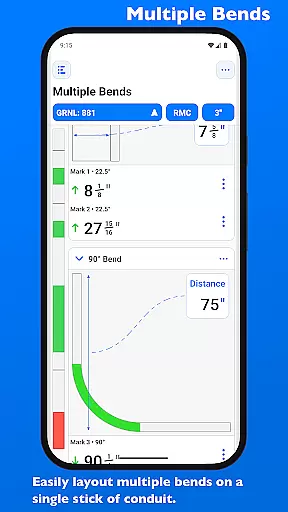
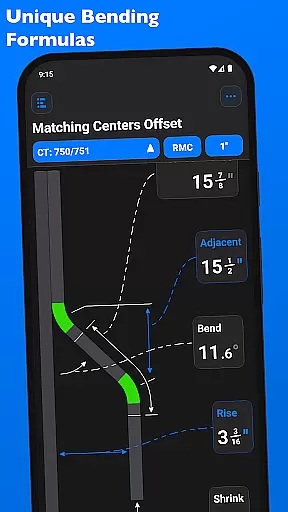
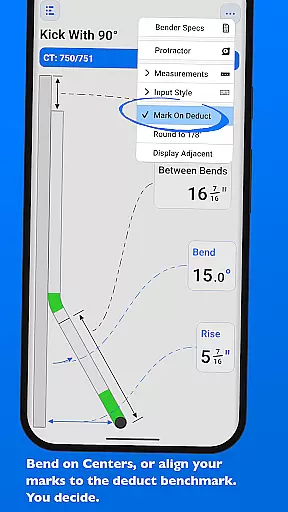
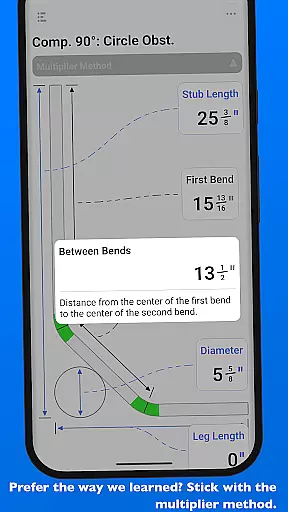
QuickBend is a cutting-edge conduit bending calculator app designed for precision and ease of use. It stands out by offering the most accurate measurements, factoring in the radius of the shoe and bender, conduit type, and size diameter. The app employs a centerline radius algorithm to ensure rigorous and field-tested calculations, making it an indispensable tool for electricians and DIY enthusiasts alike.
Beyond its core functionality, QuickBend provides an intuitive interface for inputting data, allowing users to toggle between inches and centimeters. Its innovative features include visual feedback through color-coded text, indicating the feasibility of a bend, thus preventing mistakes and saving valuable time and resources. Whether you're a seasoned professional or a novice, QuickBend caters to all skill levels.
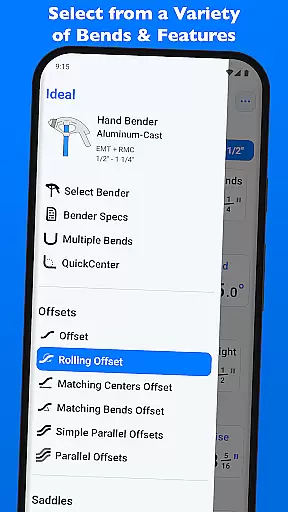
The app supports a wide array of bends and enables laying out multiple bends on a single conduit with precise measurements. With no need for complex navigation, users can easily select different types of benders and conduit specifications, pin frequently used benders, and edit detailed bender specifications visually. QuickBend's comprehensive approach revolutionizes how conduit bending projects are planned and executed.
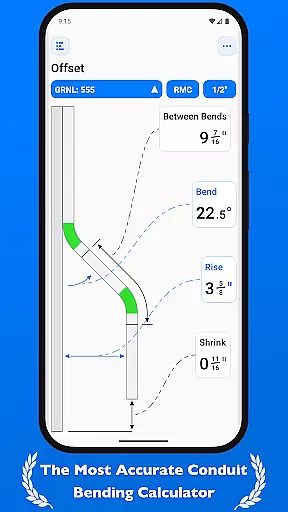
QuickBend distinguishes itself through advanced features tailored for efficiency and accuracy. One standout aspect is its ability to support various types of bends, including Offset, Rolling Offset, Three-Point Saddle, and more. Each calculation considers specific variables such as shoe radius and conduit dimensions, ensuring unparalleled precision that has been rigorously field-tested.
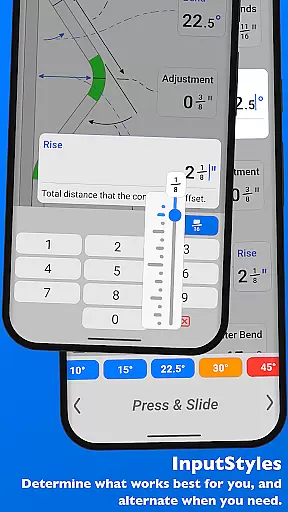
Another remarkable feature is QuickCheck, which provides real-time feedback via color changes, alerting users to potential issues with specific bends before finalizing calculations. This preemptive guidance helps avoid costly errors. Additionally, QuickBend offers flexible input methods like a number pad or slider bar, catering to different user preferences and enhancing overall usability.
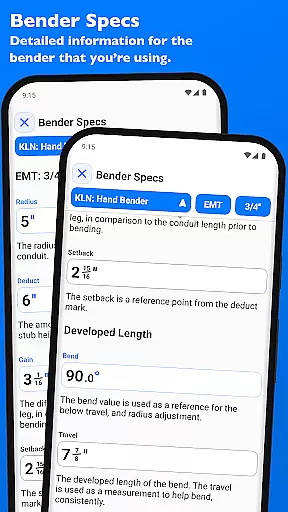
Users benefit from extensive customization options, including editing bender specifications and viewing detailed metrics such as centerline radius, deduct, gain, and setback. These capabilities empower users to fine-tune their workflow and achieve optimal results. By integrating these sophisticated tools into an intuitive interface, QuickBend significantly boosts productivity and project success rates.
QuickBend revolutionizes the way electricians and conduit workers manage their bending tasks through its advanced calculation engine. The app's core functionality lies in its ability to handle complex measurements with precision, taking into account variables such as shoe radius, bender type, and conduit dimensions. This ensures that every bend is calculated using the centerline radius algorithm, which has been rigorously tested for accuracy.
The app supports a wide range of bend types, from simple offsets to intricate compound bends. Users can layout multiple bends on a single conduit and receive precise measurements for each mark. With QuickBend, there's no need to worry about switching between different tools or screens; all necessary adjustments can be made within the same interface where users input their data.
What sets QuickBend apart is its intuitive design that allows users to toggle between inches and centimeters, use either a number pad or slider bar for input, and even visually check if a bend is feasible before finalizing it. These features not only save time but also reduce errors, making the entire process more efficient and reliable.
While QuickBend focuses primarily on providing accurate calculations, it also offers reliable cross-device synchronization capabilities. Electricians who work across multiple job sites will appreciate how seamlessly they can transition from one device to another without losing any critical information. Whether you're switching between your phone and tablet, QuickBend ensures that all your data remains consistent and up-to-date.
This reliability extends to the appu2019s ability to store detailed specifications for various benders. Users can pin frequently used benders for quick access, ensuring that they donu2019t have to scroll through lists repeatedly. Additionally, the 'Bender Specs' feature provides comprehensive details like centerline radius, deduct, gain, setback, travel, and radius adjustmentsu2014all visualized clearly within the app.
By integrating these robust synchronization features, QuickBend enhances productivity by allowing users to focus on their tasks rather than worrying about data consistency. This seamless experience across devices makes QuickBend an indispensable tool for professionals in the field.
Highly accurate calculations
User-friendly interface
Wide range of supported bends
Real-time error prevention
Customizable bender specs
Premium version required
Steep learning curve
Limited free features
Occasional bugs reported
Heavy on system resources

A Revolutionary All-in-One Artificial Intelligence Tools
 3.80
3.80
The long-awaited modern gallery app for your Nextcloud server
4.70
Device's storage information in a simple and clear graphical form (infographics)
4.10
We're working to become the best machining app on the market! www.cncdirt.com
4.80
Multilingual translator for text, voice, and image translation!
4.90
A Pixel Art watchface inspired by other iconic 90s designs for Wear OS devices!
4.40
Quickly and easily keep track of your work shifts
4.70
Intelligent AI Assistant
4.10
Browse and view your photos and videos from the phone with photo & video hide.
4.10
Understand anything with a personalized AI research assistant
4.80
Stay on top of your to-dos with Google Tasks, part of Google Workspace.
4.60
All document reader, all in one file viewer read PDF, DOCX, XLS, PPT, TXT files.
4.60
When you Focus, so will your Bean in this cozy focus timer
4.30
Experience real multitasking on your Android!
4.00
⏰ Finally a timer app which can run multiple timers simultaneously on your watch
3.90
Access your phone's notifications, calls, apps, photos & texts on your PC
3.90
Smart PDF reader & editor to view, organize and manage PDF documents easily.
3.70
Create study competitions, track your hours, and stay consistent with friends
4.5
The upgraded version of Name Wheel with AI and the power to add your own wheels.
4.3


User Reviews