
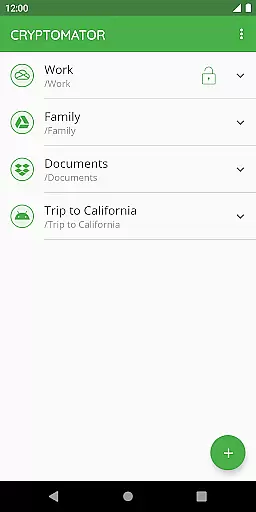
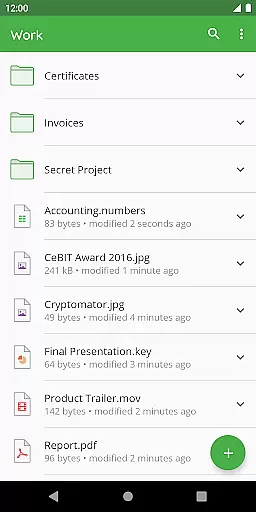
Cryptomator is a user-friendly encryption tool designed to secure your cloud-stored data. This productivity app allows you to create secure vaults, protecting your files with robust AES-256 encryption. Simply set a password and manage your data independently without the need for extra accounts or complex configurations.
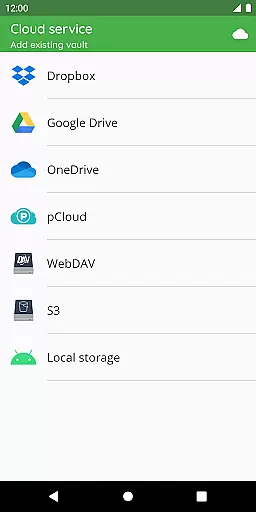
Compatible with major cloud services like Dropbox, Google Drive, and OneDrive, Cryptomator ensures cross-platform accessibility. Whether on mobile or desktop, you can access your encrypted files anytime, anywhere. The app also supports Android's local storage, working seamlessly with third-party sync apps.
With its open-source nature, Cryptomator offers transparency in its security protocols. It encrypts both file content and filenames, uses scrypt for enhanced brute-force resistance, and locks automatically when idle. Recognized with the CeBIT Innovation Award 2016, Cryptomator provides reliable privacy for countless users worldwide.
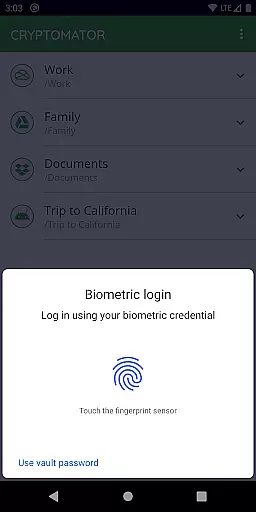
Cryptomator stands out with its easy-to-use interface and powerful encryption capabilities. The app employs AES-256 encryption for file content and filenames, ensuring top-tier security. Its intuitive design lets users create vaults effortlessly, assign passwords, and even unlock them using fingerprint authentication.
One of Cryptomator's key strengths is its compatibility with various platforms and cloud services. It integrates seamlessly with Dropbox, Google Drive, OneDrive, and WebDAV-based services. Additionally, it supports Android's local storage, making it versatile for different workflows. Users can access their encrypted files across multiple devices without hassle.
The app's security features are publicly documented, offering transparency and trust. Vaults lock automatically after being sent to the background, and the use of scrypt enhances protection against brute-force attacks. As an open-source project, Cryptomator invites community contributions, fostering continuous improvement and innovation in digital privacy solutions.
At the heart of Cryptomator lies its robust core task management system, designed to simplify the process of securing your digital assets. This productivity tool focuses on creating and managing encrypted vaults where users can safely store their sensitive data before uploading it to cloud services.
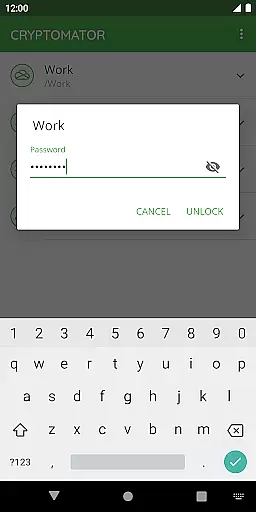
The application enables effortless creation of secure vaults with a user-defined password, eliminating the need for additional accounts or complex configurations. With intuitive controls, users can easily lock and unlock these vaults, even using biometric authentication such as fingerprint recognition for added convenience.
Cryptomator's approach to task management extends to its seamless integration with various cloud storage solutions like Dropbox, Google Drive, and OneDrive. This compatibility ensures that once data is secured within a vault, it can be effortlessly synchronized across all devices, maintaining security without compromising accessibility.
Cross-device synchronization is a pivotal feature of Cryptomator, ensuring that your encrypted files are reliably accessible across all your devices. By leveraging widely-used cloud services such as Dropbox, Google Drive, and OneDrive, Cryptomator facilitates smooth and consistent file synchronization.
This reliable synchronization process guarantees that any changes made to your vaults are accurately reflected on every connected device, preserving data integrity. Whether you're updating documents on your desktop or accessing files from a mobile device, Cryptomator ensures consistency and security throughout.
Moreover, Cryptomator's dedication to open-source transparency means users can trust in the softwareu2019s ability to securely manage their data transfers. The implementation details of this synchronization feature are well-documented, providing peace of mind for users who demand both security and reliability in their digital workflow.
Strong AES-256 encryption
User-friendly interface
Cross-platform compatibility
Automatic vault locking
Open-source transparency
No built-in cloud storage
Limited advanced features
Fingerprint sensor required
Occasional sync delays
Basic free version

AI Video AI Image Private LLM AI Browser Llama Gemma Ollama Connect LLM Studio
 4.3
4.3
The long-awaited modern gallery app for your Nextcloud server
4.70
Total remote control for your Android device, PC and cloud services (IFTTT)!
4.20
Make your handwriting beautiful, even more than pen on paper.
3.60
Pwnagotchi companion app
4.20
App lock - lock apps with fingerprint, password, pin or pattern, protect privacy
4.70
* block pre-roll ads, pop-up and forced redirect ads * Samsung certification app
4.00
To do list widget with a notebook organizer, checklist, simple shopping list
4.60
Set up, print, and get support—in one place
4.20
Protect and view your important info on your phone and tablet with eWallet®
4.80
Secure, fast, open-source, Remote Desktop Client for Windows and Linux with SSH
4.60
Lightweight PDF, Word, Excel reader.
4.60
PDF scanner & converter for files, photos, lottery, QR codes. One swipe away!
4.50
Translate text/voice/photos in 150+ languages. Offline & fast translator app.
4.50
Experience Reading - Night Mode for Documents
4.40
Intelligent AI Assistant
4.10
Create and edit presentations with Google Slides, part of Google Workspace.
4.00
The ultimate file manager for rooted devices. The original and still the best.
4.00
A comprehensive suite of tools designed specifically for Lactation Consultants
4.0


User Reviews