


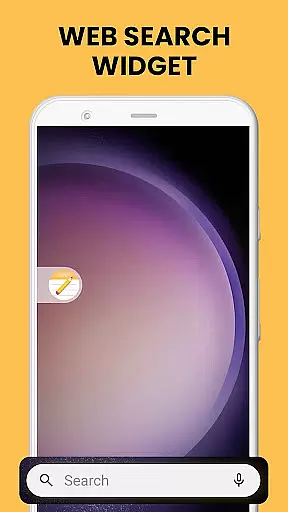
Notes Launcher is a productivity app designed to streamline note-taking and task management. The application allows users to create quick notes or to-do lists with a simple swipe from the home screen, making it an efficient tool for capturing thoughts and organizing tasks on the go. Its user-friendly interface integrates seamlessly into daily routines, offering features like text formatting tools, color-coding, and lockable notes to secure sensitive information.
Beyond basic note-taking, Notes Launcher provides advanced functionalities such as categorization, sorting filters, and multi-touchpoint search capabilities powered by Yahoo. These features ensure that users can easily retrieve their notes and stay organized. Whether you're managing work projects or planning personal activities, this app offers a comprehensive solution to keep all your important information in one accessible place.
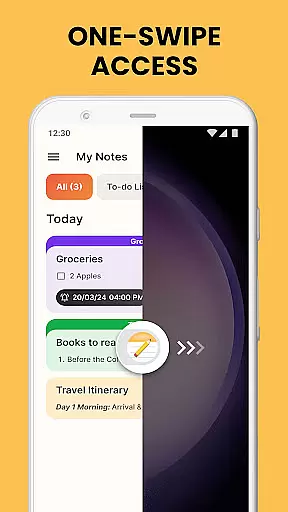
Notes Launcher stands out with its rich feature set tailored for productivity enthusiasts. One of its key highlights is the ability to create notes and checklists instantly by swiping right from the home screen, ensuring that users never miss an important idea or task. The app also includes a robust text formatting tool, allowing users to customize fonts, apply styles like italics or underlining, and create structured lists.
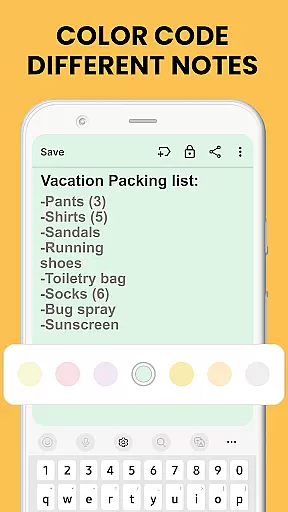
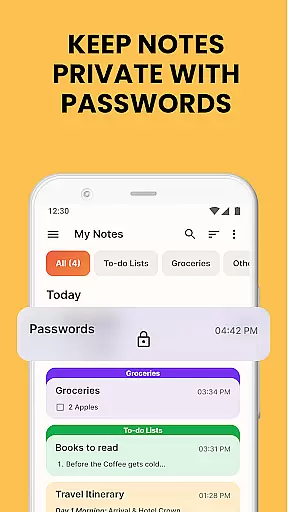
Security and organization are prioritized through features like color-coded notes and lockable notes, which help users manage and protect their information effectively. Additionally, the app supports categorization and sorting options, enabling users to group related notes and arrange them by modification date or creation order. With multi-touchpoint search functionality, finding specific notes becomes effortless, enhancing overall usability.
The inclusion of home screen widgets displaying time and weather adds another layer of convenience, while personalized wallpapers allow for aesthetic customization. These thoughtful additions make Notes Launcher not just a functional tool but also a visually pleasing part of users' digital environments.
Efficient task management is essential for staying organized in today's fast-paced world. Notes Launcher offers a comprehensive suite of tools to help users manage their tasks effectively. The app allows you to create quick notes or to-do lists with just a swipe from your home screen, ensuring that no idea or task is forgotten.
The app provides features such as categorization and sorting filters, which allow users to group related notes and arrange them by modification date or creation order. This ensures that users can easily find and prioritize their tasks. Additionally, the color-coding feature enables users to visually organize their notes based on urgency or category, making it simpler to identify and tackle high-priority items.
Notes Launcher also includes a powerful search function, enabling users to quickly locate specific notes using keywords or phrases. This functionality saves time and enhances productivity by eliminating the need to scroll through numerous entries. With these robust task management capabilities, Notes Launcher empowers users to stay on top of their responsibilities and achieve their goals efficiently.
In an era where individuals use multiple devices throughout their day, reliable cross-device synchronization is crucial for maintaining productivity. Notes Launcher addresses this need by offering seamless integration across various platforms, ensuring that users have access to their notes regardless of the device they are using.
While the current version of Notes Launcher focuses on providing a rich feature set for individual devices, future updates aim to enhance cloud-based synchronization. This will enable users to start a note on their smartphone and continue editing it on a tablet or computer without missing a beat. Such continuity is vital for users who switch between devices frequently.
Moreover, the appu2019s developers are committed to ensuring data integrity during synchronization. By implementing advanced algorithms and secure data transfer protocols, Notes Launcher guarantees that users' notes remain consistent and up-to-date across all their devices. This reliability fosters trust and encourages users to rely on Notes Launcher as their primary note-taking solution.
User-friendly interface
Quick note creation
Advanced security options
Customizable organization
Integrated search functionality
Home screen layout changes
Limited design flexibility
No cloud sync option
Basic free version
Occasional performance lags

The long-awaited modern gallery app for your Nextcloud server
 4.70
4.70
Ads Free App! Editor, Hide File, Copy, Move, Delete and Rename.. all facility av
1.70
Mega cloud explorer plugin for Solid Explorer
3.80
A lightweight JSON & XML files creator, editor and viewer (Premium Version)
4.40
Protect and view your important info on your phone and tablet with eWallet®
4.80
Subscribe to Webcal & .ics calendars and keep them up-to-date!
4.50
To do list widget with a notebook organizer, checklist, simple shopping list
4.60
This small app MUST BE INSTALLED after purchase, else license won't work
4.40
Daily processing of PDF documents.
4.40
Great calculator for Android named one of USA TODAY's "25 Essential Apps".
4.90
Seamlessly integrate data and reports to build your presentation to impress
4.80
A beautiful digital clock with autostart and many other functions
4.70
Absolutely the best CNC machinist speed and feed calculator around. fswizard.com
4.60
A Pixel Art watchface inspired by other iconic 90s designs for Wear OS devices!
4.40
When you Focus, so will your Bean in this cozy focus timer
4.30
All in One PDF Reader: Manage, Read and Edit your Documents
4.20
Cloud storage, automatic phone backup, and more.
4.10
Customizable calendar widget for seamless event sync, planning & scheduling.
4.00
Remotely view listen control and record cameras.
3.70


User Reviews