
ID.me Authenticator is a productivity-focused application designed to enhance account security through Two Factor Authentication (2FA). This free solution generates 6-digit Time-Based One-Time Passwords (TOTP) and provides PUSH notification-based authentication. Users can secure their online accounts on supported websites by adding an extra layer of protection.
The app functions both as a TOTP code generator, enabling offline verification code generation after initial setup via QR code scanning, and as a PUSH notification authenticator, allowing one-touch approval for login attempts. This dual functionality ensures flexibility and convenience while maintaining high security standards.
Whether you're accessing sensitive information or managing multiple accounts, ID.me Authenticator offers a reliable way to protect your digital identity. Its seamless integration with ID.me accounts makes it an essential tool for users seeking enhanced security without compromising ease of use.
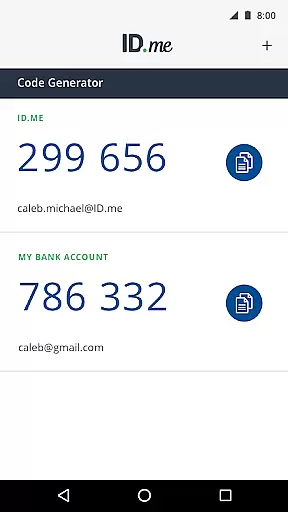
ID.me Authenticator stands out with its robust feature set tailored for secure authentication. As a TOTP Code Generator, the app produces 6-digit time-based passwords that do not require network or cellular connections once configured. This allows users to generate verification codes anytime, anywhere, ensuring uninterrupted access to their accounts.
For PUSH-based authentication, the app streamlines the login process by sending push notifications directly to the user's device. After entering their username and password, users simply approve the notification to complete the authentication process. This method significantly reduces the complexity often associated with traditional 2FA methods.
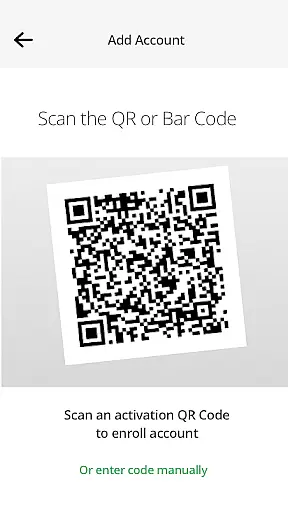
Both features are easily set up by enrolling and connecting the app to an ID.me account through QR code scanning. The combination of these technologies provides a comprehensive security solution that balances protection with user convenience, making ID.me Authenticator a valuable asset in today's digital landscape.
In the realm of productivity, core task management is pivotal for organizing and prioritizing tasks efficiently. ID.me Authenticator excels in this area by offering a seamless two-factor authentication process that integrates smoothly into your daily routine.
The app generates 6-digit Time-Based One-Time Passwords (TOTP) and supports PUSH notification-based one-touch authentication. This dual approach ensures that users can manage their security tasks without hassle, making it an essential tool for maintaining account security.
By enabling users to generate verification codes without needing a network or cellular connection, ID.me Authenticator provides a reliable solution for managing access to important accounts. This feature is particularly beneficial for those who require secure and uninterrupted access to their online resources.
Cross-device synchronization is crucial for ensuring that your authentication data is consistent and up-to-date across all your devices. ID.me Authenticator offers robust synchronization capabilities that enhance the user experience by providing reliable access to authentication methods regardless of the device being used.
Users can enroll and connect ID.me Authenticator to their account by scanning a QR code during setup. This straightforward process ensures that all devices are synchronized with the latest authentication data, thereby reducing the risk of unauthorized access.
Moreover, the PUSH notification feature allows users to approve sign-in attempts from any connected device instantly. This real-time synchronization not only enhances security but also streamlines the authentication process, making it more convenient for users to manage their accounts securely across multiple platforms.
Enhanced Security
User-Friendly Interface
Offline Code Generation
Quick PUSH Approval
Free to Use
Limited to ID.me Accounts
Requires Initial Setup
QR Code Dependency
No Backup Codes
Device-Specific

Secure, fast, open-source, VNC and SSH Remote Desktop for Windows, Linux and Mac
 4.70
4.70
Create study competitions, track your hours, and stay consistent with friends
4.5
Smart PDF reader & editor to view, organize and manage PDF documents easily.
3.70
The upgraded version of Name Wheel with AI and the power to add your own wheels.
4.4
We're working to become the best machining app on the market! www.cncdirt.com
4.80
All in One PDF Reader: Manage, Read and Edit your Documents
4.20
Docker, Kubernetes management over Portainer Mobile
4.40
Great calculator for Android named one of USA TODAY's "25 Essential Apps".
4.90
Secure your apps with lock screens, use custom themes and different features.
4.40
Native client for Forgejo and Gitea
5.00
aCalendar+ makes your day, week and month
4.70
Calendar 2023 widget for Android. Appointment scheduler, planner, and reminder
4.60
To do list widget with a notebook organizer, checklist, simple shopping list
4.60
Planet Free VPN - The best Fast Unlimited and Secure VPN Without Logs
4.50
Subscribe to Webcal & .ics calendars and keep them up-to-date!
4.50
Todo reminder
4.10
Wake up & get tasks done! Add alarms & reminders on the Clock Launcher.
4.00
Take control of your clipboard with Clipper!
3.90
All in one sketching tool. Technical and General drawing. Online Maps support.
3.70


User Reviews