
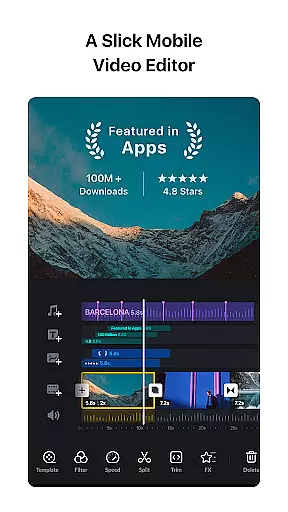
VN is a versatile video editing app that combines professional-grade features with an intuitive interface, making it suitable for both beginners and experienced editors. The app offers advanced tools such as multi-track editing, keyframe animation, and color grading filters, enabling users to create high-quality videos without watermarks. Its precise editing capabilities allow frame-by-frame adjustments, while the creative templates and effects enhance video storytelling.
One of VN's standout features is its seamless integration of music beats and voice-overs, which helps users align video cuts with audio rhythms. Additionally, the app supports non-destructive editing, ensuring original files remain intact. Whether you're crafting social media content or professional projects, VN provides the flexibility and functionality needed to produce engaging videos efficiently.
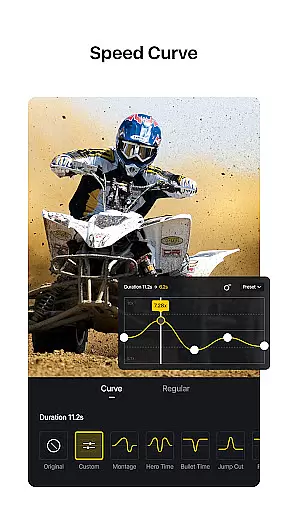
VN stands out with its comprehensive set of video editing tools designed for precision and creativity. The multi-track timeline allows users to layer videos, images, text, and animations effortlessly. With features like Speed Curve and Time Remapping, creators can control playback speed with cinematic smoothness. Keyframe animation adds dynamic transitions and effects, while reverse and zoom functions bring novelty to video clips.
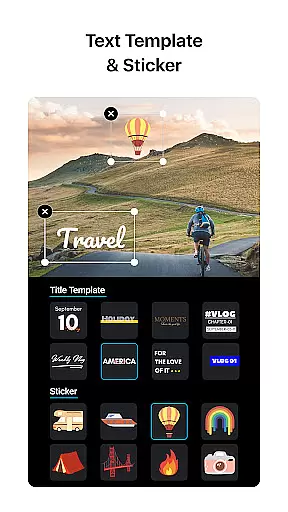
The app also includes rich customization options, from LUT-based color grading to detailed text editing. Users can import custom materials via Wi-Fi or cloud services, ensuring maximum flexibility. Furthermore, VN prioritizes collaboration and security by enabling project transfers across devices through Google Drive or OneDrive. These robust features make VN a top choice for anyone seeking a powerful yet user-friendly video editor.
One of VN's standout features is its extensive video format compatibility, making it a versatile tool for both amateur and professional video editors. The app supports a wide range of video formats, allowing users to import and edit footage without the need for prior conversion. This saves valuable time and ensures that the original quality of the video is maintained throughout the editing process.
VN Video Editor goes beyond basic format support by offering advanced customization options during export. Users can tailor the video resolution, frame rate, and bit rate to their specific needs. Whether you're aiming for high-quality 4K resolution at 60 FPS or optimizing for faster web uploads, VN provides the necessary tools to achieve your desired output while maintaining professional-grade quality.
The app's compatibility extends to its seamless integration with various material import methods. Through Wi-Fi, WhatsApp, Telegram, or bulk imports via Zip files, users can easily incorporate diverse media elements into their projects. This flexibility in handling different file types and sources streamlines the editing workflow, enabling creators to focus on their artistic vision rather than technical limitations.
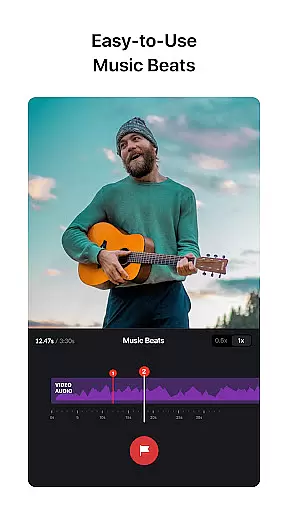
VN incorporates cutting-edge AI-powered editing features that revolutionize the video creation process. Among these innovations is the Music Beats function, which utilizes advanced algorithms to automatically detect music beats and suggest optimal cut points. This intelligent feature enables users to synchronize their video edits with musical rhythms, elevating the overall impact of their productions without requiring manual timing calculations.
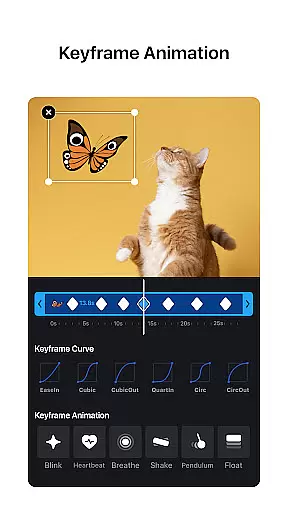
The app's AI capabilities extend to its sophisticated Keyframe Animation system, which offers 19 built-in animation effects that can be customized through additional keyframes and curves. These AI-driven tools help create professional-grade transitions and effects that would typically require complex manual adjustments in traditional editing software. The Speed Curve feature, comparable to Time Remapping in Adobe Premiere Pro, demonstrates VN's commitment to providing advanced editing capabilities through artificial intelligence.
Furthermore, VN's AI technology enhances productivity through its intuitive multi-track interface and automated asset management. The app's Protection Mode exemplifies how AI can secure creative assets by intelligently managing expiration dates and access permissions for drafts and templates. These AI-powered features work in concert to create an efficient, user-friendly editing environment that maintains professional standards while simplifying complex editing tasks.
User-friendly interface
Professional editing tools
No watermark on exports
Seamless cross-device sync
Rich library of effects
Limited advanced tutorials
Occasional export delays
Fewer third-party integrations
Basic stabilization tools
Premium filter costs

Powerful, professional, versatile teleprompter. Developed by an active film crew
 4.00
4.00
Video Player - Unlimited features, 30 days money back guarantee.
4.60
High-Quality USB Camera Viewer & HDMI Display
4.70
AI Video Editor:AI Music, Text to Video,Text to Speech,Auto Caption,Video Effect
4.00
IPTV Loader, loads your own Playlist. DOES NOT CONTAIN ANY LIST OR CHANNELS
4.60
Mix with Virtual DJ directly from your phone or tablet !
3.10
Find, download, and play torrents with the official BitTorrent® Pro app
4.70
A Simple app to download Video & Music from the Internet.
4.70
Make videos you’re proud to share with Edits, a video editor for creators.
4.70
Pro video editor app for Instagram, edit video with song, AI, effect & slowmo.
4.80
Create photo video with music & template. AI video maker for stunning slideshow.
4.60
VLC Remote lets you control your VLC Media Player on Mac, PC or Linux.
4.60
KineMaster, Your Ultimate Video Editor!
4.40
Full HD Video mp3 Player, MP4 player play 1080p, File manager, Video Downloader
4.40
Powerful Video Editor & Photo Editing App —— Quick Edits & Stunning Effects!
4.30
Powerful video player with advanced hardware acceleration and subtitle supports
4.20
1)AirPlay/DLNA Mirroring/Streaming, up to 4 connections; 2)Samba/NAS/DMS Player.
4.00
Download videos easily & play them all in one smart, powerful video manager.
3.40
You can play SWF format file!
2.50


User Reviews