
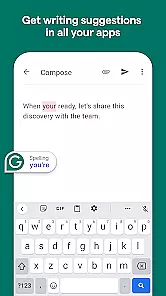
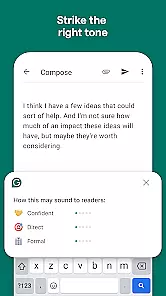
Grammarly is a productivity app designed to enhance your writing by providing real-time grammar, punctuation, and style suggestions. It functions as both a standalone application and a keyboard for Android devices, allowing users to improve their writing across various platforms such as email, social media, and document editing.
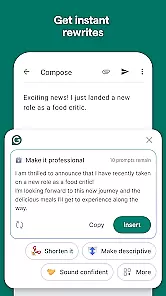
The app's core feature is its AI-powered writing assistant that checks for errors and offers improvement suggestions. It also includes a thesaurus, tone detector, and plagiarism checker, making it an essential tool for students, professionals, and anyone looking to polish their written communication.
Whether you're crafting an important email or engaging in creative writing, Grammarly ensures your text is clear, concise, and error-free. Its seamless integration with multiple applications makes it an invaluable companion for anyone who writes on their mobile device.
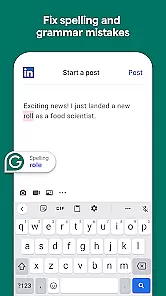
Grammarly stands out with its comprehensive set of features tailored to improve writing quality. The app provides real-time suggestions for grammar, spelling, punctuation, clarity, and conciseness, ensuring your writing is polished and professional.
One notable feature is the tone detector, which helps users maintain an appropriate tone in their writing, whether formal or casual. Additionally, the built-in thesaurus suggests synonyms to diversify vocabulary usage. For those concerned about originality, Grammarly offers a plagiarism checker that compares your text against billions of web pages.
Users can customize their experience through personalization options like setting writing goals and adjusting feedback intensity. These features collectively ensure that Grammarly adapts to individual writing styles while maintaining high standards of accuracy and readability.
Task management is a cornerstone of productivity applications, and Grammarly excels in this area by offering users the ability to handle writing tasks efficiently. The app provides real-time suggestions for grammar, punctuation, and style improvements, which helps users focus on their core writing responsibilities without getting bogged down by technical details.
Grammarly's implementation includes an intuitive interface that highlights errors and offers one-click corrections, streamlining the editing process. This feature ensures that users can manage their writing tasks effectively, whether they are crafting emails, reports, or creative content.
The value to users is significant as it not only saves time but also enhances the quality of their written communication. By delegating the task of proofreading to Grammarly, users can concentrate on the substance of their content, knowing that the app will help maintain a professional standard.
Ultimately, Grammarly's task management capabilities empower users to write with confidence, ensuring their messages are clear, concise, and error-free, thus improving overall productivity.
Cross-device synchronization is vital for users who operate across multiple platforms, ensuring that their data and preferences are consistently available wherever they choose to work. Grammarly addresses this need by providing reliable synchronization that keeps user settings, custom dictionaries, and saved corrections up-to-date across all devices.
This synchronization is achieved through a robust cloud-based system that updates in real-time, meaning that any changes made on one device are immediately reflected on others. Whether switching from a desktop to a mobile device, Grammarly ensures a seamless experience with no loss of functionality or personalization.
For the user, this means unparalleled convenience and continuity in their workflow. They can start a document on their computer and continue editing on their phone with all Grammarly's assistance features intact, promoting a flexible and efficient writing process.
By prioritizing synchronization reliability, Grammarly supports modern work habits, allowing users to maintain productivity regardless of the device they are using, and reinforcing its position as an indispensable tool for writers in various contexts.
Real-time suggestions
User-friendly interface
Wide platform compatibility
Advanced grammar checks
Tone detection feature
Premium subscription required
Limited free version
Occasional incorrect suggestions
High resource consumption
Privacy concerns with sensitive data

Create study competitions, track your hours, and stay consistent with friends
 4.5
4.5
Direct Chat without saving contacts & Dual WA Account on Single Device
4.70
The upgraded version of Name Wheel with AI and the power to add your own wheels.
4.5
Make your handwriting beautiful, even more than pen on paper.
3.60
aCalendar+ makes your day, week and month
4.70
PDF scanner & converter for files, photos, lottery, QR codes. One swipe away!
4.50
Functional QR scanner and barcode reader that requires little storage space.
4.60
Translate text/voice/photos in 150+ languages. Offline & fast translator app.
4.50
Daily processing of PDF documents.
4.40
Scientific calculator for Android - looks and operates like the real thing!
4.90
Simple notepad & memo. Take notes, to-do list, shopping list with reminders.
4.80
Client for Nextcloud Deck
4.60
CalenGoo is a very flexible and feature-rich calendar app
4.40
Share files & memories safely. Keep your photos and videos secure.
4.40
Device's storage information in a simple and clear graphical form (infographics)
4.10
Wake up & get tasks done! Add alarms & reminders on the Clock Launcher.
4.00
Take control of your clipboard with Clipper!
3.90
Auto-shutoff Alarm with Sunrise, Sunset & Fixed Options.
3.50
A simple, portable logger for POTA, SOTA, Field Day, and more
4.5


User Reviews